
The Bulk Actions and Select All (Ghost Selection) feature allows you to perform simultaneous updates, tagging, assignments, and status changes across multiple records in the Chat Inbox, Contacts list, and data tables. Thousands of records can be managed in seconds without having to edit them individually.
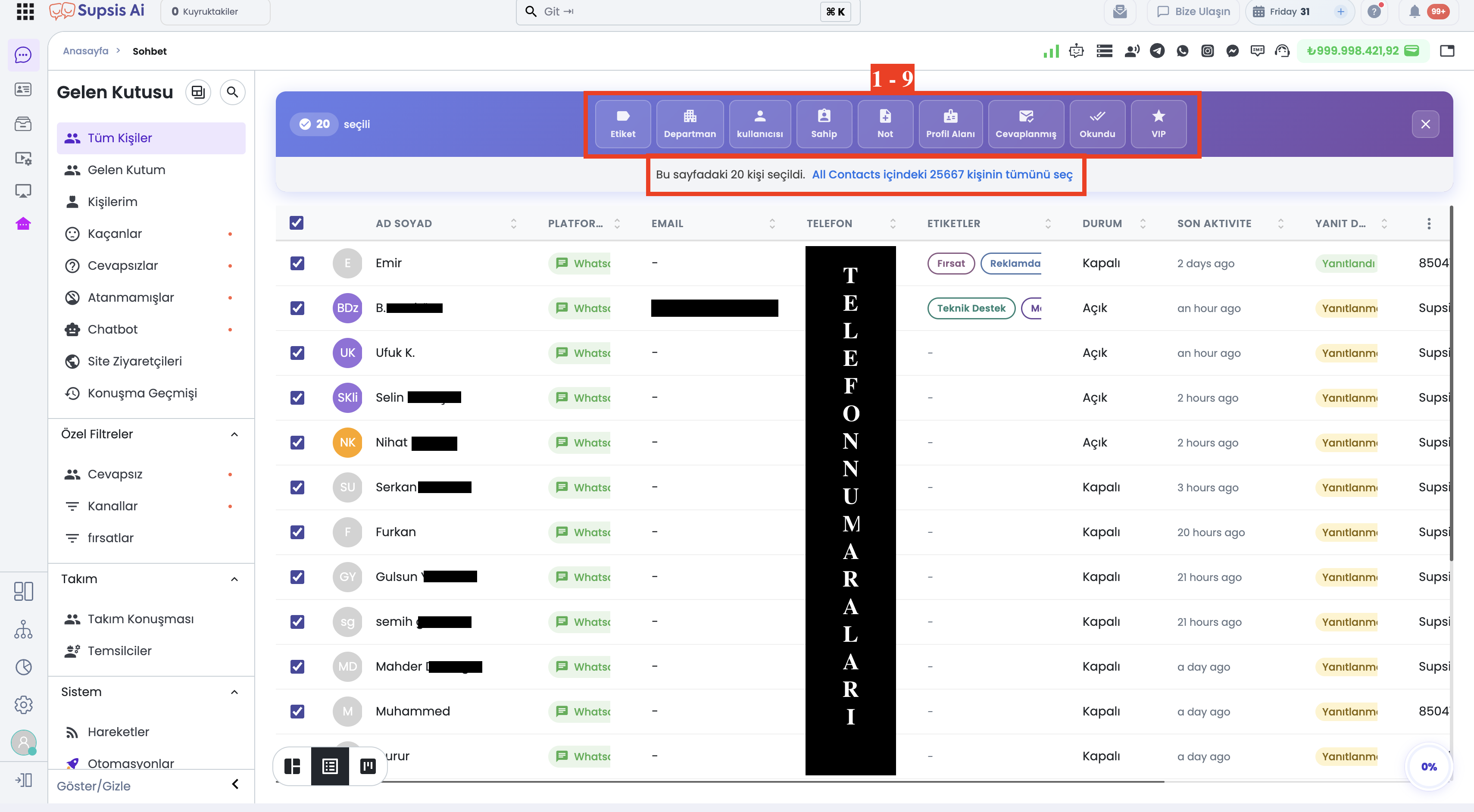
1-) Select All (Ghost Selection) Feature
When multiple records are checked in the Chat or Contacts list, a top selection action bar appears.
- Page-Level Selection: Initially selects records listed on the current page (e.g.
20 selected). - Ghost Selection (Entire Database/Filter Selection): A blue banner link appears below the selection toolbar:
20 contacts on this page are selected. Select all 25667 contacts in All Contacts
- Select All Link: Clicking this link selects all matching records across the entire database (e.g. 25,667 contacts), not just those on the current page. This allows database-wide bulk operations without having to navigate page by page.
2-) Bulk Action Options (9 Core Actions)
When multiple items are selected, 9 bulk action buttons open in the top toolbar:
1. Tag (Add/Remove Tags)
Allows adding or removing tags in bulk across selected chat or contact records. * Use Case: Marketing segments, support categories, or status tags are assigned to all selected contacts in a single step.
2. Department (Assign Department)
Bulk assigns selected chats and contacts to a specific department. * Use Case: Conversations coming from specific channels or topics can be transferred to the relevant team (e.g. Sales, Support, Accounting) at once.
3. User / Representative (Assign Preferred Representative)
Assigns a preferred representative (user) to the profile cards of selected contacts in bulk. * Use Case: When designated contacts reach out again, their chats are automatically routed to the assigned agent.
4. Owner (Assign Owner)
Changes the owner of selected contact or chat records in bulk. * Use Case: During representative reassignments or portfolio handovers, all customer records are transferred to the new owner.
5. Note (Add Bulk Note)
Appends a shared note to the profile cards of all selected contacts or chats. * Use Case: Informational notes, campaign announcements, or action logs are saved to all selected profiles at once.
6. Profile Property (Update Profile Field)
Updates custom profile fields (Contact Properties / dynamic attributes) in bulk. * Use Case: Select the target profile field (e.g. customer segment, preference, city) from the dropdown and save the new value across all records.
7. Answered (Mark as Answered)
Sets the response status of selected chats to "Answered" in bulk. * Use Case: Used to clear and resolve conversations that were answered but not manually marked.
8. Read (Mark as Read)
Marks all selected chats as "Read" with a single click. * Use Case: Instantly clears unread message counters and notifications in the inbox.
9. VIP (Toggle VIP Status)
Enables or disables the VIP customer status for selected contacts in bulk. * Use Case: Used to prioritize key customer groups and include them in VIP filters.
3-) Applied Modules & Usage
The Bulk Actions and Ghost Selection framework is primarily available across:
- Chat Menu (Inbox & Custom Filters): Bulk assignment, read/answered status updates, and tagging of incoming chats.
- Contacts (Visitors) Page: Bulk representative assignment, profile property updates, and VIP tagging across contact records.
- Table & Custom Filter Views: Bulk data management and export workflows on filtered datasets.