
6-) Chat Theme Settings
Chat Theme Settings is the customization area that allows you to align the design of the chat widget with your website and brand identity. Through this section, you can define the overall appearance, theme structure, colors, and font of the chat widget, providing visitors with a more professional and brand-focused experience.
All customizations made here aim to ensure visual consistency between the chat widget and your website design, while enabling users to easily recognize your brand from the very first interaction.
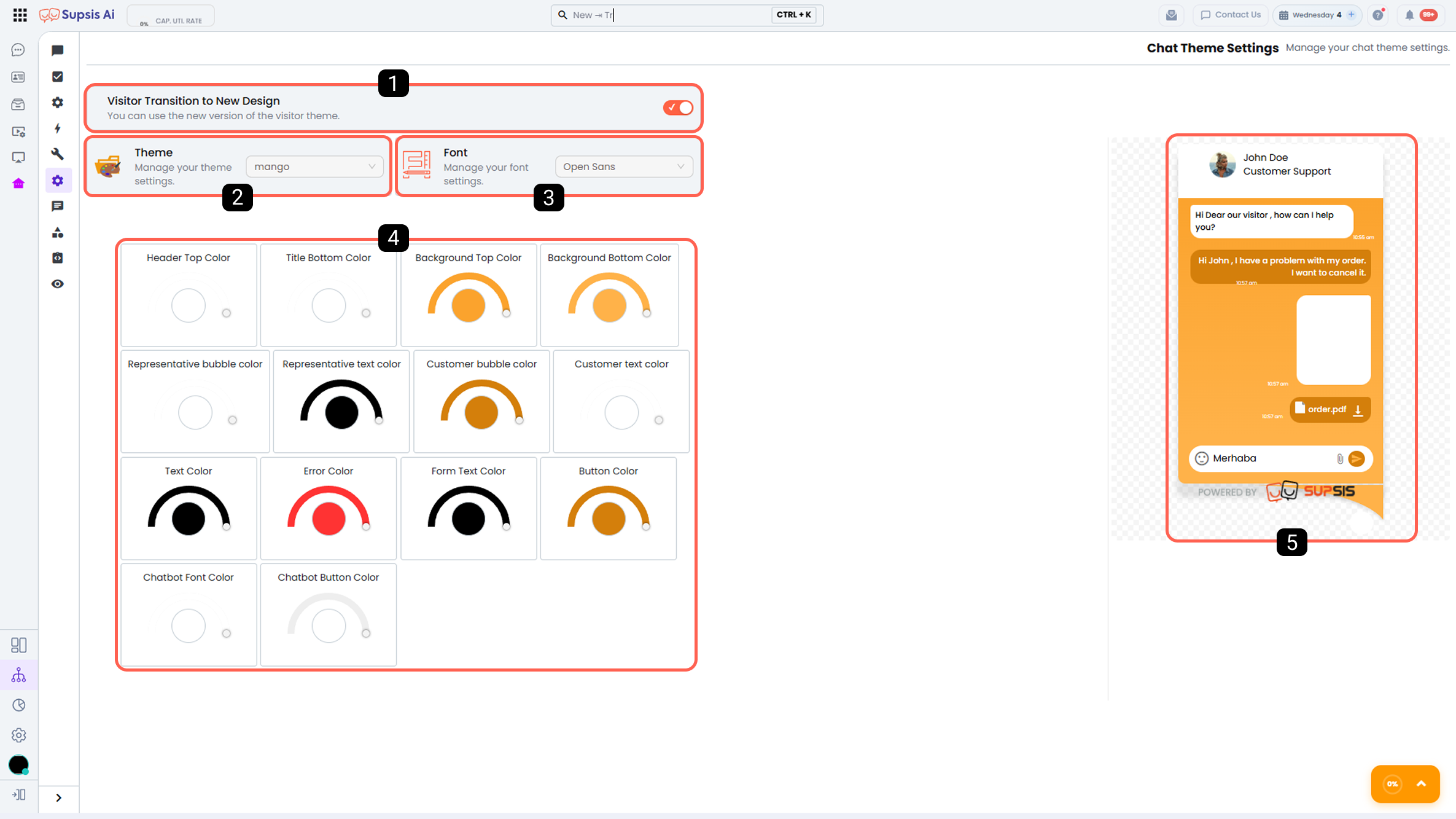
1 - New Visitor Theme
When this option is enabled, the new chat widget theme with a modern and updated design is activated. The new visitor theme enhances user experience with its improved interface structure and allows visitors to interact more comfortably with the chat area.
Designed with a modern approach, this theme reflects your brand’s innovative image and aims to capture visitors’ attention.
2 - Theme
The Theme section allows you to choose from predefined template themes for the chat widget. In addition, with the Custom Theme option, you can create a fully brand-specific design tailored to your needs.
3 - Font
From this section, you can determine the font to be used in the chat widget. Choosing the right font increases the readability of chat content while also reflecting your brand’s character.
Selecting a font that aligns with your website’s overall design language strengthens the user experience and gives the chat widget a more professional appearance.
4 - Customizable Theme Color Settings
Color Settings allow you to customize the colors of different components of the chat widget. In this section, you can adjust the colors of the chat header, message bubbles, buttons, and other interface elements to match your brand’s color palette.
Using the right colors enhances visual consistency, ensures harmony with your website, and leaves a more professional impression on visitors.
5 - Preview
The Preview area allows you to see in real time how the applied theme and design changes will appear in the chat widget. This enables you to evaluate adjustments from the user’s perspective and quickly make necessary improvements.
The preview feature ensures that theme settings can be safely and carefully adjusted until the optimal user experience is achieved.