
sups.is Link Shortener Service is a self-hosted, built-in URL shortening infrastructure integrated into Supsis AI that enables you to shorten long URLs with a single click or programmatically via automation code blocks without requiring 3rd-party services (Bitly, TinyURL, etc.).
With this integration, long panel links and campaign URLs in WhatsApp, SMS, Email, and live chat messages are transformed into short, secure, and memorable links.
📍 Where to Find It?
The sups.is link shortener service can be accessed from 3 primary entry points across the platform:
- In-Panel Share Modals:
- Task Details: Share button on the task card.
- Visitor Details: Share button on the visitor/contact card.
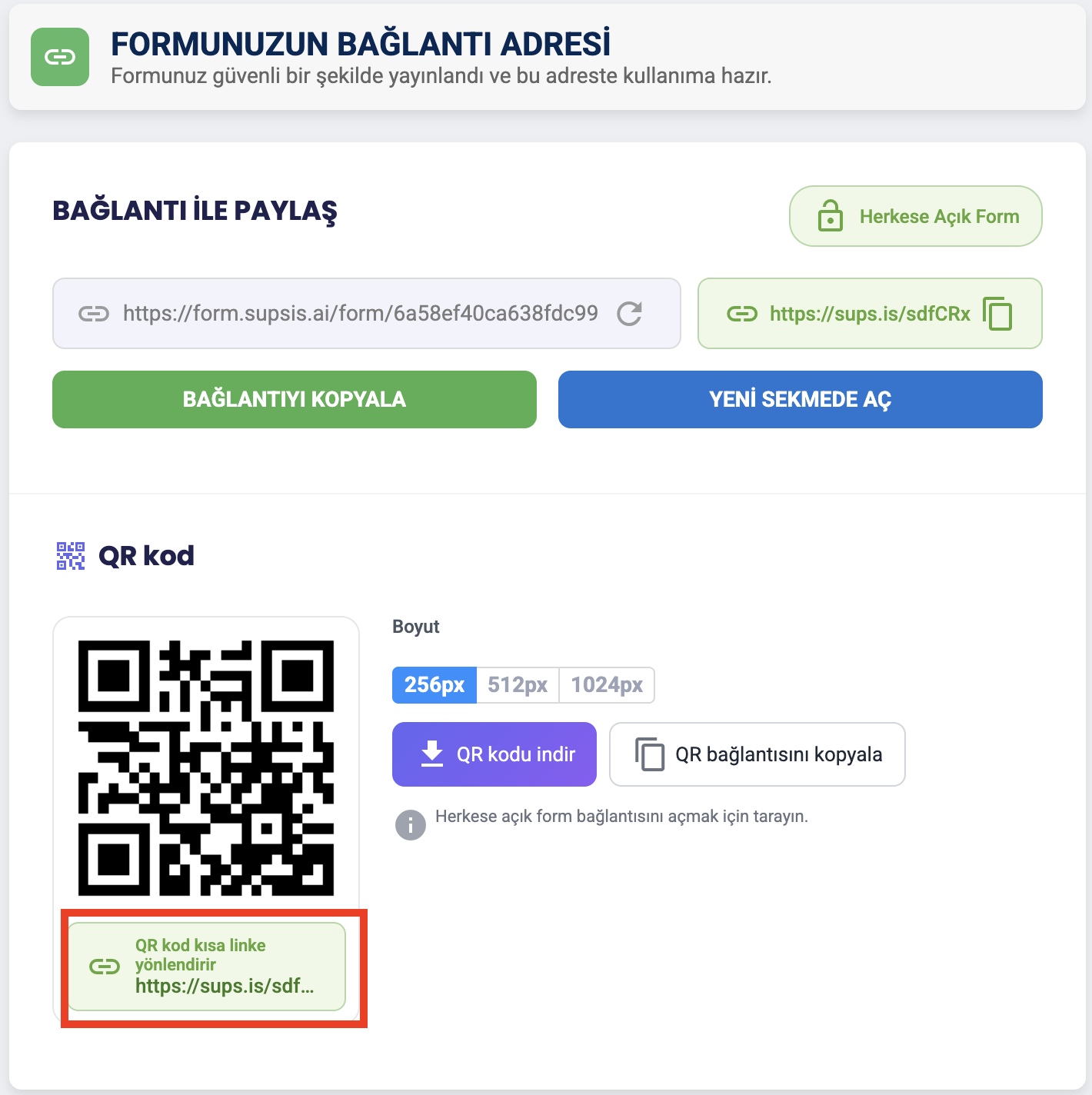
- Form Publishing & List: Form share modal (Generated QR codes automatically update to target the short link!).
- Table Record Viewer: Share window inside dynamic table record views.
- Automation Webhook Details: Webhook trigger URL share modal.
-
Chat Contact Details: Contact card share modal inside chat conversations.
-
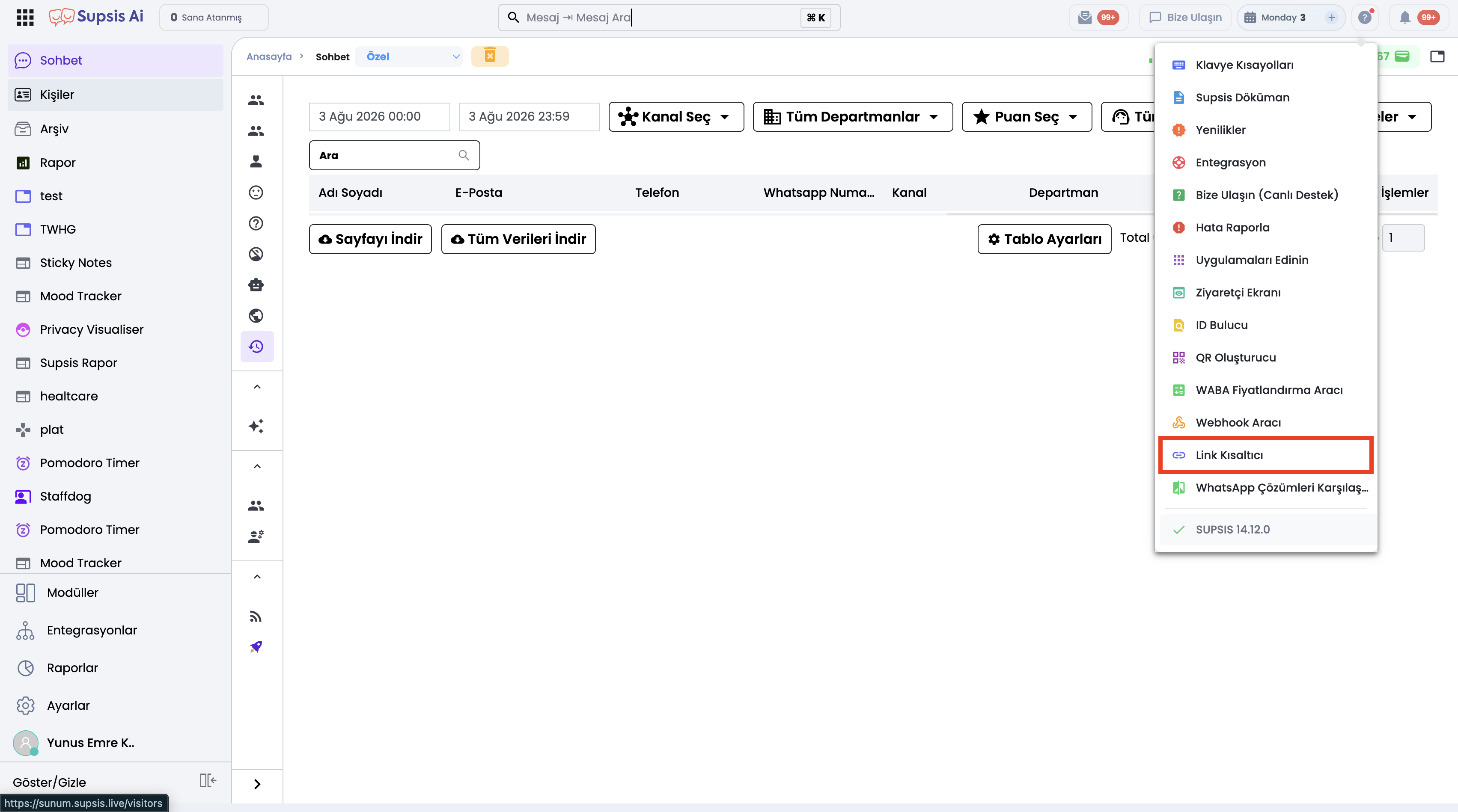
Top-Right Help Menu (
?): -
Clicking the help icon (
?) in the top-right corner of the panel displays the Link Shortener option, which opens thesups.ismanagement interface in a new browser tab. -
Automation & Chatbot JavaScript SDK:
- Programmatic
supsis.util.shortLink()andsupsis.util.isShortLinkAvailable()utility methods inside JavaScript code blocks.
🛠️ Step-by-Step Usage Guide
Method 1: Shortening via In-Panel Share Modal
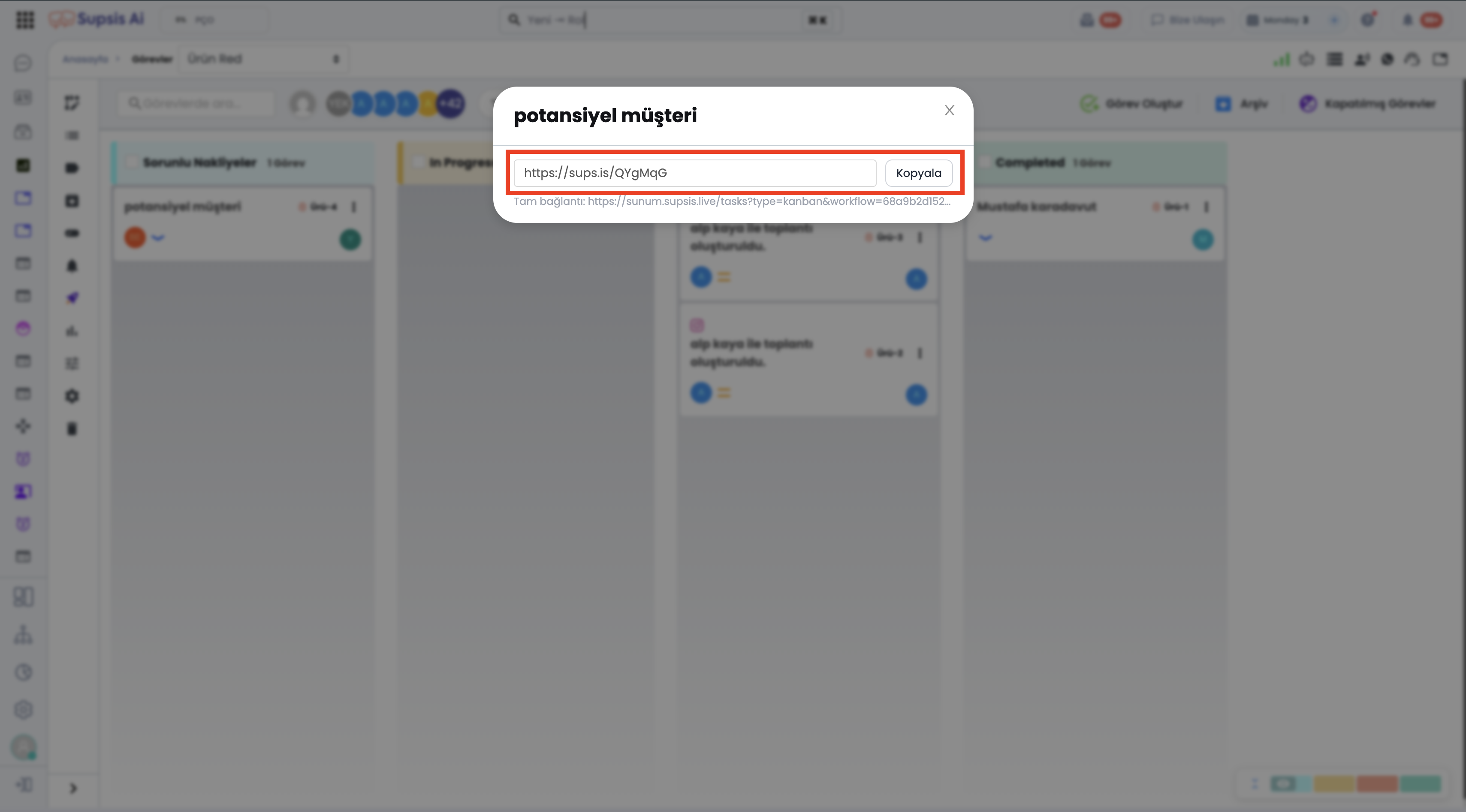
- Open the detail view of the record you wish to share (task, visitor, form, table record, webhook) and click the Share button.
- The modal displays the original long URL; click the Shorten button next to it.
- The URL instantly converts to
sups.isformat and is automatically copied to your clipboard.
- Form Publishing & QR Code: When shortening inside a Form Share modal, the displayed QR code automatically updates to target the new short link.
Method 2: Shortening Custom URLs via Help Menu (sups.is Interface)
- Click the help (
?) icon in the top-right corner of your panel and select Link Shortener.
- Paste any external long URL into the URL input field on the
sups.isinterface that opens in a new tab. - Optionally expand Show Advanced Options to configure:
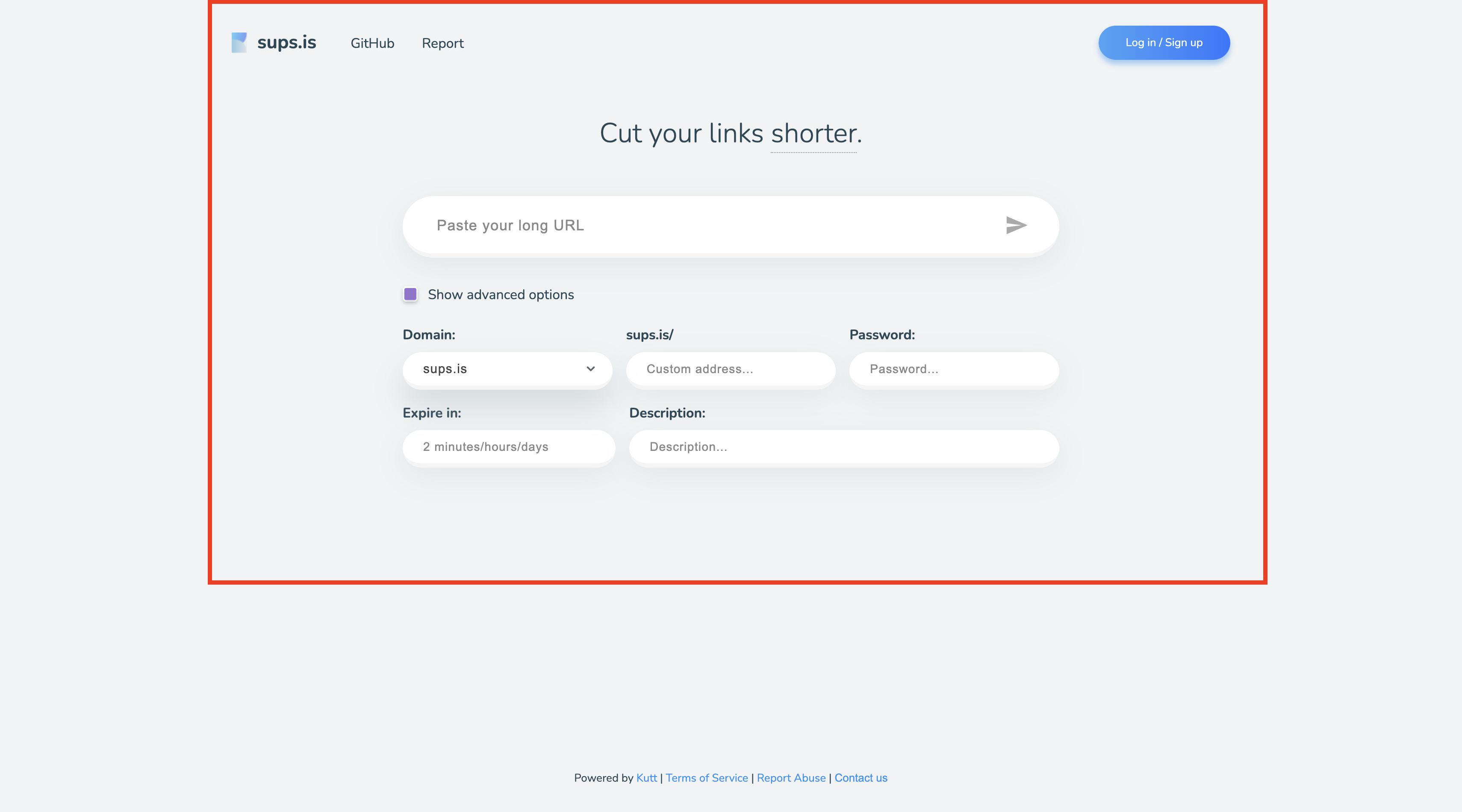
- Domain: Custom domain selection.
- Custom Alias (Custom URL): Custom word appended to the link (e.g.,
sups.is/spring-campaign). - Password Protection: Require password entry before redirection.
- Expiration (Expire In): Duration for which the link remains valid (e.g.,
2 days). - Description: Internal note regarding the link.
- Click Shorten to generate your copyable short link.
Method 3: Programmatic Shortening via Automation & Chatbot JavaScript SDK
Dynamically generate short links inside automation rules or chatbot JavaScript blocks:
// Generate short link with custom alias and expiration
const shortLink = await supsis.util.shortLink("https://store-example.com/campaign/spring-discount?utm_source=whatsapp&ref=12345", {
  customUrl: "spring-campaign",
  expireIn: "2 days",
  description: "Spring Campaign Discount Link"
});

// Use generated short link in message content
const message = `Hello! Here is your exclusive discount link: ${shortLink}`;
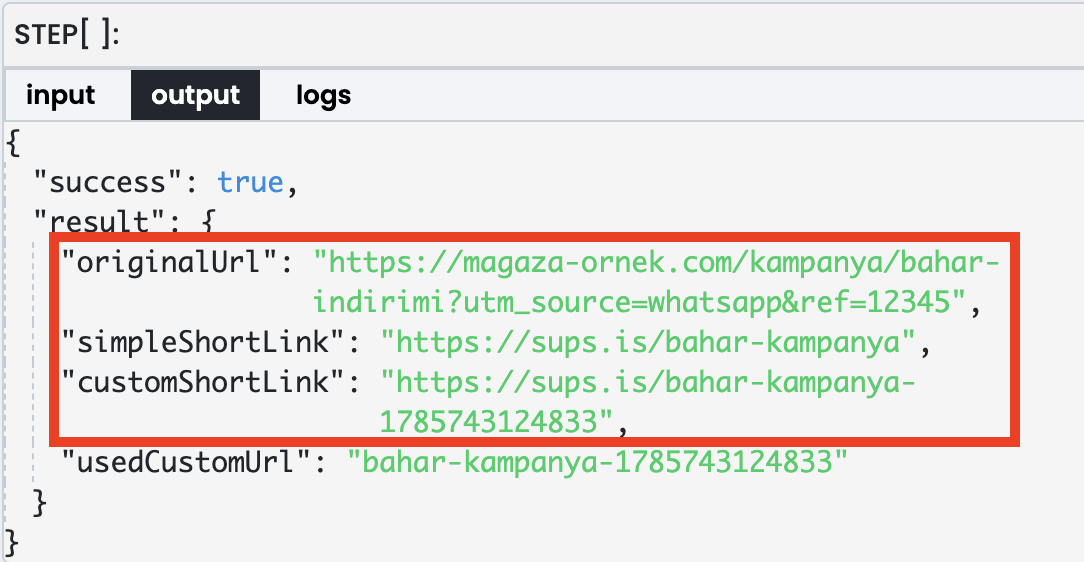
⚡ JavaScript SDK Technical Details & Rules
1. supsis.util.shortLink(url, options)
Shortens the provided target URL via sups.is.
url(String, Required): Original long target URL.options(Object, Optional):customUrl(String): Custom alias. (Rules: Contains only letters, numbers, hyphens-, and underscores_; max 64 characters; must be unique across the system).expireIn(String): Expiration duration formatted as text (e.g.,"2 minutes","1 hour","2 days","7 days"). Expired links redirect to a 'Not Found' page.password(String): Password protection. Prompts users for a password before redirecting to the destination.description(String): Internal description note.domain(String): Custom domain selection.reuse(Boolean): Whether to reuse an existing short link for the same target URL.
2. supsis.util.isShortLinkAvailable(customUrl)
Checks whether a specified custom alias (customUrl) is available in the system (true/false).
📌 Critical Execution Rules:
- Alias Conflict Handling: If a specified
customUrlis already taken, the system does NOT silently fall back to a random URL; it throws an error. We recommend checking availability withisShortLinkAvailable()first. - Reuse Behavior: Calls made without options reuse the same short link for identical target URLs. Specifying
customUrldisables this reuse behavior and registers the requested custom alias. - Editor Autocomplete: In Automation and Chatbot JS editors,
shortLinkandisShortLinkAvailablefunctions appear in autocomplete dropdowns complete with descriptions and parameter hints.
🎯 Use Cases
- WhatsApp & SMS Character Cost Savings: Reduce URL character length in SMS and WhatsApp broadcasts to lower messaging costs.
- Readability & Mobile Compatibility: Prevent long, complex URLs from breaking across lines on mobile devices.
- Form & QR Code Optimization: Shorten form URLs so generated QR codes become less dense and easier for camera scanners to read.
- Brand Awareness & Custom Alias Campaigns: Create memorable branded links like
sups.is/spring2026to boost click-through rates and customer trust. - Time-Limited Discount Links: Set
expireIn: "24 hours"for flash sales or event invitations, automatically disabling access once expired. - Password-Protected Sensitive Sharing: Share confidential dealer price lists or proposal documents behind password protection.
- Internal Team Sharing: Easily share shortened internal panel links for tasks, visitors, or table records among teammates.
💡 Customer Benefits
- No Extra Subscriptions or Costs: Hosted entirely on Supsis infrastructure — no need to subscribe to external services like Bitly or Rebrandly.
- Message Optimization: Eliminates SMS character limits and WhatsApp clutter.
- Full Control & Security: Expiration times and password protection ensure complete control over shared links.