
The Plans section on the Billing & Payment page includes the plans offered to enable you to use the modules available on the Supsis platform and the communication channels that can be integrated. Some of these plans are offered as a free plan with limited features, while plans that include advanced features and higher usage limits require a purchase in order to be activated.
In order to use paid plans or activate more comprehensive packages, it is mandatory to fully define your Payment Method and Billing Address information via the panel and complete the plan selection.
In this document:
- Available plans
- Information about purchase pricing
- Packages within the plans
- Package details
- Package contents and usage details
are explained in detail.
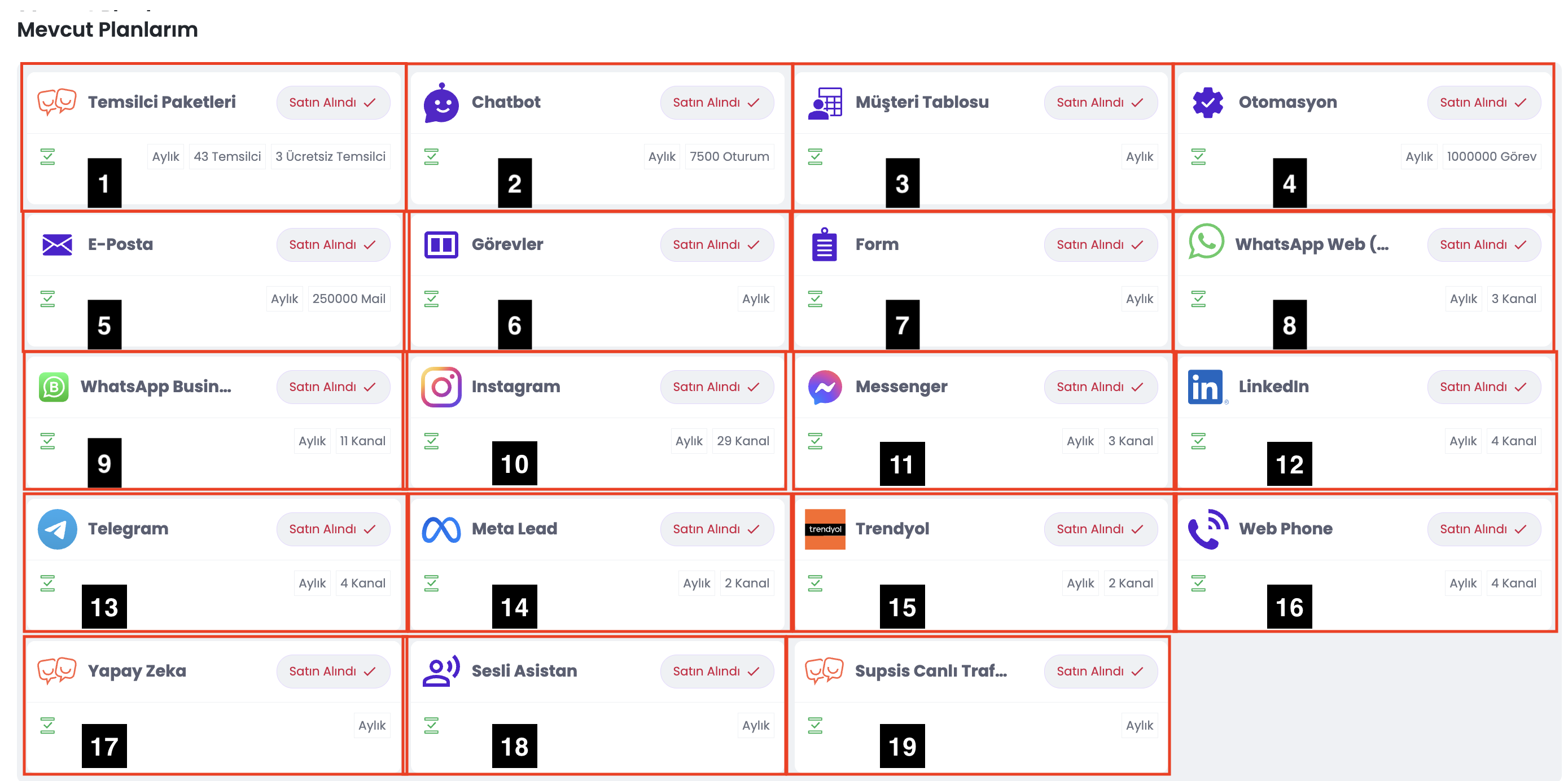
| No | Menu |
|---|---|
| 1 | Agent Packages |
| 2 | Chatbot |
| 3 | Customer Table |
| 4 | Automation |
| 5 | |
| 6 | Tasks |
| 7 | Form |
| 8 | WhatsApp Web (QR) |
| 9 | WhatsApp Business API |
| 10 | |
| 11 | Messenger |
| 12 | |
| 13 | Telegram |
| 14 | Meta Lead |
| 15 | Trendyol |
| 16 | Web Phone |
| 17 | Artificial Intelligence |
| 18 | Voice Agent |
| 19 | Supsis Live Traffic |
| 20 | Subscription Downgrade Management |
| 21 | Commercial Data Security and Plan Confidentiality |
1-) Agent Packages
The Agent Packages section allows you to define the features accessible to the agents who will use the Supsis system, the core features of your panel, and the total number of agents.
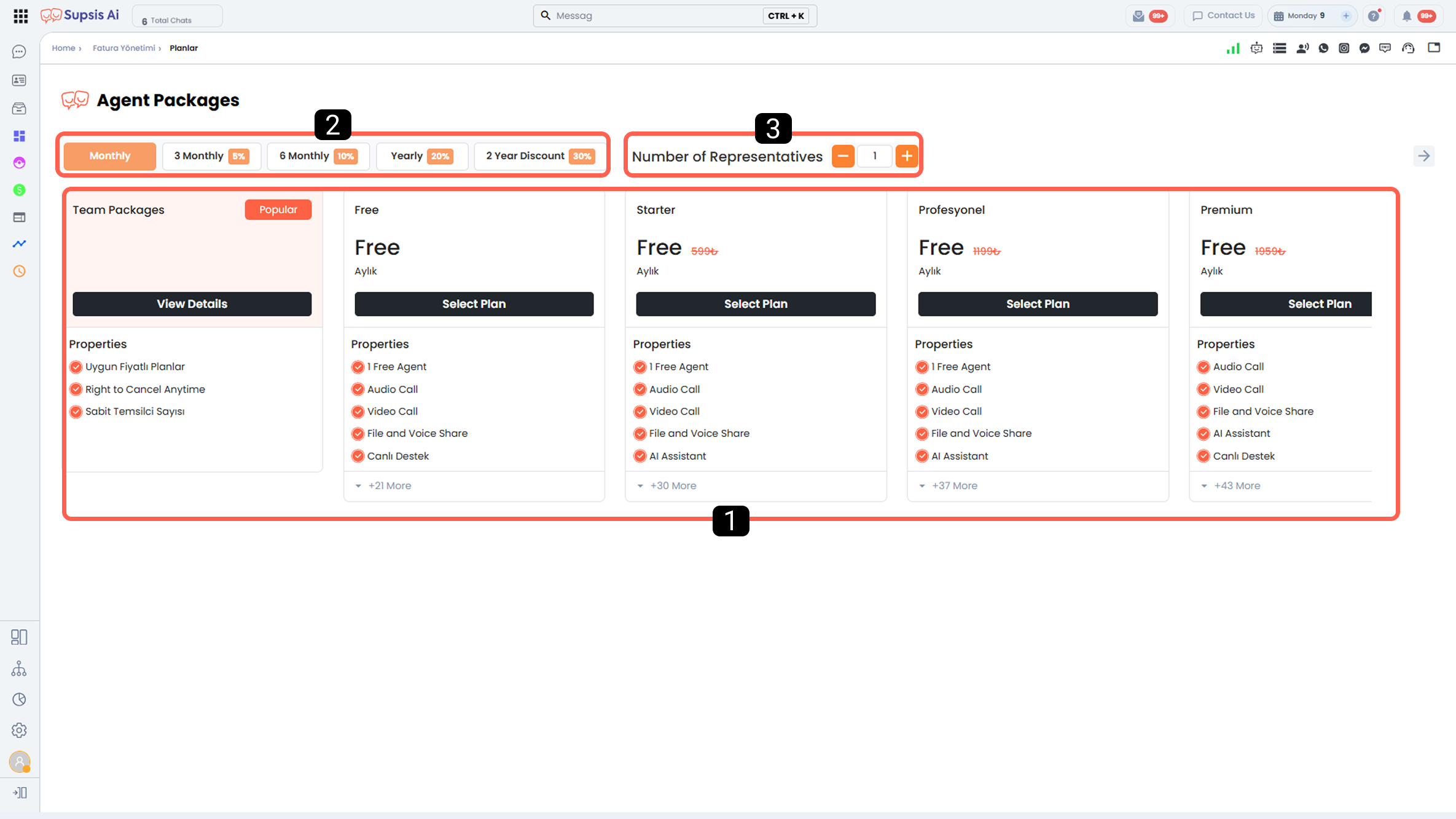
- Packages
- Package Duration and Discount Rate
- Quantity Selection
1-) Packages
In this section, you can select the package that best suits your needs. The features offered by each package are listed in detail under the Features section within the package.
Higher-tier packages include all features of the lower-tier packages and additionally offer their own exclusive features.
2-) Package Duration and Discount Rate
From this section, you can determine the usage duration of the selected package.
The discount rates applied based on package duration are as follows:
 3 Months: 5% discount
 6 Months: 10% discount
 12 Months (Annual): 20% discount
 24 Months: 30% discount
The discount amount is calculated based on the total package price.
The calculation is made by multiplying the selected package’s monthly price, the number of agents, and the package duration (in months), and then applying the relevant discount rate to the total amount.
3-) Quantity Selection
From this section, you can determine the number of agents to be included in the selected package.
2-) Chatbot
In this section, you can determine the maximum number of monthly customer sessions that the chatbot and artificial intelligence can serve for customers coming from your communication channels.
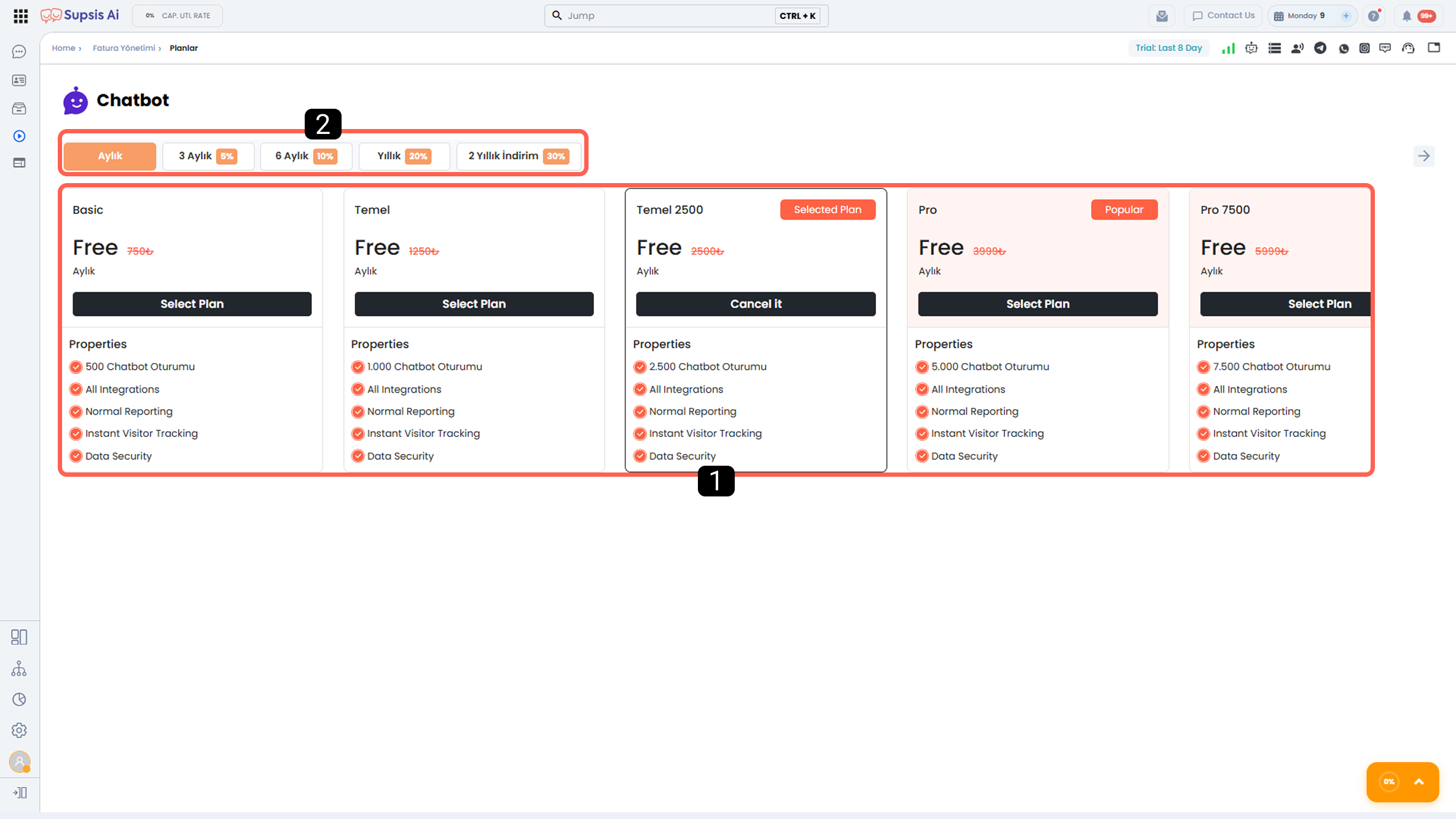
- Packages
- Package Duration and Discount Rate
- Extra Package
1-) Packages
There is no difference between chatbot packages other than the number of sessions.
Each conversation handled by the chatbot or artificial intelligence corresponds to 1 chatbot session.
A conversation is counted as 1 session when any of the following occurs:
- After the chatbot or AI communicates with the customer and transfers the conversation to an agent,
- The agent manually takes over the conversation,
- The conversation reaches the time limit defined in the duration settings,
- The customer interacts with the “Close Conversation” block in the chatbot diagram.
When one of these situations occurs, the session is considered closed or transferred, and 1 session is consumed.
If the same customer sends another message later and starts a new conversation, an additional 1 session is consumed.
2-) Package Duration and Discount Rate
From this section, you can determine the usage duration of the selected package.
The discount rates applied based on package duration are as follows:
 3 Months: 5% discount
 6 Months: 10% discount
 12 Months (Annual): 20% discount
 24 Months: 30% discount
The discount amount is calculated based on the total package price.
The calculation is made by multiplying the selected package’s monthly price and the package duration (in months), and then applying the relevant discount rate to the total amount.
For monthly purchases, the session count defined in the selected package is assigned to your panel on a monthly basis and renews at the beginning of each month. Unused sessions do not roll over to the next month.
For purchases longer than 1 month, the monthly session count of the package is multiplied by the selected package duration (in months), and this total session count can be used throughout the entire package period.
3-) Extra Package
If your current chatbot package is insufficient or if you would like to test the chatbot module, you can purchase an extra session package from this section.
When purchasing an extra package, you must specify the number of sessions you wish to buy. Extra packages are subject to tiered pricing and discount rates based on the number of sessions purchased.
Example:
- If 1 session is purchased, the cost per session is 2.50 TL,
- For 5,000 sessions, the cost per session is 0.80 TL.
As the number of purchased sessions increases, the unit session cost decreases.
3-) Customer Table
The Customer Table provides a comprehensive database designed to be used in marketing, automation, chatbot, and artificial intelligence processes.
This module offers two-way integration with all modules where tables within the Supsis platform can be functionally used. In other words, other modules can read data from customer tables and write data to these tables.
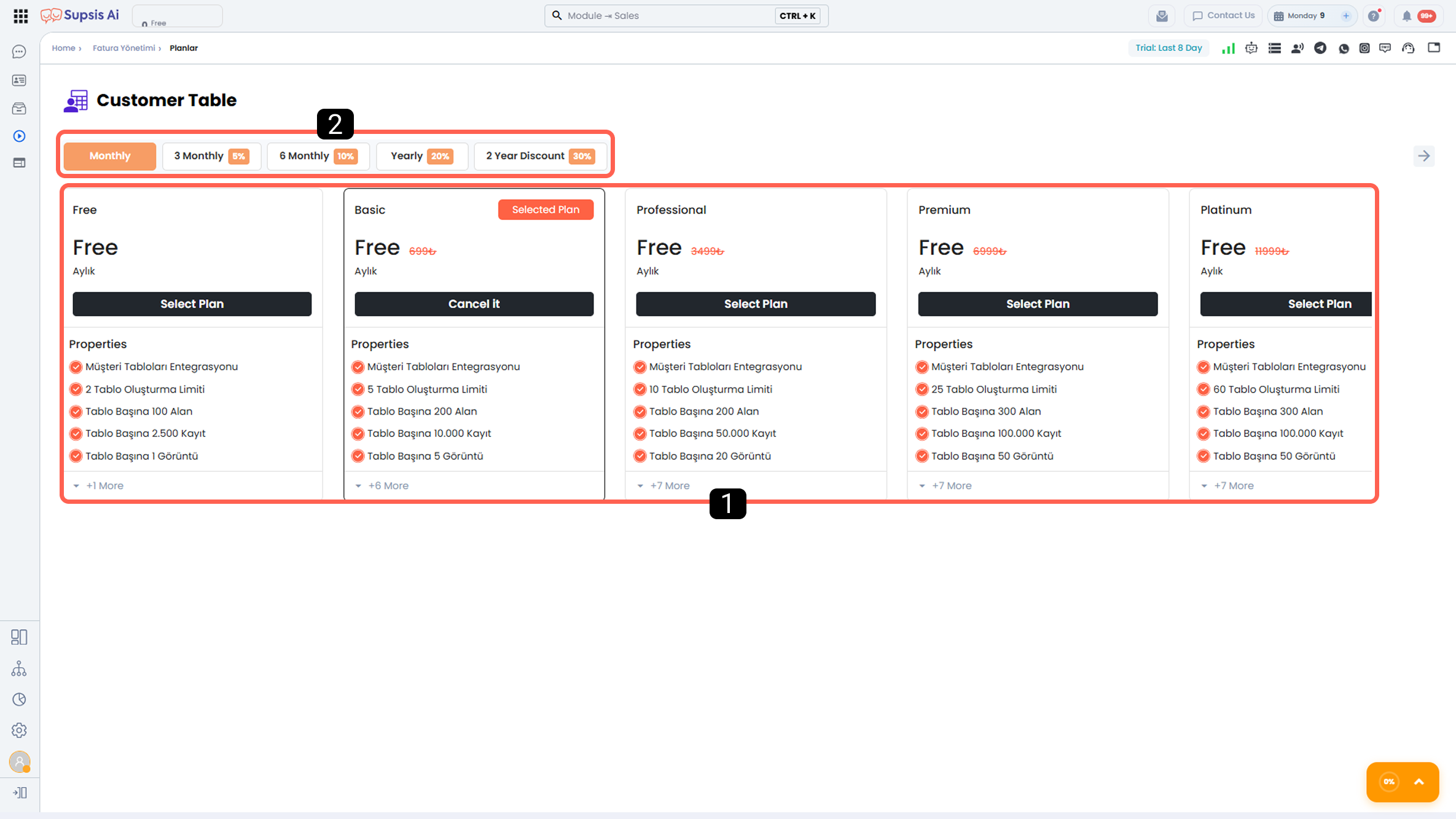
- Packages
- Package Duration and Discount Rate
1-) Packages
In this section, you can select the package that best suits your needs. The features offered by each package are listed in detail under the Features section within the package.
Higher-tier packages include all features of the lower-tier packages and additionally offer their own exclusive features.
2-) Package Duration and Discount Rate
From this section, you can determine the usage duration of the selected package.
The discount rates applied based on package duration are as follows:
 3 Months: 5% discount
 6 Months: 10% discount
 12 Months (Annual): 20% discount
 24 Months: 30% discount
The discount amount is calculated based on the total package price.
The calculation is made by multiplying the selected package’s monthly price and the package duration (in months), and then applying the relevant discount rate to the total amount.
4-) Automation
Automations are workflow mechanisms that are triggered by specific events occurring within the Supsis panel, scheduled timers, or the execution of Webhook URLs belonging to the automation, and automatically perform the steps defined in the automation diagram.
With automations, processes can be managed without manual intervention, repetitive tasks can be automated, and operational efficiency can be increased.
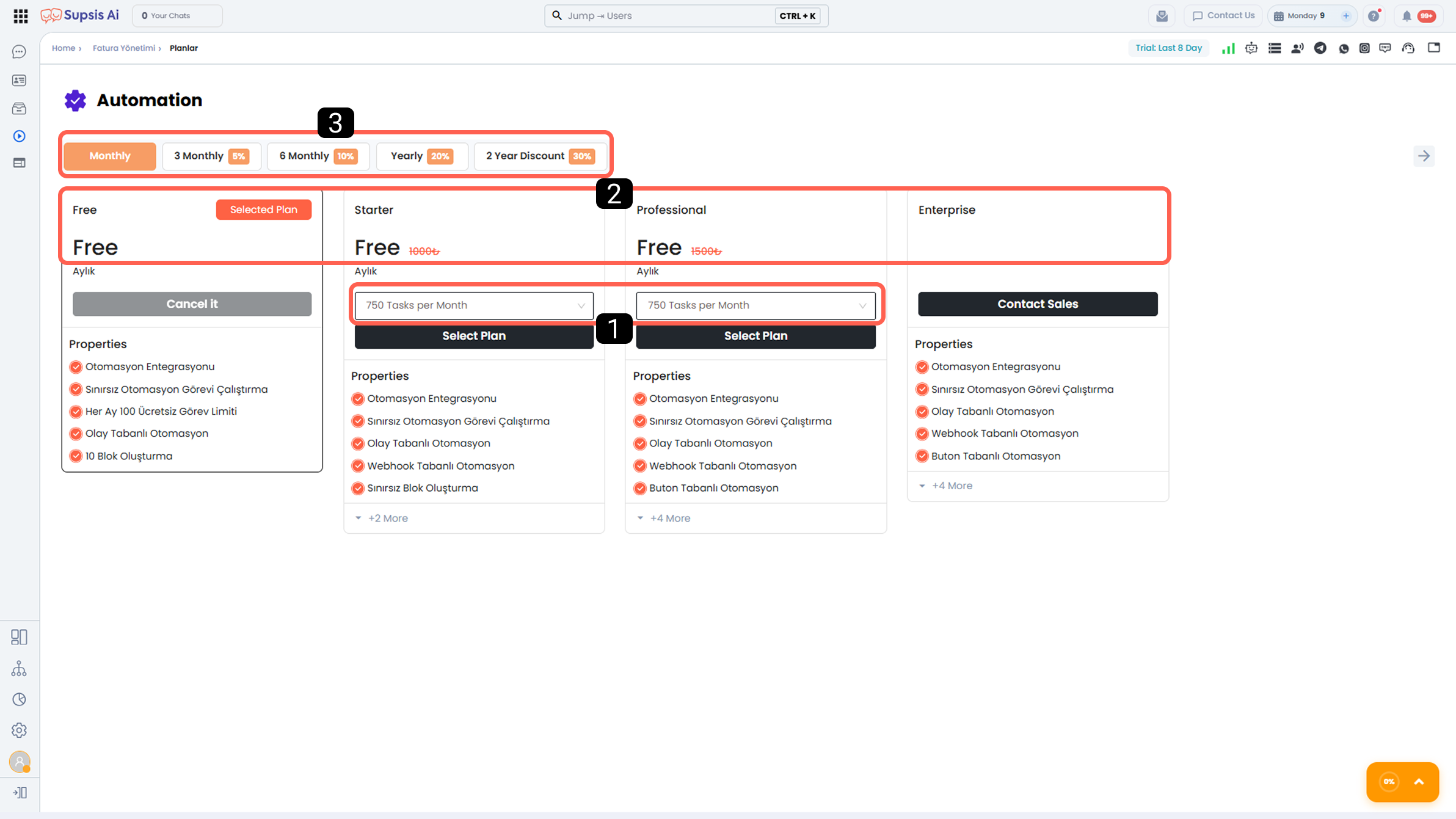
- Number of Automation Tasks
- Packages
- Package Duration and Discount Rate
1-) Number of Automation Tasks
From this section, you can determine the number of automation tasks included in the selected package.
The selected number of automation tasks allows you to create automations with the features provided by the package, and defines the maximum number of tasks that can run within those automations.
Pricing for the number of automation tasks varies depending on the type and scope of the selected automation package.
2-) Packages
In this section, you can select the automation package that best suits your needs.
The features offered by each package are listed in detail under the Features section within the package.
Higher-tier packages include all features of the lower-tier packages and additionally offer their own exclusive features.
3-) Package Duration and Discount Rate
From this section, you can determine the usage duration of the selected package.
The discount rates applied based on package duration are as follows:
 3 Months: 5% discount
 6 Months: 10% discount
 12 Months (Annual): 20% discount
 24 Months: 30% discount
The discount amount is calculated based on the total package price.
The calculation is made by multiplying the selected package’s monthly price by the package duration (in months), and then applying the relevant discount rate to the total amount.
For monthly purchases, the number of tasks defined in the selected package is assigned to your panel monthly and renews at the beginning of each month. Unused tasks do not roll over to the next month.
For purchases longer than 1 month, the monthly task count of the package is multiplied by the selected package duration (in months), and this total task count can be used throughout the entire package period.
5-) E-Mail
The E-Mail integration allows you to integrate your email services with Supsis and centrally manage all operations performed via your email address through the Supsis panel. With this integration, you can control your email communication processes from a single panel and increase operational efficiency.
With Supsis E-Mail integration:
- You can perform bulk email sendings.
- You can view emails received in your inbox through the Supsis panel and manage them with your entire team or with the help of artificial intelligence.
- You can actively benefit from AI-supported content generation in email creation and sending processes.
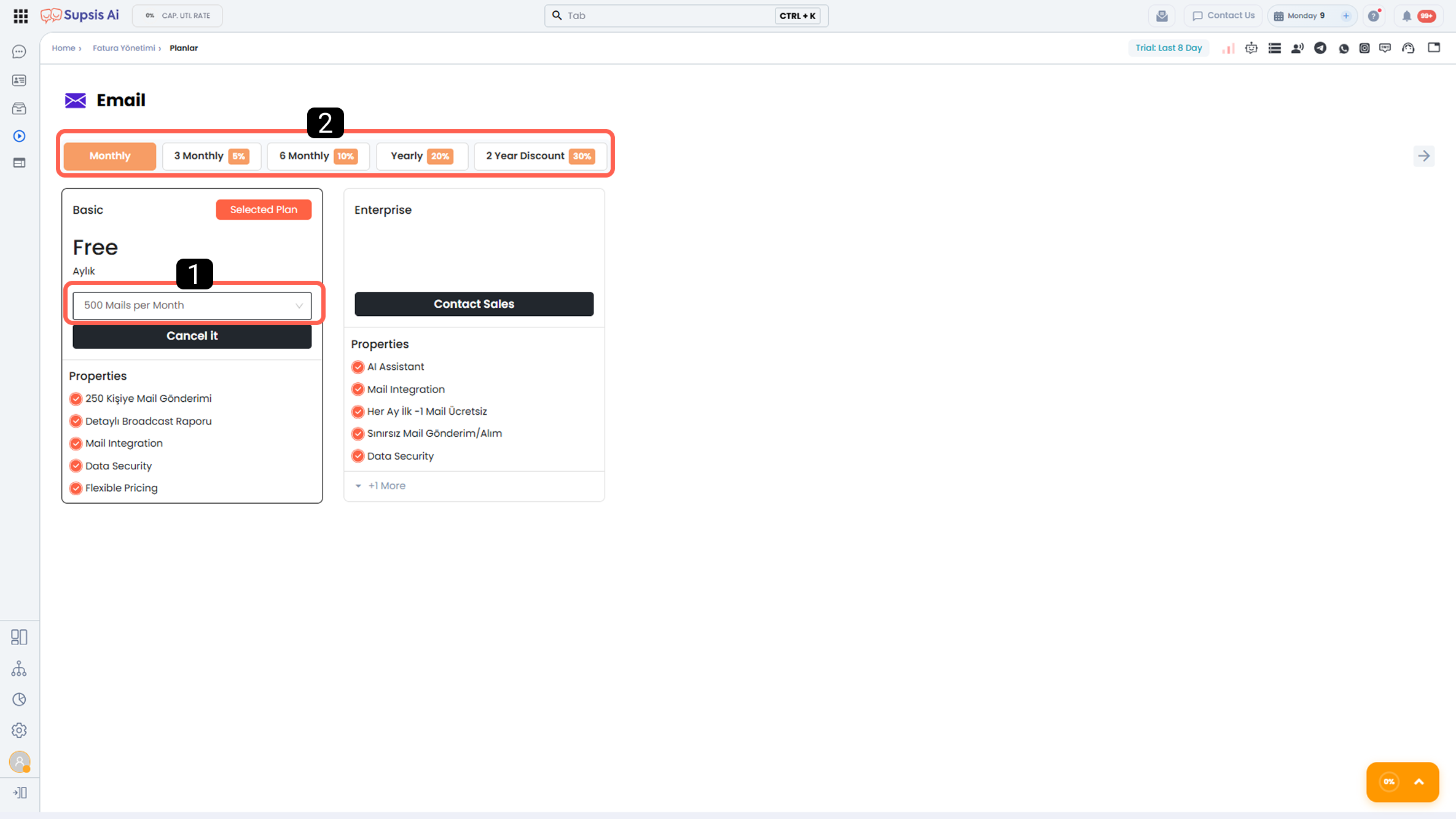
- Number of Emails Sent
- Package Duration and Discount Rate
1-) Number of Emails Sent
From this section, you can determine the number of emails to be sent.
There is no package-based differentiation in the Mail module.
Pricing varies only according to the selected email sending quantity.
2-) Package Duration and Discount Rate
From this section, you can determine the usage duration for the selected sending quantity.
The discount rates applied based on the sending duration are as follows:
 3 Months: 5% discount
 6 Months: 10% discount
 12 Months (Annual): 20% discount
 24 Months: 30% discount
The discount amount is calculated based on the total package price.
The calculation is made by multiplying the monthly price of the selected sending quantity by the selected duration (in months), and then applying the relevant discount rate to the total amount.
For monthly purchases, the selected email sending quantity is assigned to your panel monthly and renews at the beginning of each month. Unused sendings do not roll over to the next month.
For purchases longer than 1 month, the selected monthly sending quantity is multiplied by the package duration (in months), and this total sending right can be used throughout the entire package period.
6-) Tasks
The Task Management Module works in integration with Supsis’s CRM infrastructure, allowing you to manage your team’s workflows through a centralized, organized, and trackable structure.
Tasks can be easily created through conversations, contact cards, users, automations, and chatbots, and can be instantly tracked by relevant teams or departments.
With this module, internal team coordination is strengthened, business processes become transparent, and tasks are ensured to be completed on time.
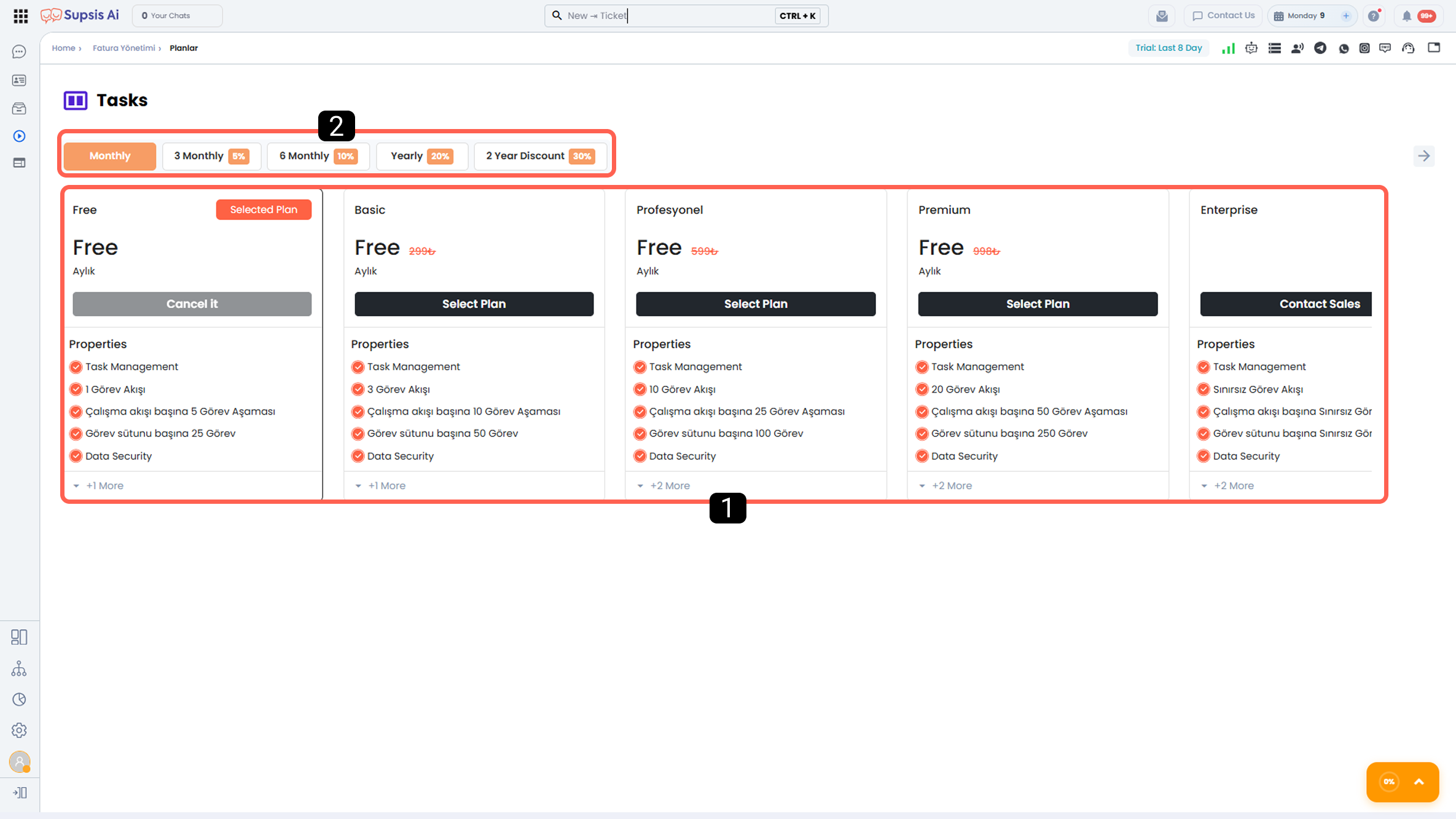
- Packages
- Package Duration and Discount Rate
1-) Packages
In this section, you can select the package that best suits your needs. The features offered by each package are listed in detail under the Features section within the package.
Higher-tier packages include all features of the lower-tier packages and additionally offer their own exclusive features.
2-) Package Duration and Discount Rate
From this section, you can determine the usage duration of the selected package.
The discount rates applied based on package duration are as follows:
 3 Months: 5% discount
 6 Months: 10% discount
 12 Months (Annual): 20% discount
 24 Months: 30% discount
The discount amount is calculated based on the total package price.
The calculation is made by multiplying the selected package’s monthly price by the package duration (in months), and then applying the relevant discount rate to the total amount.
7-) Form
Forms are designed to make your customer data collection processes easy, flexible, and manageable.
You can share the forms you create via a dedicated form URL or integrate them into your website using iFrame or popup methods.
Thanks to the drag-and-drop infrastructure, you can quickly create forms without needing technical knowledge, and edit or update them at any time according to your needs.
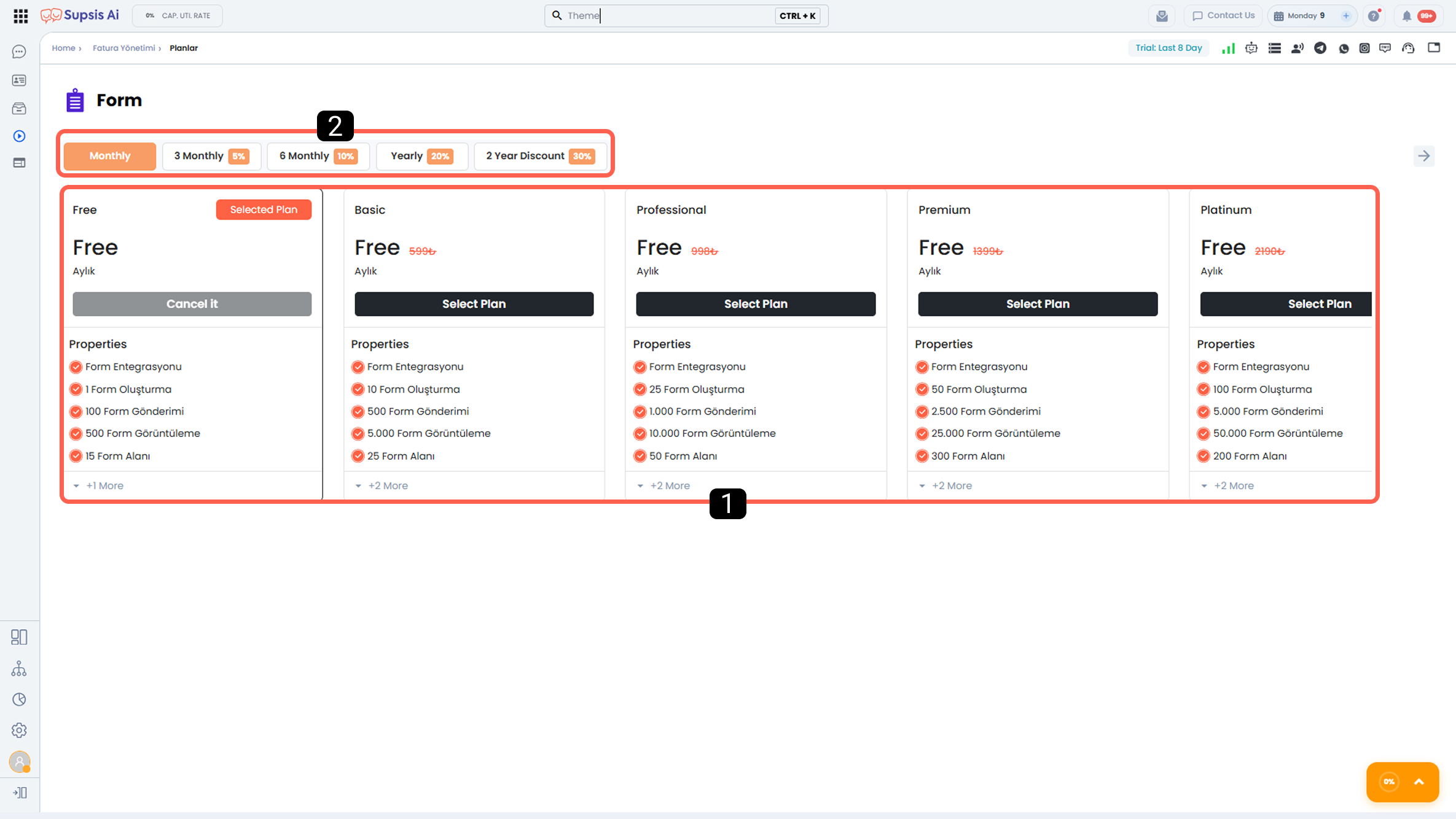
- Packages
- Package Duration and Discount Rate
1-) Packages
In this section, you can select the package that best suits your needs. The features offered by each package are listed in detail under the Features section within the package.
Higher-tier packages include all features of the lower-tier packages and additionally offer their own exclusive features.
2-) Package Duration and Discount Rate
From this section, you can determine the usage duration of the selected package.
The discount rates applied based on package duration are as follows:
 3 Months: 5% discount
 6 Months: 10% discount
 12 Months (Annual): 20% discount
 24 Months: 30% discount
The discount amount is calculated based on the total package price.
The calculation is made by multiplying the selected package’s monthly price by the package duration (in months), and then applying the relevant discount rate to the total amount.
8-) WhatsApp Web (QR)
WhatsApp Web (QR) integration is a communication model that is activated by scanning a QR code, requires no technical setup, and works integrated with both the mobile WhatsApp application and WhatsApp Web.
With this integration, bulk message sending can be performed while continuing to use standard WhatsApp. However, compliance with spam regulations, KVKK, and relevant legal legislation is entirely the user’s responsibility.
Within the scope of WhatsApp Web (QR) integration:
- While AI scenarios run smoothly, chatbot usage does not support button-based messages. As an alternative, chatbot scenarios can be designed using numbered text responses such as 1 – 2 – 3.
- WhatsApp accounts belonging to team members can be included in the Supsis panel, allowing all messaging processes to be centrally recorded and reported.
- Operational processes can be managed from a single panel with Supsis reports and account/authorization management features.
- With Supsis’s advanced marketing and process automation capabilities, the probability of converting potential customers from the WhatsApp channel into sales can be increased.
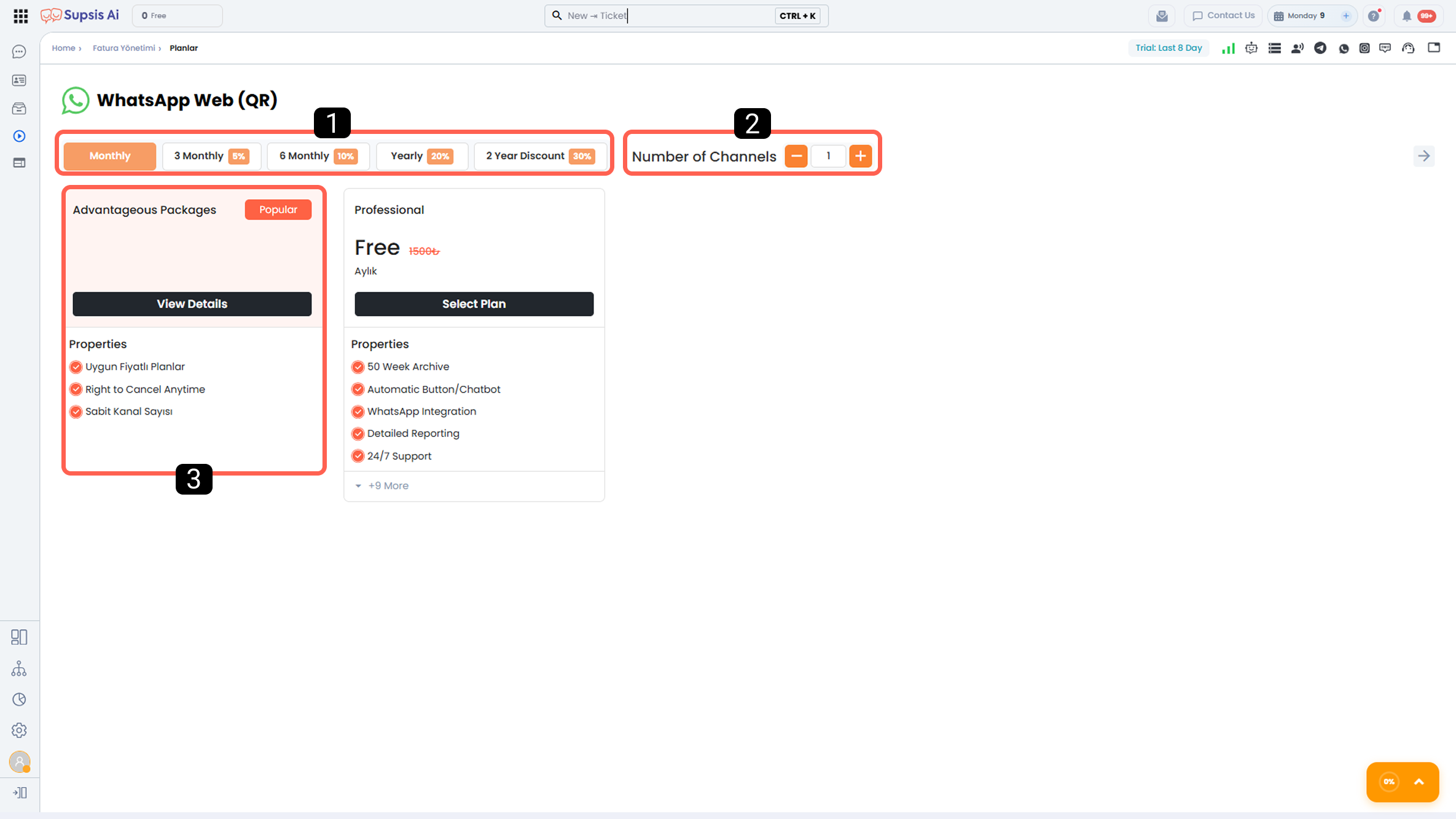
- Package Duration and Discount Rate
- Number of Channels
- Advantageous Packages
1-) Package Duration and Discount Rate
From this section, you can determine the usage duration of the selected package.
The discount rates applied based on package duration are as follows:
 3 Months: 5% discount
 6 Months: 10% discount
 12 Months (Annual): 20% discount
 24 Months: 30% discount
Discount Calculation Logic:
The discount amount is calculated by multiplying the channel fees determined according to the selected number of channels by the monthly equivalent of the selected package duration, and then applying the relevant discount rate to the total amount.
2-) Channel Selection
From this section, you can determine the number of channels (WhatsApp numbers) you want to connect to the Supsis panel via WhatsApp Web (QR) integration.
The selected number of channels directly affects the total package price. Each channel is defined as a separate WhatsApp Web (QR) channel in the Supsis panel, and once the integration process is completed, interactions from these accounts can be managed through Supsis.
3-) Advantageous Packages
The Advantageous Packages section offers more affordable package options tailored to users planning to purchase multiple channels.
This section includes packages for 5, 10, 25, 50, and 100 channels. Each package has specially defined advantageous discount rates based on the number of channels.
In advantageous packages, duration-based discounts continue to be applied. Thus, you can benefit from both multi-channel purchase advantages and long-term usage discounts simultaneously.
9-) WhatsApp Business API
WhatsApp Business API is the official integration model provided by WhatsApp for corporate and scalable customer communication. This structure allows bulk messaging in compliance with KVKK and relevant legal regulations and is designed for high-volume customer communication needs.
Within the scope of WhatsApp Business API integration:
- Advanced chatbot and artificial intelligence scenarios are supported through button-based messages.
- Users are presented with a corporate profile displaying the business name, and under certain conditions, a green check mark (official business verification) can be obtained.
- All messaging operations are recorded within the Supsis panel and can be reported and analyzed in detail.
- With Supsis’s advanced marketing and process automation capabilities, the probability of converting potential customers from the WhatsApp channel into sales can be increased.
WhatsApp Business API is the most secure and sustainable WhatsApp communication model for businesses requiring legal compliance, automation capability, and a corporate appearance.
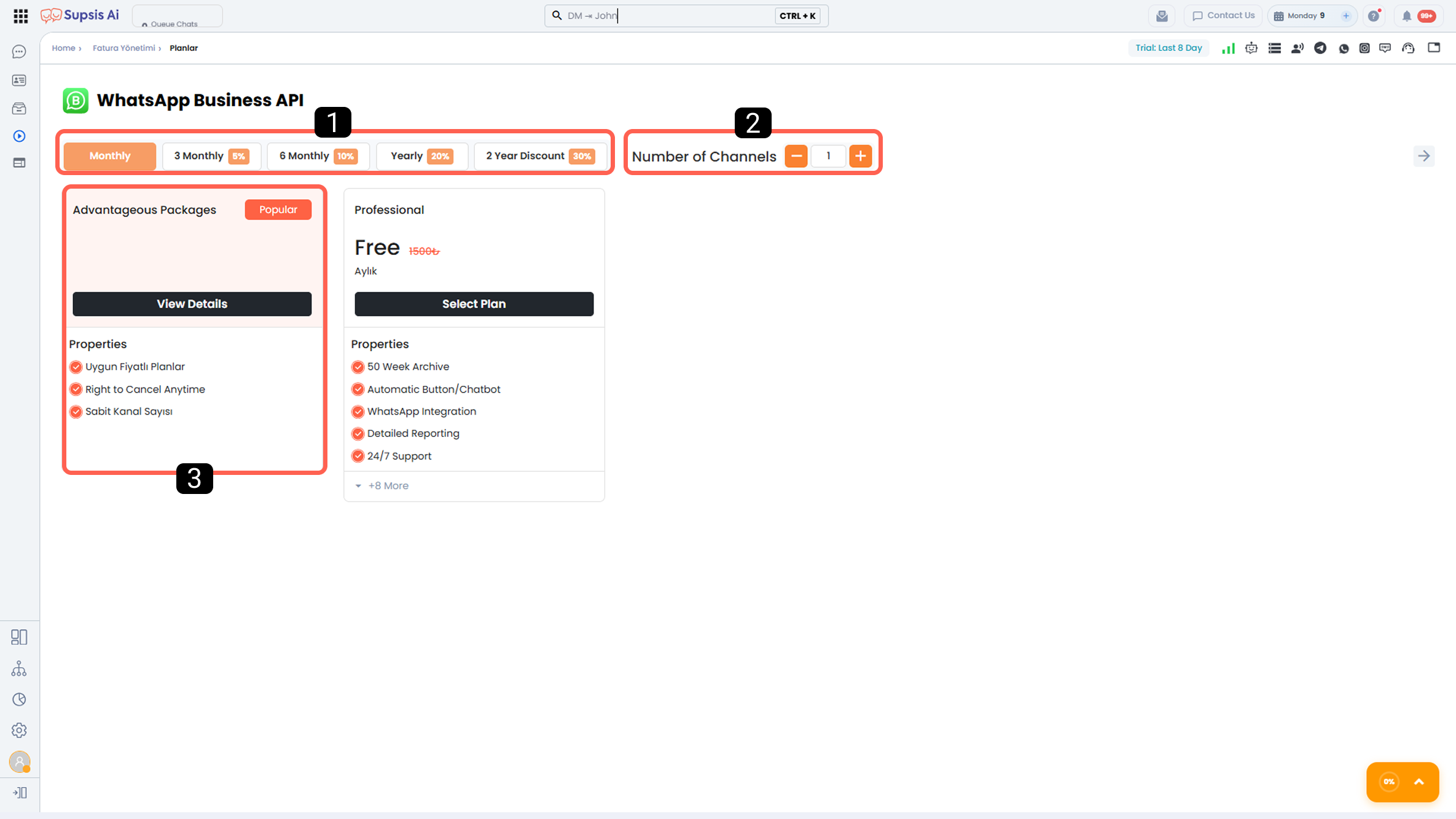
- Package Duration and Discount Rate
- Number of Channels
- Advantageous Packages
1-) Package Duration and Discount Rate
From this section, you can determine the usage duration of the selected package.
The discount rates applied based on package duration are as follows:
 3 Months: 5% discount
 6 Months: 10% discount
 12 Months (Annual): 20% discount
 24 Months: 30% discount
Discount Calculation Logic:
The discount amount is calculated by multiplying the channel fees determined according to the selected number of channels by the monthly equivalent of the selected package duration, and then applying the relevant discount rate to the total amount.
2-) Channel Selection
From this section, you can determine the number of channels (WhatsApp numbers) you want to connect to the Supsis panel via WhatsApp Business API integration.
The selected number of channels directly affects the total package price. Each channel is defined as a separate WhatsApp Business API channel in the Supsis panel, and once the integration process is completed, interactions from these accounts can be managed through Supsis.
3-) Advantageous Packages
The Advantageous Packages section offers more affordable package options tailored to users planning to purchase multiple channels.
This section includes packages for 5, 10, 25, 50, and 100 channels. Each package has specially defined advantageous discount rates based on the number of channels.
In advantageous packages, duration-based discounts continue to be applied. Thus, you can benefit from both multi-channel purchase advantages and long-term usage discounts simultaneously.
Note (WhatsApp Business API Message Rates and Price Calculator): Fees for template and conversation messages sent via WhatsApp Business API are determined according to Meta's updated country and category pricing guidelines. To calculate real-time message costs based on target countries and categories (Marketing, Utility, etc.), please visit the Supsis WABA Pricing Calculator (wabapricing.supsis.ai).
10-) Instagram
Instagram integration allows messages, comments, and all interactions received through your Instagram business accounts to be centrally managed via the Supsis panel.
With this integration:
- All Instagram interactions are collected in a single panel,
- All customer interactions can be easily managed by team members using Supsis’s operational support tools,
- The probability of converting Instagram customers into sales can be increased through Supsis’s advanced marketing and process automation,
- Customer communication becomes faster, more organized, and more scalable.
Despite increasing interaction volume, Instagram integration helps maintain operational efficiency while optimizing internal task distribution and follow-up processes.
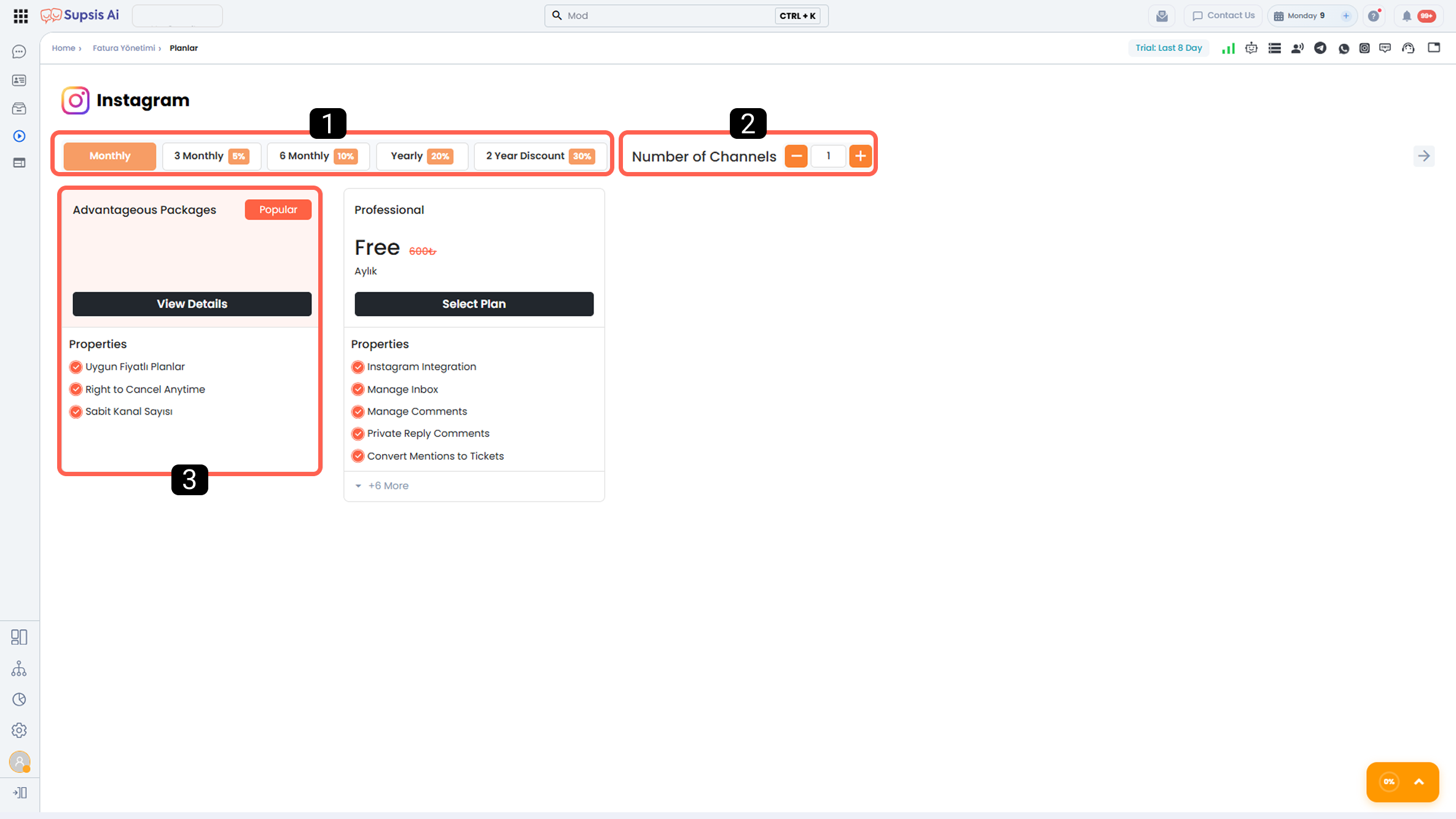
- Package Duration and Discount Rate
- Number of Channels
- Advantageous Packages
1-) Package Duration and Discount Rate
From this section, you can determine the usage duration of the selected package.
The discount rates applied based on package duration are as follows:
 3 Months: 5% discount
 6 Months: 10% discount
 12 Months (Annual): 20% discount
 24 Months: 30% discount
Discount Calculation Logic:
The discount amount is calculated by multiplying the channel fees determined according to the selected number of channels by the monthly equivalent of the selected package duration, and then applying the relevant discount rate to the total amount.
2-) Channel Selection
From this section, you can determine the number of channels (Instagram accounts) you want to connect to the Supsis panel via Instagram integration.
The selected number of channels directly affects the total package price. Each channel is defined as a separate Instagram channel in the Supsis panel, and once the integration process is completed, interactions from these accounts can be managed through Supsis.
3-) Advantageous Packages
The Advantageous Packages section offers more affordable package options tailored to users planning to purchase multiple channels.
This section includes packages for 5, 10, 25, 50, and 100 channels. Each package has specially defined advantageous discount rates based on the number of channels.
In advantageous packages, duration-based discounts continue to be applied. Thus, you can benefit from both multi-channel purchase advantages and long-term usage discounts simultaneously.
11-) Messenger
Messenger integration allows messages, comments, and all interactions received through your Facebook business accounts to be centrally managed via the Supsis panel.
With this integration:
- All Facebook interactions are collected in a single panel,
- All customer interactions can be easily managed by team members using Supsis’s operational support tools,
- The probability of converting Facebook customers into sales can be increased through Supsis’s advanced marketing and process automation,
- Customer communication becomes faster, more organized, and more scalable.
Despite increasing interaction volume, Facebook integration helps maintain operational efficiency while optimizing internal task distribution and follow-up processes.
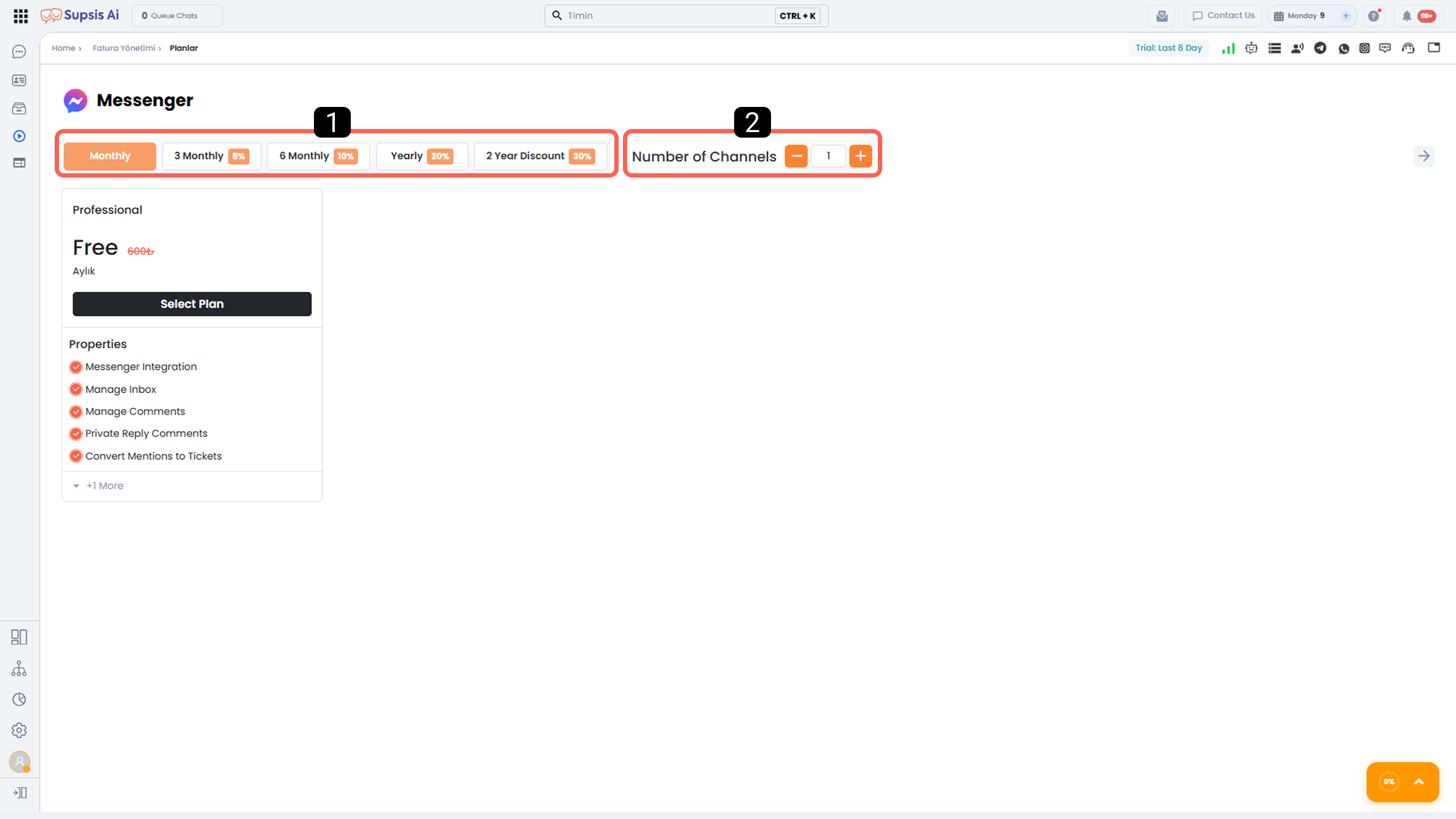
- Package Duration and Discount Rate
- Number of Channels
1-) Package Duration and Discount Rate
From this section, you can determine the usage duration of the selected package.
The discount rates applied based on package duration are as follows:
 3 Months: 5% discount
 6 Months: 10% discount
 12 Months (Annual): 20% discount
 24 Months: 30% discount
Discount Calculation Logic:
The discount amount is calculated by multiplying the channel fees determined according to the selected number of channels by the monthly equivalent of the selected package duration, and then applying the relevant discount rate to the total amount.
2-) Channel Selection
From this section, you can determine the number of channels (Facebook accounts) you want to connect to the Supsis panel via Messenger integration.
The selected number of channels directly affects the total package price. Each channel is defined as a separate Messenger channel in the Supsis panel, and once the integration process is completed, interactions from these accounts can be managed through Supsis.
12-) LinkedIn
LinkedIn integration allows messages received through your LinkedIn accounts to be centrally managed via the Supsis panel.
With this integration:
- All inbox interactions of the integrated LinkedIn accounts are collected in the Supsis panel.
- All messaging processes occurring on the connected accounts can be easily managed by team members using Supsis’s operational support tools.
- LinkedIn communication becomes faster, more organized, and more scalable.
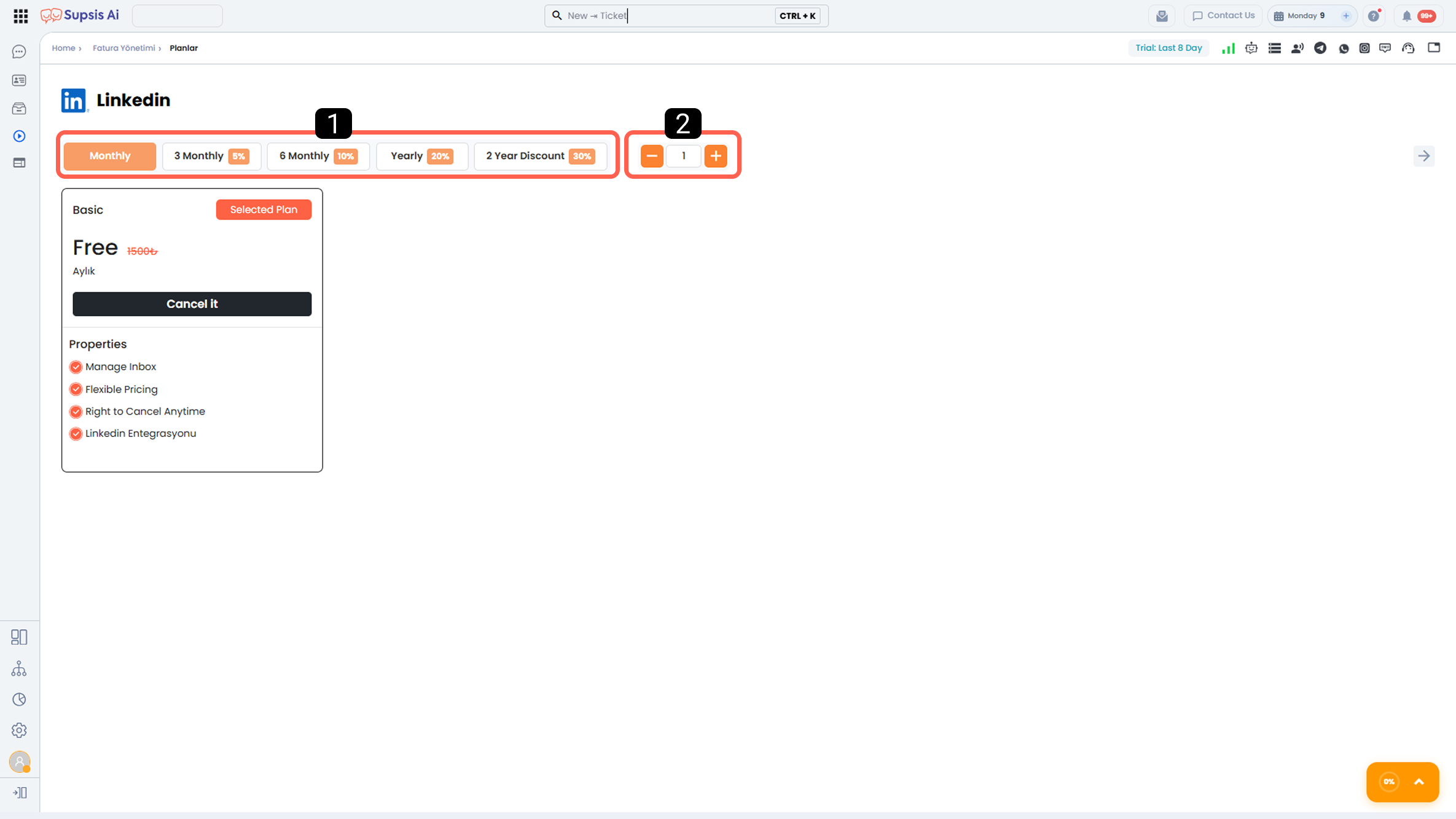
- Package Duration and Discount Rate
- Number of Channels
1-) Package Duration and Discount Rate
From this section, you can determine the usage duration of the selected package.
The discount rates applied based on package duration are as follows:
 3 Months: 5% discount
 6 Months: 10% discount
 12 Months (Annual): 20% discount
 24 Months: 30% discount
Discount Calculation Logic:
The discount amount is calculated by multiplying the channel fees determined according to the selected number of channels by the monthly equivalent of the selected package duration, and then applying the relevant discount rate to the total amount.
2-) Channel Selection
From this section, you can determine the number of channels (LinkedIn accounts) you want to connect to the Supsis panel via LinkedIn integration.
The selected number of channels directly affects the total package price. Each channel is defined as a separate LinkedIn channel in the Supsis panel, and once the integration is completed, the connected accounts can be centrally managed through the panel.
13-) Telegram
Telegram integration allows messages received through your Telegram accounts to be centrally managed via the Supsis panel.
With this integration:
- All message interactions from the integrated Telegram accounts are collected in the Supsis panel.
- All messaging processes occurring on the connected accounts can be easily managed by team members using Supsis’s operational support tools.
- The probability of converting Telegram customers into sales can be increased through Supsis’s advanced marketing and process automation.
- Customer communication becomes faster, more organized, and more scalable.
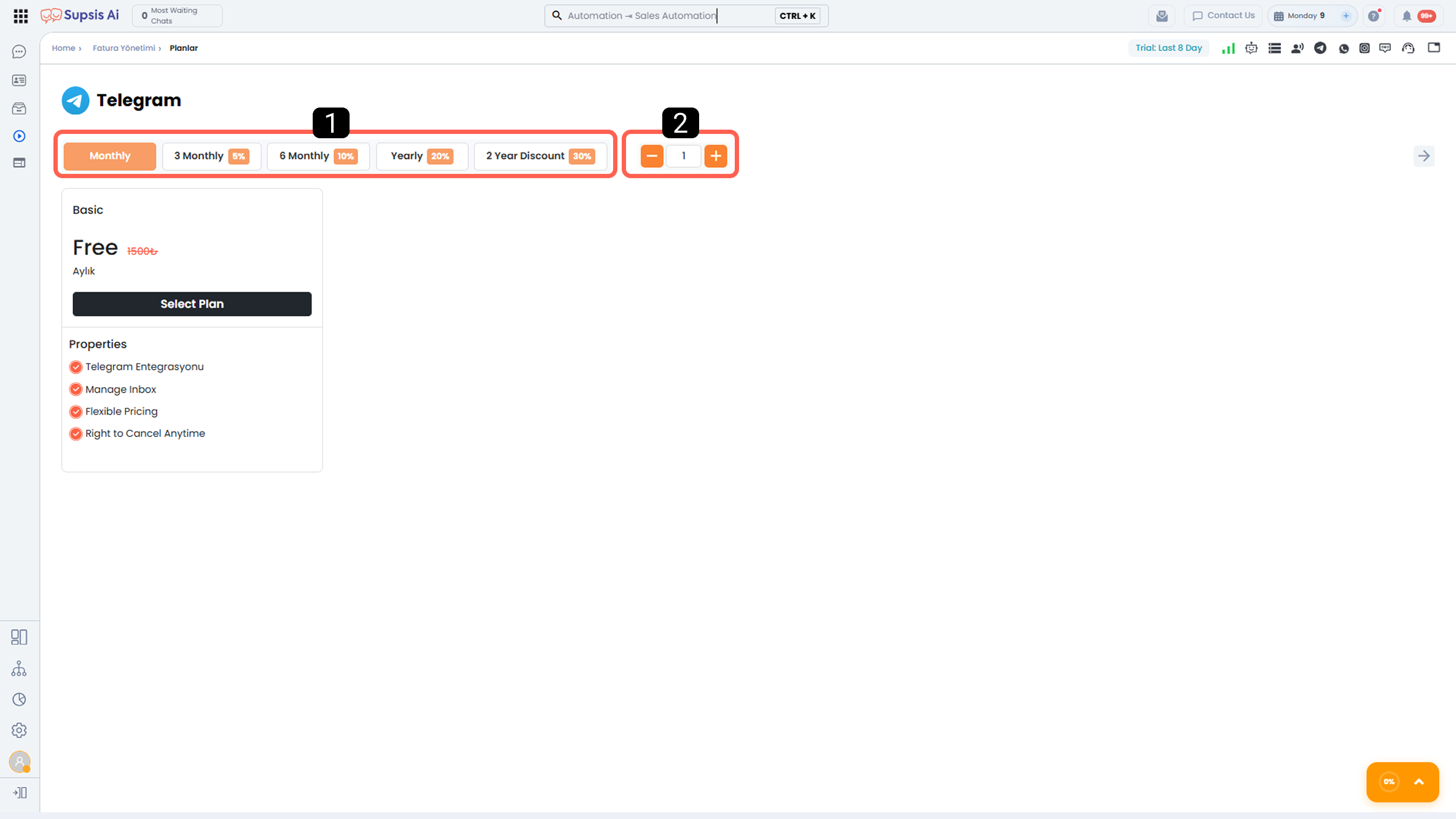
1-) Package Duration and Discount Rate
From this section, you can determine the usage duration of the selected package.
The discount rates applied based on package duration are as follows:
 3 Months: 5% discount
 6 Months: 10% discount
 12 Months (Annual): 20% discount
 24 Months: 30% discount
Discount Calculation Logic:
The discount amount is calculated by multiplying the channel fees determined according to the selected number of channels by the monthly equivalent of the selected package duration, and then applying the relevant discount rate to the total amount.
2-) Channel Selection
From this section, you can determine the number of channels (Telegram accounts) you want to connect to the Supsis panel via Telegram integration.
The selected number of channels directly affects the total package price. Each channel is defined as a separate Telegram channel in the Supsis panel, and once the integration is completed, the connected accounts can be centrally managed through the panel.
14-) Meta Lead
Supsis’s Meta Lead Ads integration digitizes customer data collected through Lead (form) advertisements on Meta platforms end-to-end and enables centralized management of sales and marketing processes.
With this integration, data from Meta Lead forms is instantly transferred to the Supsis panel; contact profiles are automatically created, and when a new Meta Lead record is generated, automation can be triggered immediately.
With this integration:
- All customer information received through Meta Lead (form) advertisements is centrally collected in the Supsis panel.
- Created contact profiles can be assigned to team members, tagged, and tracked based on processes.
- All operations to be performed on customer data obtained from Meta Lead forms can be easily managed by team members using Supsis’s operational support tools.
- With Supsis’s advanced marketing and process automation capabilities, automatic actions can be triggered for customers coming from Meta Lead; by ensuring fast follow-up, customer satisfaction and sales conversion rates can be increased.
- Despite increasing lead volume, customer communication becomes faster, more organized, and more scalable.
Meta Lead integration contributes to more efficient ad performance management by enabling sales and marketing teams to reach potential customers without delay.
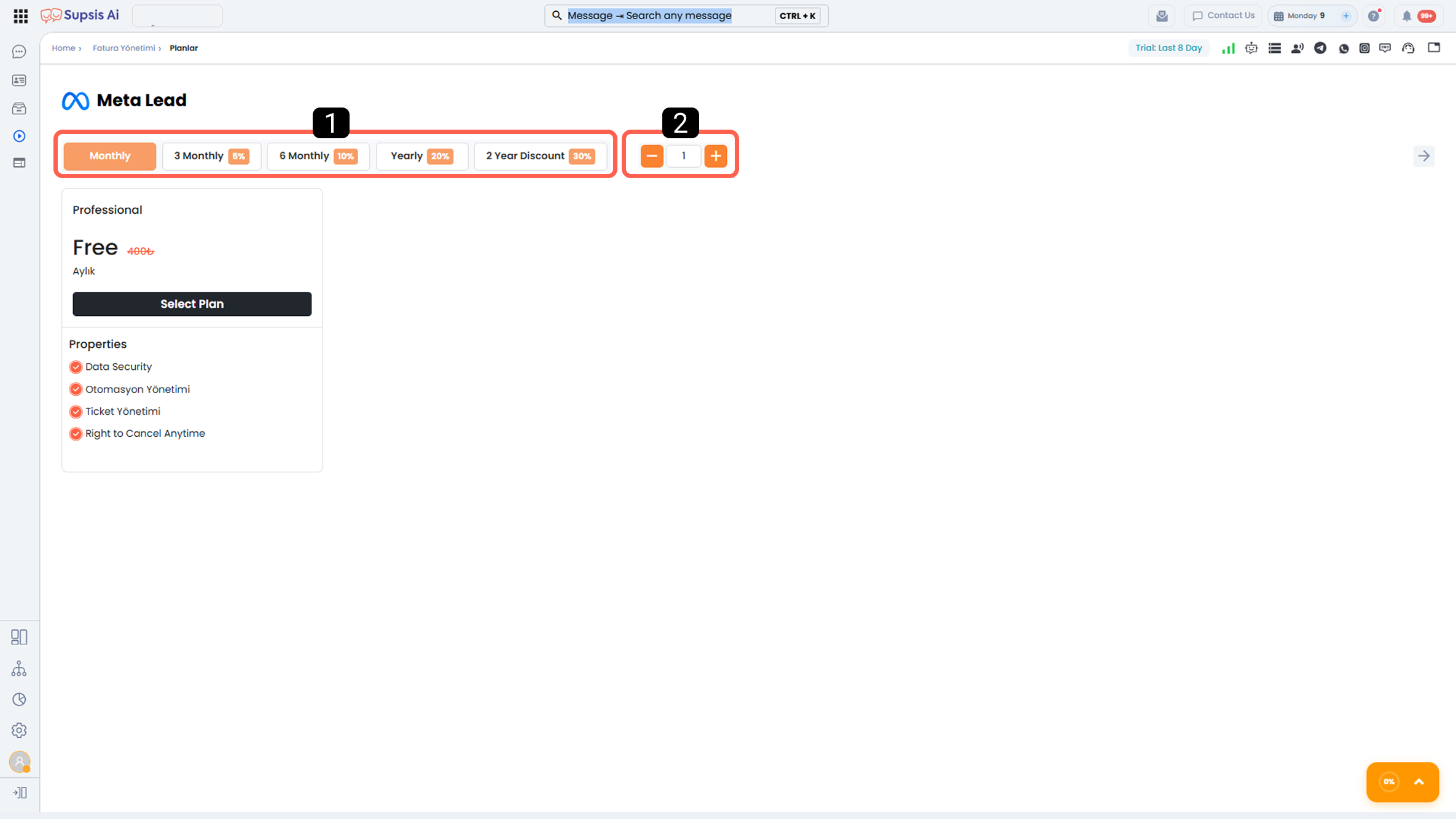
1-) Package Duration and Discount Rate
From this section, you can determine the usage duration of the selected package.
The discount rates applied based on package duration are as follows:
 3 Months: 5% discount
 6 Months: 10% discount
 12 Months (Annual): 20% discount
 24 Months: 30% discount
Discount Calculation Logic:
The discount amount is calculated by multiplying the channel fees determined according to the selected number of channels by the monthly equivalent of the selected package duration, and then applying the relevant discount rate to the total amount.
2-) Channel Selection
From this section, you can determine the number of channels (Meta Ads accounts) you want to connect to the Supsis panel via Meta Lead integration.
The selected number of channels directly affects the total package price. Each channel is defined as a separate Meta Lead channel in the Supsis panel, and once the integration is completed, the connected accounts can be centrally managed through the panel.
15-) Trendyol
Supsis’s Trendyol integration enables centralized and recorded management of customer questions and messages received for your Trendyol store and products.
Incoming questions are collected in the Supsis panel and can be effectively managed via chatbot, artificial intelligence, or team members.
With this integration:
- Customer questions and messages received for your Trendyol store and products are centrally displayed in the Supsis panel.
- Customer questions can be automatically answered via chatbot and artificial intelligence or directed to agents through the ticket (support request) menu.
- Agents can track, respond to, and record all requests coming from Trendyol via the Supsis panel.
- Thanks to automatic and manual response options, response times are shortened, and customer satisfaction and operational efficiency are increased.
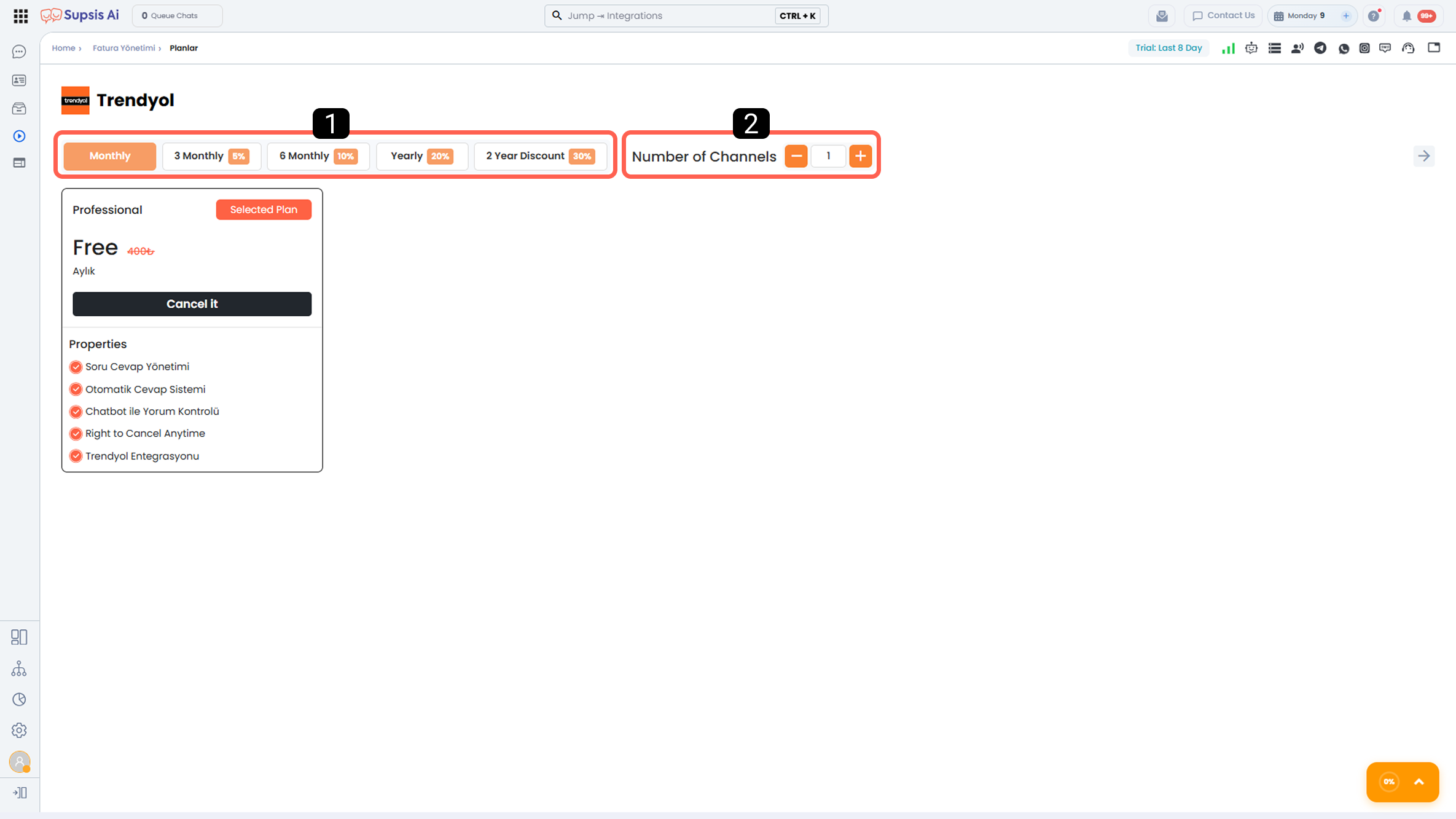
1-) Package Duration and Discount Rate
From this section, you can determine the usage duration of the selected package.
The discount rates applied based on package duration are as follows:
 3 Months: 5% discount
 6 Months: 10% discount
 12 Months (Annual): 20% discount
 24 Months: 30% discount
Discount Calculation Logic:
The discount amount is calculated by multiplying the channel fees determined according to the selected number of channels by the monthly equivalent of the selected package duration, and then applying the relevant discount rate to the total amount.
2-) Channel Selection
From this section, you can determine the number of channels (Trendyol stores) you want to connect to the Supsis panel via Trendyol integration.
The selected number of channels directly affects the total package price. Each channel is defined as a separate Trendyol account in the Supsis panel and managed accordingly.
16-) Web Phone
Supsis Web Phone integration brings browser-based phone calls into the Supsis panel without requiring an additional device or application.
Incoming and outgoing calls can be centrally managed through a single screen by team members and AI-powered voice agents.
With this integration:
- All incoming and outgoing phone calls are managed and recorded through the Supsis panel.
- Based on the calls made, new contact cards can be automatically created or call records can be automatically matched with existing contact cards.
- Notes and tags can be added to contact cards after calls, and communication can continue with customers via other communication channels.
- Sales and support teams can access call history and customer information from a single point, enabling faster and more consistent communication.
- Call processes can be scaled and automated with AI-powered voice agents.
Web Phone integration digitizes phone-based sales and support processes, increases operational efficiency, and ensures end-to-end traceability of customer communication.
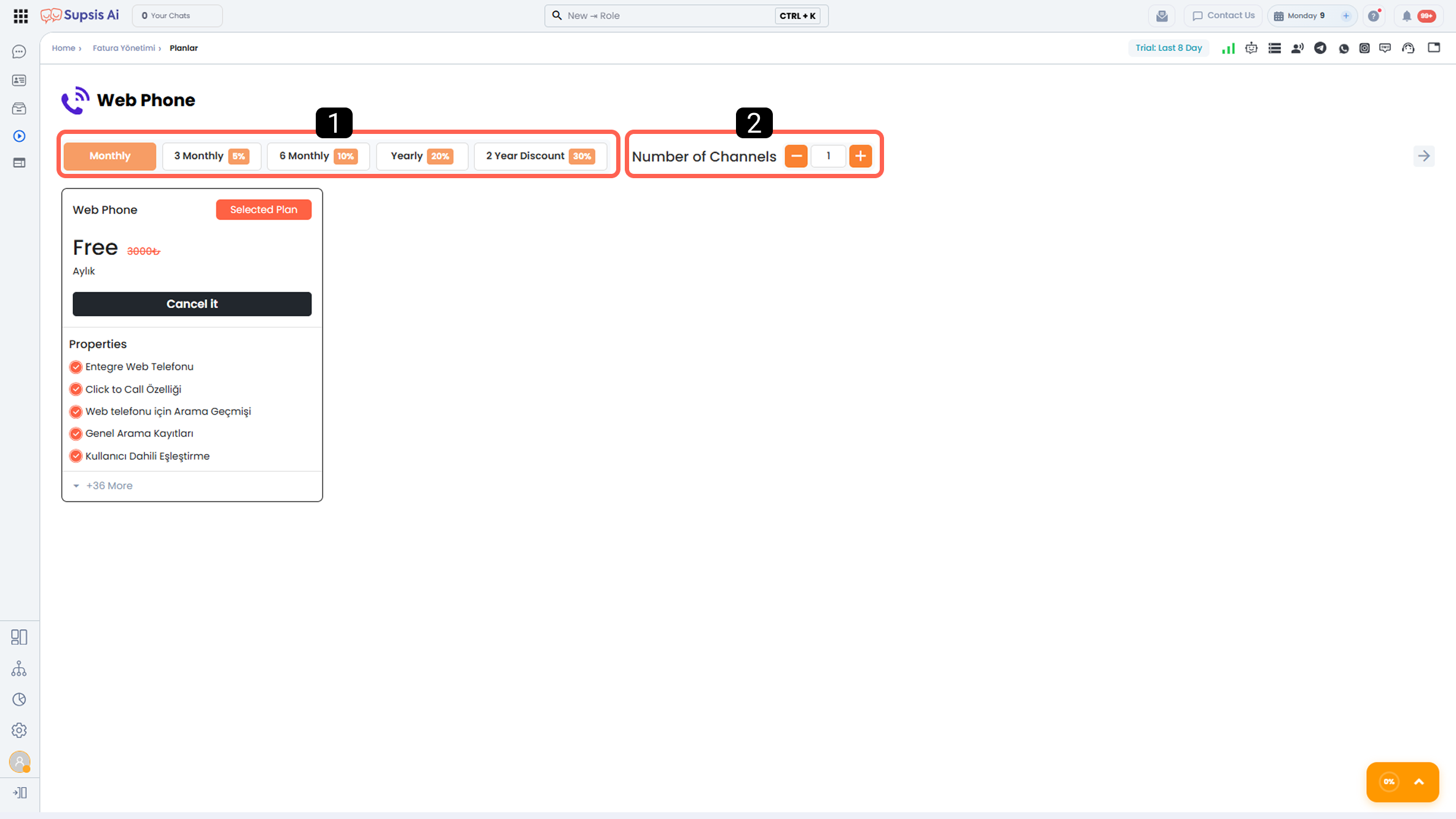
1-) Package Duration and Discount Rate
From this section, you can determine the usage duration of the selected package.
The discount rates applied based on package duration are as follows:
 3 Months: 5% discount
 6 Months: 10% discount
 12 Months (Annual): 20% discount
 24 Months: 30% discount
Discount Calculation Logic:
The discount amount is calculated by multiplying the channel fees determined according to the selected number of channels by the monthly equivalent of the selected package duration, and then applying the relevant discount rate to the total amount.
2-) Channel Selection
From this section, you can determine the number of channels (phone numbers) you want to connect to the Supsis panel via Web Phone integration.
The selected number of channels directly affects the total package price. Each channel is defined as a separate Web Phone channel in the Supsis panel and managed accordingly.
17-) Artificial Intelligence
The Artificial Intelligence module activates Supsis’s AI integration, which makes customer communication processes intelligent and automated.
With this module, operational efficiency increases while customer communication becomes faster, more consistent, and more scalable.
With the Artificial Intelligence module:
- Customer messages coming from communication channels are automatically analyzed by AI. Suggested responses are provided to agents based on message content, reducing response times.
- AI can automatically manage customer communication end-to-end according to the uploaded data and defined functions.
- Sales, support, and customer experience processes become more consistent and sustainable.
- While team workload decreases, customer satisfaction and conversion rates can increase.
The Artificial Intelligence module works integrated with all communication channels within Supsis and provides a powerful automation infrastructure for your processes.
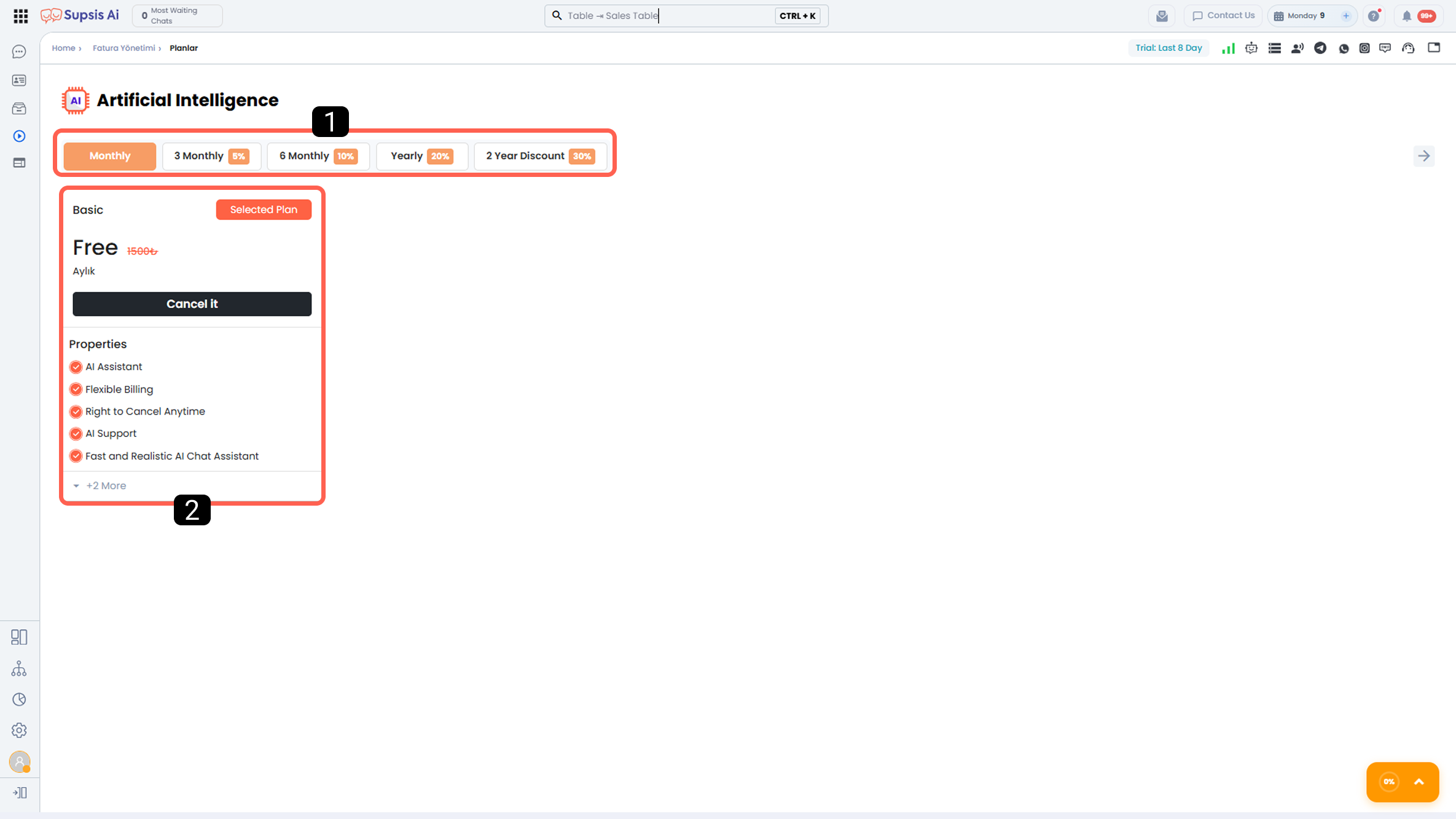
1-) Package Duration and Discount Rate
From this section, you can determine the usage duration of the selected package.
The discount rates applied based on package duration are as follows:
 3 Months: 5% discount
 6 Months: 10% discount
 12 Months (Annual): 20% discount
 24 Months: 30% discount
Discount Calculation Logic:
The discount amount is calculated by multiplying the package fee by the selected package duration (monthly equivalent), and then applying the relevant discount rate to the total amount.
2-) Package
From this section, you can select the appropriate package and view detailed information about its features.
The features offered by each package are listed in detail under the Features section within the package.
18-) Voice Agent
Supsis Voice Agent enables you to create intelligent customer support assistants that automatically handle incoming and outgoing calls connected to your Web Phone channels through AI-powered voice assistants.
The Voice Agent manages calls according to the knowledge base, custom instructions, and functions defined for the assistant.
Thus, customer requests can be automatically handled in line with predefined scenarios or directed to relevant teams when necessary.
With Voice Agent:
- Incoming and outgoing calls are automatically managed by artificial intelligence.
- Conversations are answered accurately and consistently according to the data available in the assistant’s knowledge base.
- An automatic call summary is generated for each call.
- The insights defined by the assistant are automatically processed into the relevant fields of the customer card.
- Call records are matched with customer profiles, enriching data quality.
Voice Agent provides speed, consistency, and operational efficiency in call center, sales, and customer support processes, reducing team workload and elevating the customer experience.
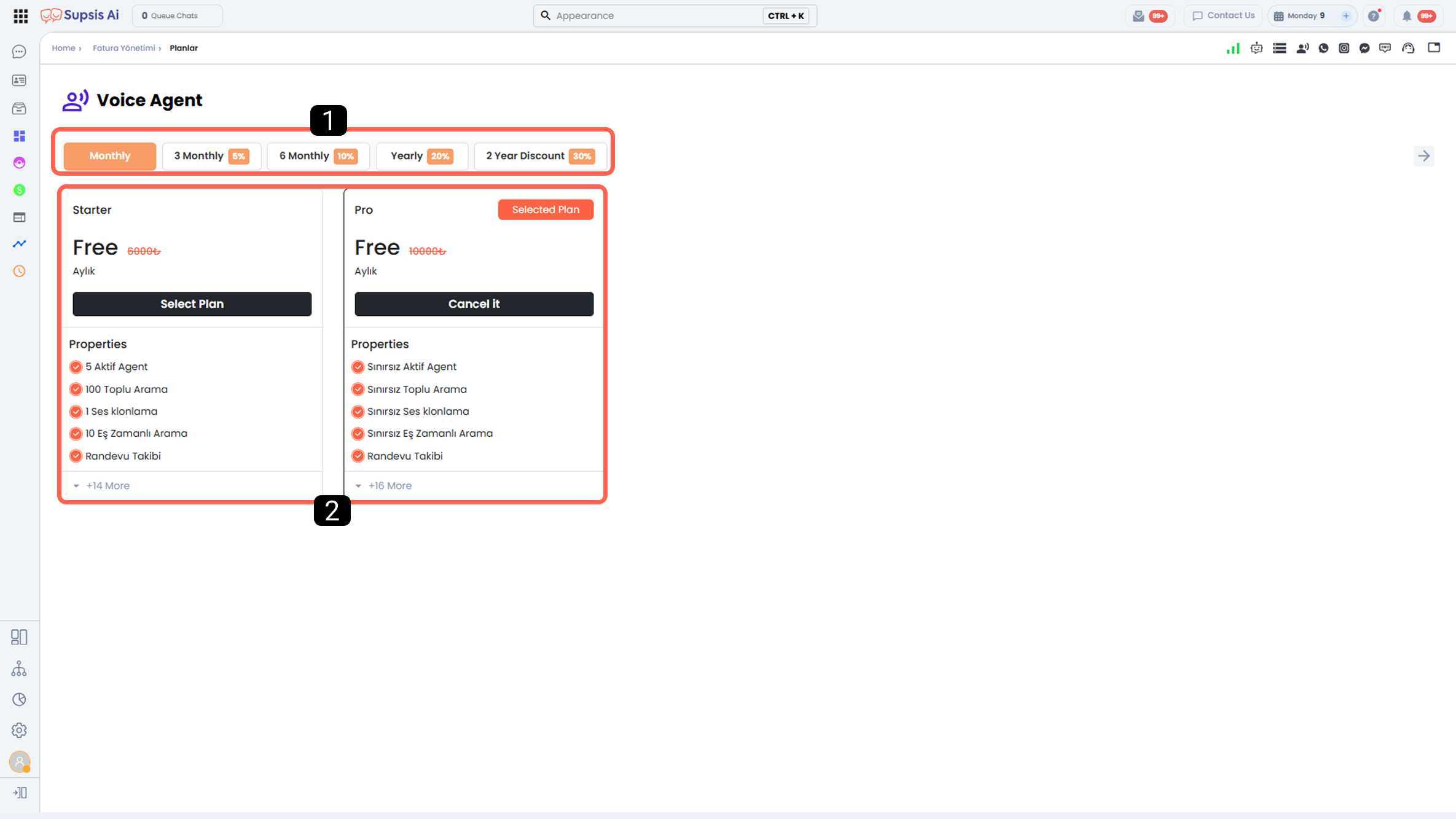
1-) Package Duration and Discount Rate
From this section, you can determine the usage duration of the selected package.
The discount rates applied based on package duration are as follows:
 3 Months: 5% discount
 6 Months: 10% discount
 12 Months (Annual): 20% discount
 24 Months: 30% discount
Discount Calculation Logic:
The discount amount is calculated by multiplying the package fee by the selected package duration (monthly equivalent), and then applying the relevant discount rate to the total amount.
2-) Package
From this section, you can select the package that best suits your needs.
The features offered by each package are listed in detail under the Features section within the package.
Higher-tier packages include all features of the lower-tier packages and additionally offer their own exclusive features.
19-) Supsis Live Traffic
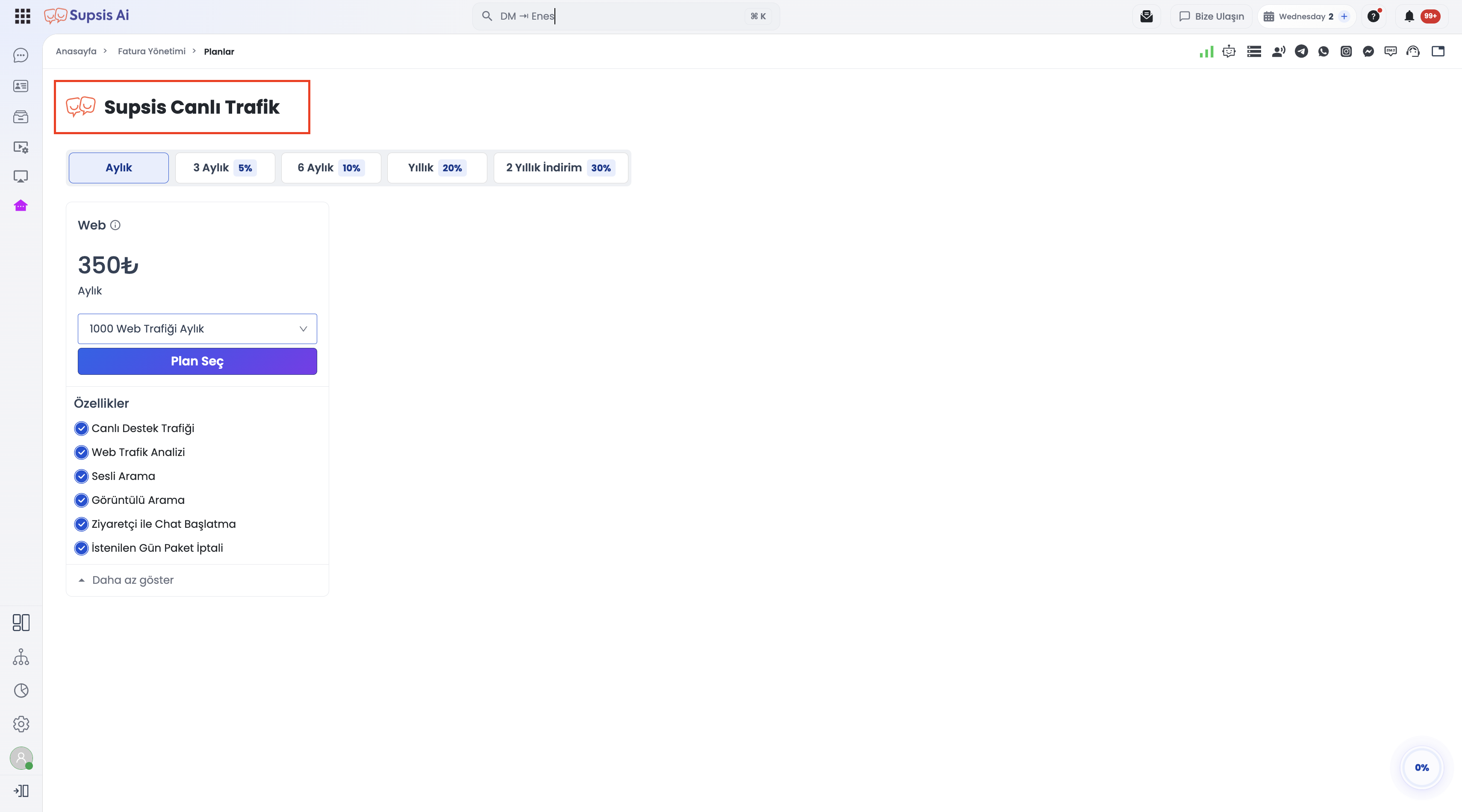
The Supsis Live Traffic (formerly Web / Web Traffic) package allows you to track website visitors in real-time, observe which pages they are browsing even if they do not click the chat bubble, and trigger timely automated messages to convert visitors into active leads.
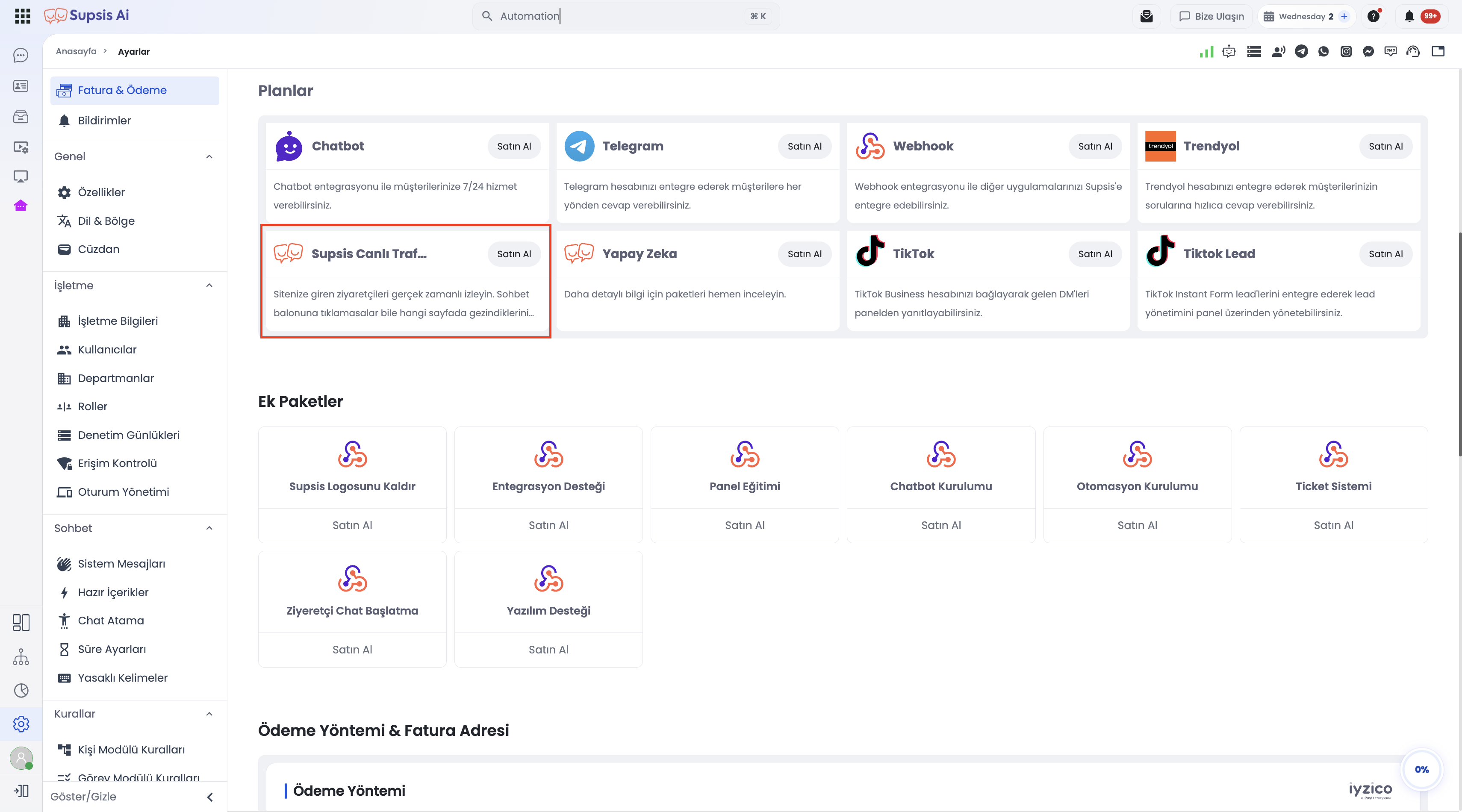
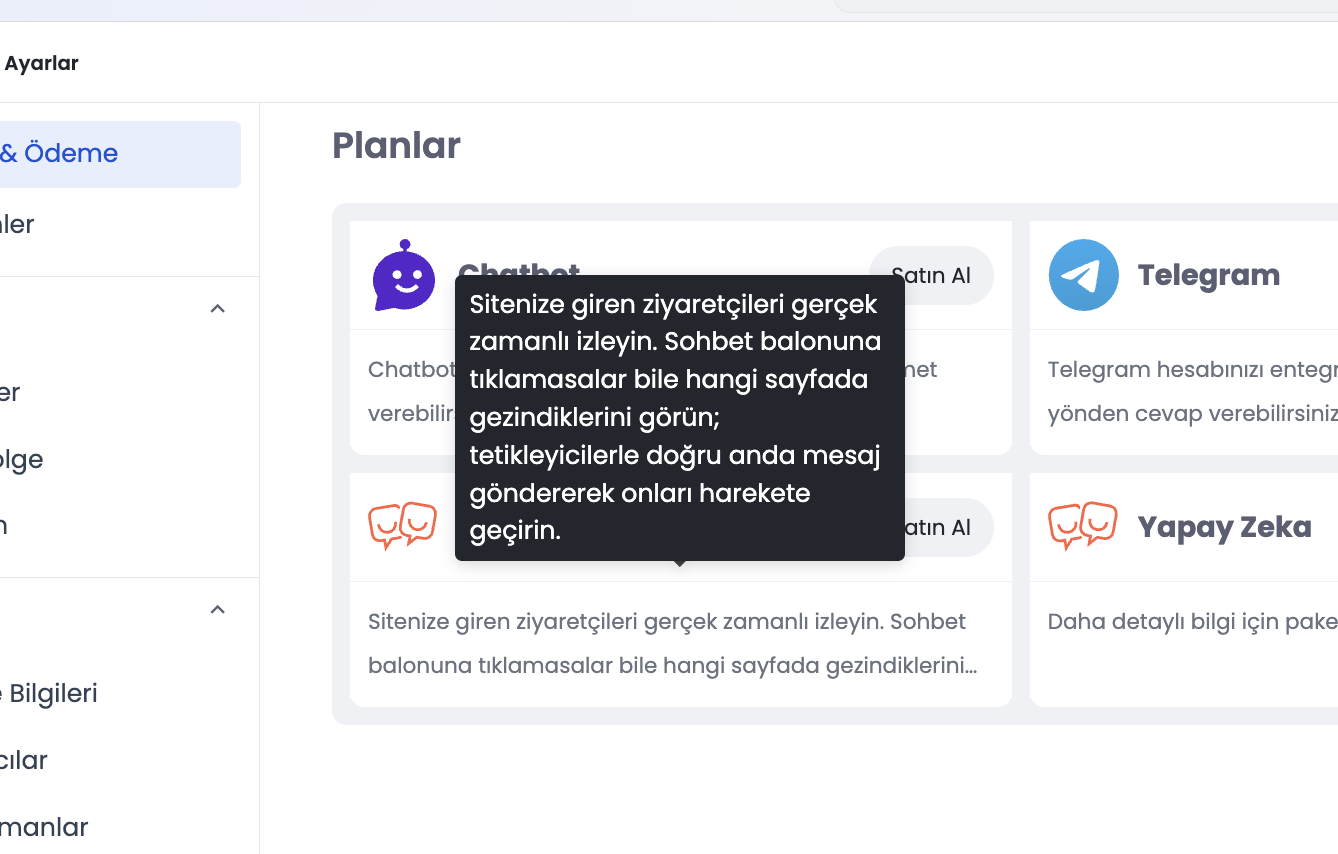
1-) Plan Card & Info Icon (Tooltip Description)
Plan cards on the billing and package selection screen feature a clean, uncluttered layout:
- Compact Presentation: The package description is not placed as long body text on the card.
- Info Icon & Hover Tooltip: A subtle information (i) icon is positioned adjacent to the plan title. Hovering over the icon displays a tooltip explaining the core purpose of the package:
> "Track website visitors in real time. Observe which pages they visit even if they don't interact with the chat bubble. Engage visitors at the right moment using smart triggers."
2-) Live Traffic Capabilities & Scope
Visitor tracking operates across two distinct operational tiers:
| Visitor State | Traffic Add-on Required? | Description |
|---|---|---|
| Chat Initiators | ❌ No | Visitors who have previously communicated via the Supsis chat bubble or submitted a form are tracked without requiring an extra traffic plan. |
| All Website Visitors (Proactive Tracking) | ✅ Yes (Supsis Live Traffic) | All active visitors browsing your domain are monitored in real time, visited URLs are tracked, and proactive chats can be initiated via triggers. |
3-) Package Duration and Discount Rate
Choose the subscription term for your live traffic package:
- 3 Months: 5% discount
- 6 Months: 10% discount
- 12 Months (Annual): 20% discount
- 24 Months: 30% discount
Quota & Discount Logic
- Discount Calculation: Applied to the total cost calculated by multiplying the monthly traffic price by the duration in months.
- Monthly Allocations: Monthly purchases reset visitor quotas at the start of each billing cycle (unused quota does not roll over).
- Multi-Month Purchases: The entire cumulative quota (Monthly Quota × Months) remains active and usable throughout the subscription term.
4-) Live Traffic Volume and Tiered Pricing
Define your desired monthly live traffic quota. As traffic volume increases, the unit cost per visitor decreases:
- 1,000 Visitors: ~0.35 TL unit cost
- 5,000 Visitors: ~0.11 TL unit cost
How to Inspect & Select Supsis Live Traffic
- Locate the Package:
- 1.a- Navigate to Settings → Billing & Payment (or Plans) in Customer Panel.
- 1.b- Find the Supsis Live Traffic card under active plans or package choices.
- Review Package Scope (Tooltip):
- 2.a- Hover over the info (
i) icon next to the card title. - 2.b- Read the tooltip outlining real-time tracking and automated trigger capabilities.
- 2.a- Hover over the info (
- Select Volume & Term:
- 3.a- Choose the visitor volume fitting your website traffic.
- 3.b- Select subscription term to apply term discounts and complete checkout.
Important Control Notes
Naming & Backend Classification
The underlying package type remains web in system architecture, but displays as Supsis Canlı Trafik in Turkish and Supsis Live Traffic in English.
Info Icon Scope
The info icon and hover tooltip behavior are specifically tailored for web (Live Traffic) plan cards.
20-) Subscription Downgrade Management
On the Supsis AI platform, you can flexibly downgrade your channel or agent (seat) quotas according to your needs and manage your subscription expenses in real time. Just as package upgrades are provided when adding a new channel or agent, subscription downgrades are also supported when deleting or disabling channels or agents.
1-) Deleting and Disabling Channels
When any connected communication channel (WhatsApp, Instagram, Telegram, etc.) is deleted or set to inactive status, the system automatically prompts the user:
- Subscription Downgrade Prompt: When a channel is deleted or disabled, the system displays a "Would you like to downgrade your subscription?" prompt, allowing you to reduce your remaining channel quota.
- Package Price Update: Upon confirming the downgrade option, your connected channel quota and associated monthly/annual package pricing are automatically updated.
2-) Deleting and Disabling Agents (Users)
When a defined agent (user) is deleted or set to inactive in the panel, you can lower your subscription tier or reduce your agent quota for the freed license slot.
3-) Flexible Cost and Quota Control
Thanks to the subscription downgrade architecture, when your operations scale down or you decide to close specific channels, you don't have to pay for unused quotas. You can dynamically adjust your quotas and plan costs downwards at any time.
21-) Commercial Data Security and Plan Confidentiality
Subscription plans, promotional coupon codes, discount rates, usage quotas, and payment methods configured for your organization are classified as highly confidential commercial data. Supsis employs a strict data isolation architecture to safeguard all commercial and financial configurations.
| Data Scope | Content & Purpose | Access & Security Layer |
|---|---|---|
| Commercial & Billing Information | Assigned promotional and coupon codes (e.g., AppSumo), payment methods, base pricing, custom discounts, commission rates, and monthly usage limits. | Authenticated Panel Access Only: Accessible strictly to authorized account administrators logged into the Supsis Customer Panel. Never exposed through public search or unauthenticated endpoints. |
| Site Discovery Data (Public Search) | Core metadata required for the live chat bubble (webchat) to identify your site (Site ID, alias, customer logo URL, custom CSS stylesheet). | General Visitor Access: Openly accessible to ensure proper widget rendering on your website. However, a strict allowlist (Public Allowlist) is enforced to completely filter out all commercial, coupon, and billing data from public responses. |
Security Principles and Protection Mechanisms
- Coupon & Promotion Confidentiality: Special discount or partner (e.g., AppSumo) coupon codes assigned to your tenant cannot be discovered or queried over the internet by external crawlers or unauthorized parties.
- Strict Attribute Allowlist: During public discovery requests queried by site address, only benign UI metadata (
PUBLIC_SITE_FIELDS) is delivered to the client. Pricing, commission rates, and quota attributes are automatically purged prior to payload compilation. - Financial Data Isolation: Negotiated contract pricing, customized discount tiers, and billing transaction details are completely safeguarded against competitor or unauthorized discovery.
Commercial Data Isolation Guarantee
Supsis maintains a definitive separation between public-facing webchat discovery services and your tenant's commercial and billing settings. Your organization's promotional coupon codes, agreed contract pricing, payment methods, and usage limits remain strictly protected and isolated from public internet traffic.