
TikTok Integration is a next-generation communication channel that connects direct messages (DMs) sent to your TikTok Business account to the Supsis AI omnichannel communication platform via the official TikTok Business Messaging API.
With this integration, businesses no longer need to constantly monitor the inbox on the TikTok mobile app. All customer messages are centralized into the same Supsis inbox alongside other channels (WhatsApp, Instagram, Telegram, Live Chat, Email, etc.). Inbound queries can be distributed across support agent pools, answered 24/7 automatically via Chatbot workflows, and included in comprehensive customer service analytics. When the channel is first connected, the past 90 days of conversation history are automatically synchronized to Supsis.
ℹ️ Scope Note: This guide specifically covers the Direct Messaging (DM) capabilities, connection prerequisites, the 48-hour messaging window, and message limits of the TikTok Integration. TikTok Comments/Mention management, TikTok Automatic Messages (Welcome Message / Suggested Questions / Chat Prompts), and TikTok Leads features are covered in separate documentation sections.
1- Overview of TikTok Integration
1.a – What is TikTok Integration and What is Its Purpose?
TikTok is a rapidly growing engagement and sales channel, especially for modern retail and service brands catering to dynamic audiences. However, the standard TikTok mobile app inbox is not designed as an enterprise customer service desk: * Chats cannot be routed or assigned to multiple agents, * There is no support for canned responses, Chatbot automations, or CRM contact profile sync, * First response times, resolution rates, and representative workloads cannot be tracked or audited, * Operations remain tied to a single mobile device or individual staff member.
Supsis TikTok Integration connects directly via official TikTok Business Messaging API and OAuth authorization, transforming TikTok DM communication into an enterprise-grade, multi-agent, and auditable omnichannel customer service pipeline.
1.b – Two-Way Operational Architecture and Message Flow
The integration operates seamlessly across two primary data streams:
| Direction | Workflow Logic | Explanation / Example |
|---|---|---|
| TikTok → Supsis | Customer DMs and interactions sent on TikTok are delivered in real time to Supsis via webhooks. | When a customer sends text, photos, AI emojis, or video links on TikTok, it immediately enters the Supsis chat list. A new contact profile is automatically created. |
| Supsis → TikTok | Agent or Chatbot responses dispatched from Supsis are transmitted via the TikTok Business Messaging API. | When an agent sends a text, image, or interactive button card from the panel, it appears instantaneously in the customer's TikTok DM thread. |
Incoming DM Delivery
Sends a direct message (text, image, or video link) to the business profile from the TikTok app.
TikTok verifies the payload and triggers an immediate webhook event to the Supsis endpoint.
Contact Profile Resolution
If reaching out for the first time, a new visitor card is created with their TikTok handle and ID.
If previously known, the incoming conversation history and tags are merged seamlessly.
Routing & Resolution
The conversation enters the live inbox and is assigned according to department distribution rules.
Supsis Chatbot triggers configured story blocks or AI voice/text agents to reply instantly.
Outbound Response Delivery
Agent replies with text, canned messages, attachments, or rich interactive QA Button/Link cards.
Dispatched via the TikTok Business API and delivered instantaneously to the user's TikTok DM thread.
1.c – Glossary of Terms
The core concepts appearing across integration interfaces, TikTok developer infrastructure, and documentation are outlined below:
| Term | System / Menu | Description |
|---|---|---|
| Business Account (TikTok Business Account) | TikTok Mobile App | TikTok's specialized account type for companies and brands. Mandatory prerequisite for Messaging API functionality. |
| Business Messaging API | TikTok Developer Platform | TikTok's official programming interface allowing third-party platforms to manage business messaging. |
| DM (Direct Message) | TikTok Internal Chat | Direct private messages exchanged between TikTok users and an official business profile. |
| OAuth / Authorization | TikTok Consent Window | Secure protocol allowing account authorization without sharing login credentials via TikTok's official prompt. |
| Scope (Permission Scope) | TikTok OAuth Screen | The specific permissions requested by Supsis (message.list.read, message.list.send, message.list.manage). |
| Access Token / Refresh Token | Technical Authentication | TikTok API session credentials. Access tokens last 1 day; refresh tokens last ~1 year; Supsis auto-renews them in the background. |
| Webhook | Real-Time Notifications | Event-driven notifications from TikTok servers triggering Supsis immediately when a new message or interaction occurs. |
| Messaging Window | TikTok Policy Rule | The 48-hour period starting from the customer's last inbound message during which the business is allowed to reply. |
| QA Button Card (Button Card) | Interactive Message Type | Rich message format consisting of a question prompt and up to 3 clickable option buttons. |
| QA Link Card (Link Card) | Interactive Message Type | Rich message format containing external URL web links instead of reply buttons (up to 3 links). |
| Share Post | Media Message | When a user shares a TikTok video or post link into the DM conversation. Rendered as a link in Supsis. |
| Sender Action ("Typing" / Read Receipt) | Status Indicator | Automated API indicator sending typing status and read receipt signals to the end user. |
| Echo Message | Two-Way Sync | When a team member replies directly from the native TikTok mobile app, the message is captured by Supsis and deducted from the window counter. |
| Advanced Access | TikTok Developer Tier | High-level developer permission tier enabling enterprise features. Supsis infrastructure is pre-approved for Advanced Access. |
| VBA (Verified Business Account) | Verified Account Badge | Accounts with an official blue/gray verification checkmark on TikTok. Required for select automated message features. |
| Forward Mode (Routing Mode) | Supsis Channel Setting | Configuration determining whether inbound messages go directly to live agents, to a Chatbot, or to a hybrid queue. |
2- 3 Critical Prerequisites Before Connecting
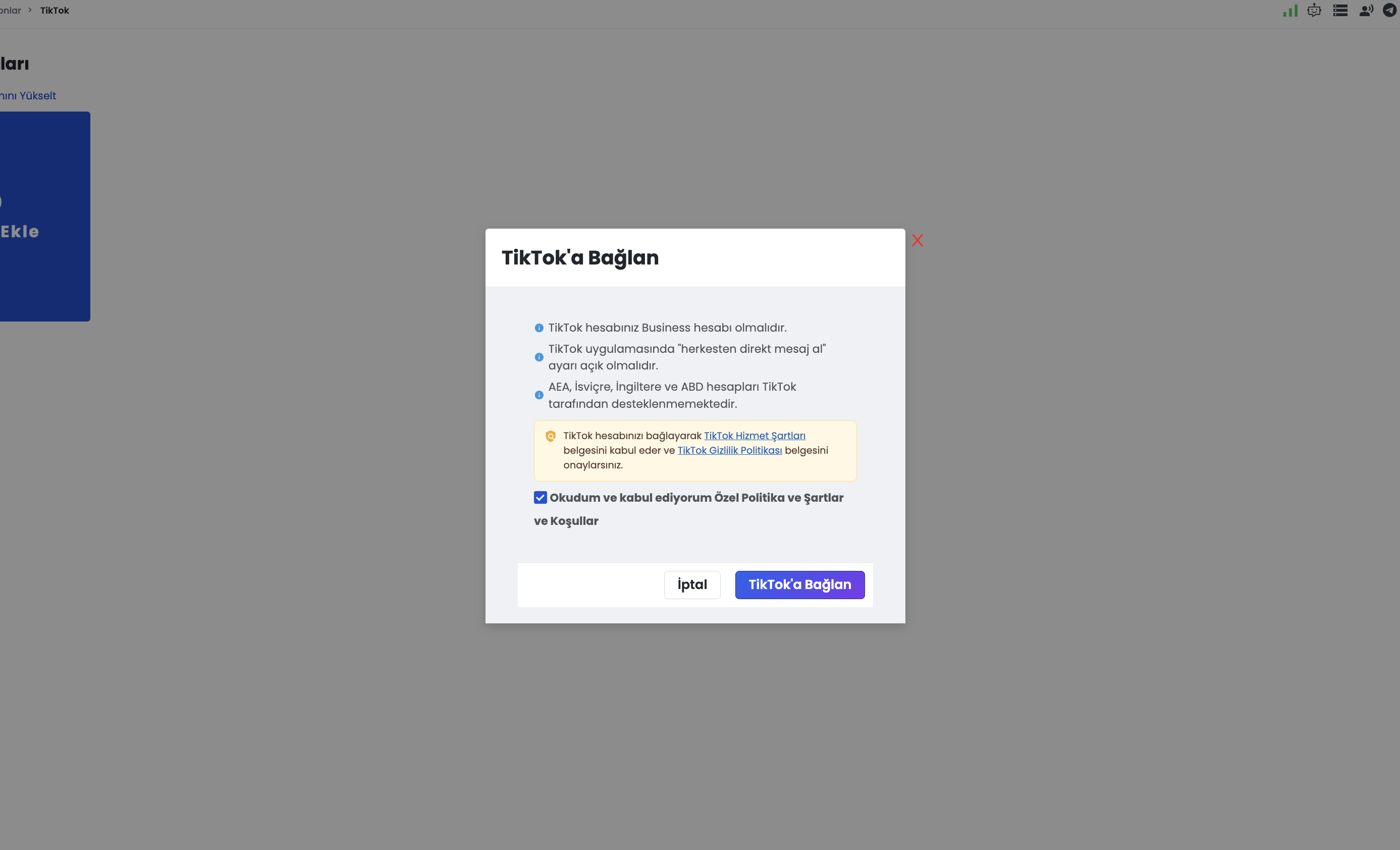
Before linking your TikTok channel to Supsis, verify that the following 3 technical and operational prerequisites are satisfied on TikTok. If any of these are missing, the integration cannot receive messages or complete setup.
2.a – Requirement 1: TikTok Account Must Be a "Business Account"
The TikTok Business Messaging API operates solely on Business Accounts. Personal and Creator accounts are strictly unsupported by TikTok's messaging API.
- How to Check and Switch to a Business Account:
- Open the TikTok mobile app and go to your Profile.
- Tap the Menu (☰) icon in the top right corner.
- Navigate to Settings and privacy → Account → Switch to Business Account.
- Select your business category and complete the setup.
⚠️ Important: If the account remains a personal account, API access will be rejected even if permissions are granted during OAuth.
2.b – Requirement 2: "Receive Direct Messages from Everyone" Must Be Enabled
The most common reason for "Connected successfully, but customer messages are not showing up in Supsis" is mobile privacy settings. According to TikTok privacy policies, if your DM inbox is restricted to followers or mutual friends, TikTok disables webhook event dispatching to third parties. For your business account to receive inbound messages from any user, you must complete four essential configurations inside the TikTok mobile app.
Step-by-Step Mobile Configuration
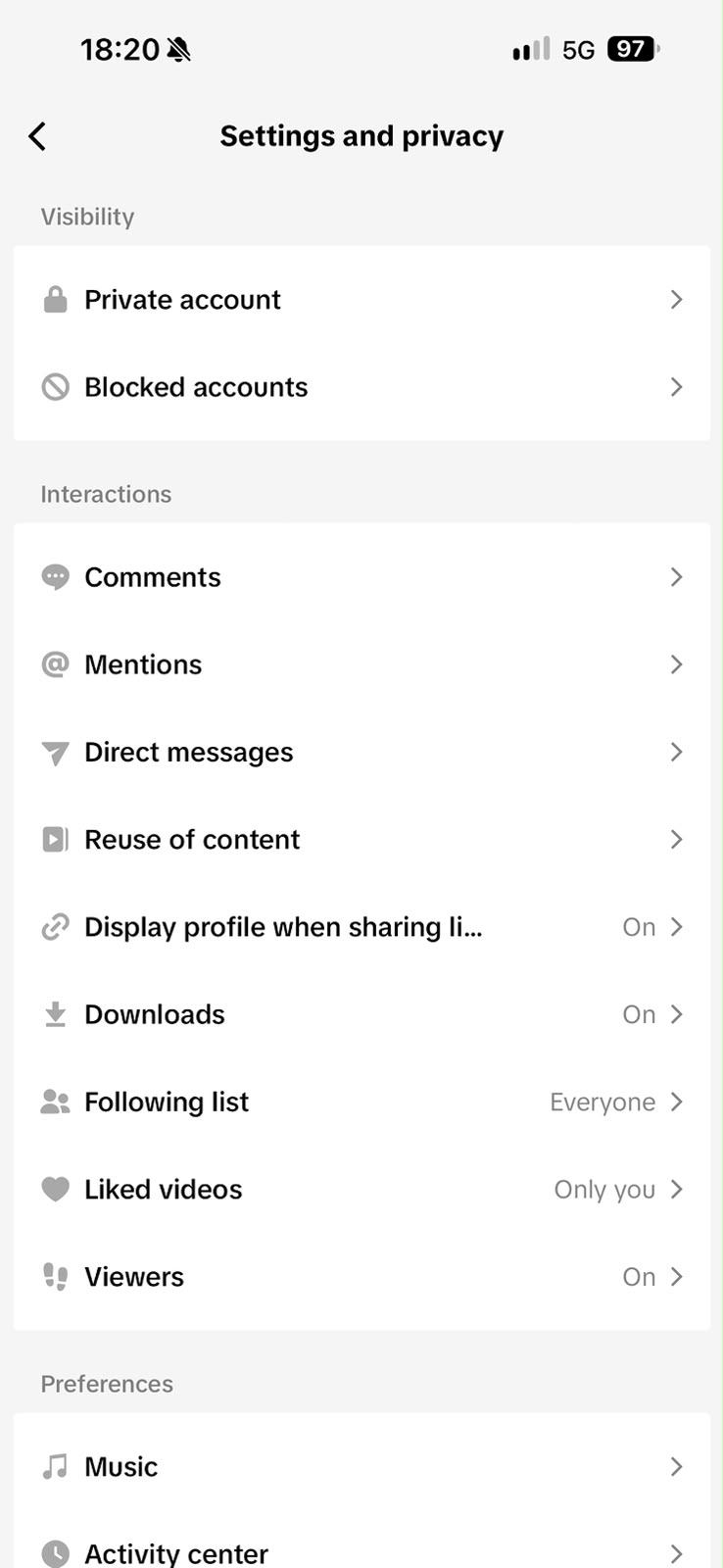
- Accessing Settings and Privacy (General Screen):
- Open the TikTok mobile app and go to your Profile.
- Tap the Menu (☰) icon in the top right corner and choose Settings and privacy.
- Under the Interactions section, locate and tap Direct messages.
- Configuring Direct Messages Settings:
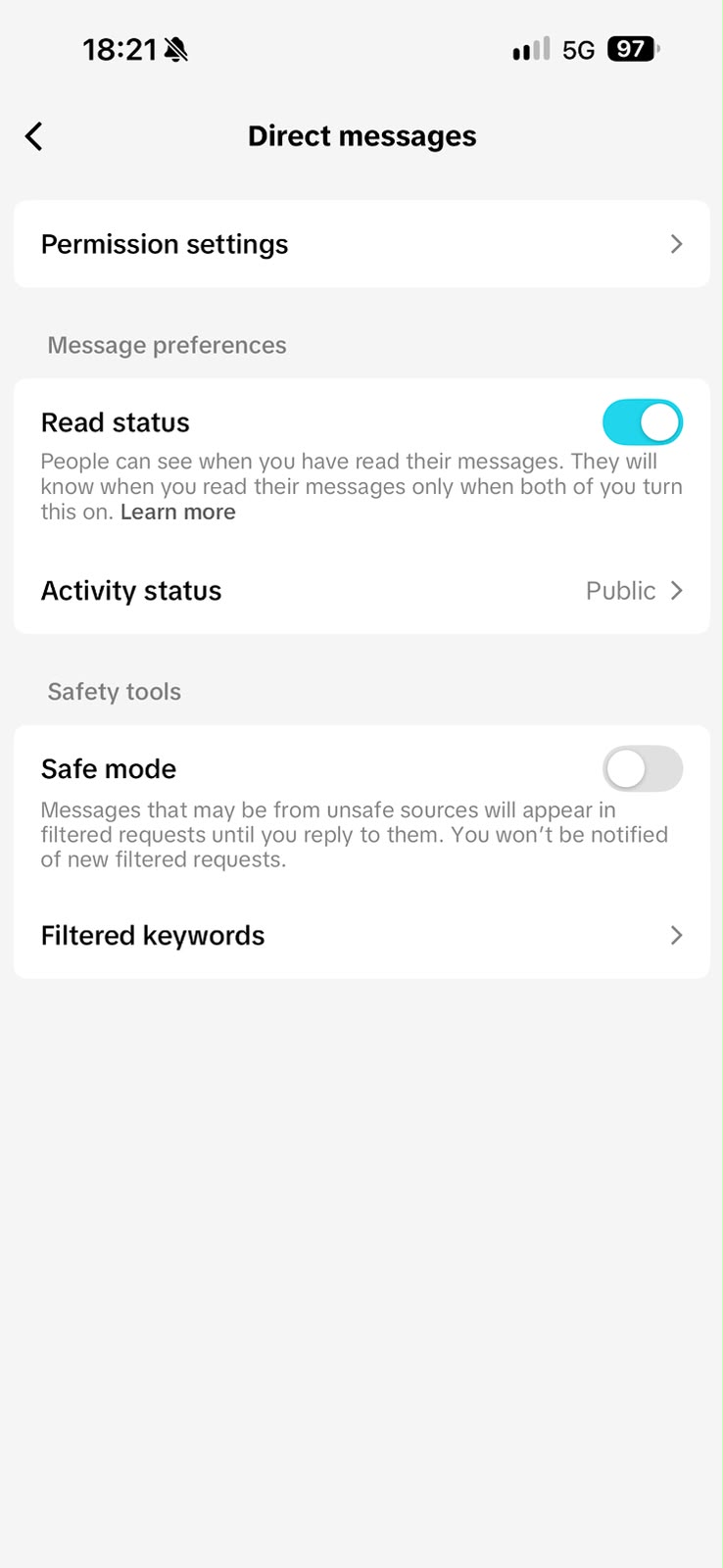
- The Direct messages settings screen is the control hub for messaging permissions, read status, and safety preferences.
- Verify Permission settings and Activity status from this screen.
- Ensure that Safe mode is turned Off. When safe mode is enabled, inbound inquiries from unrecognized users might get diverted to filtered message requests rather than reaching the main inbox immediately.
- Setting Activity Status to Public:
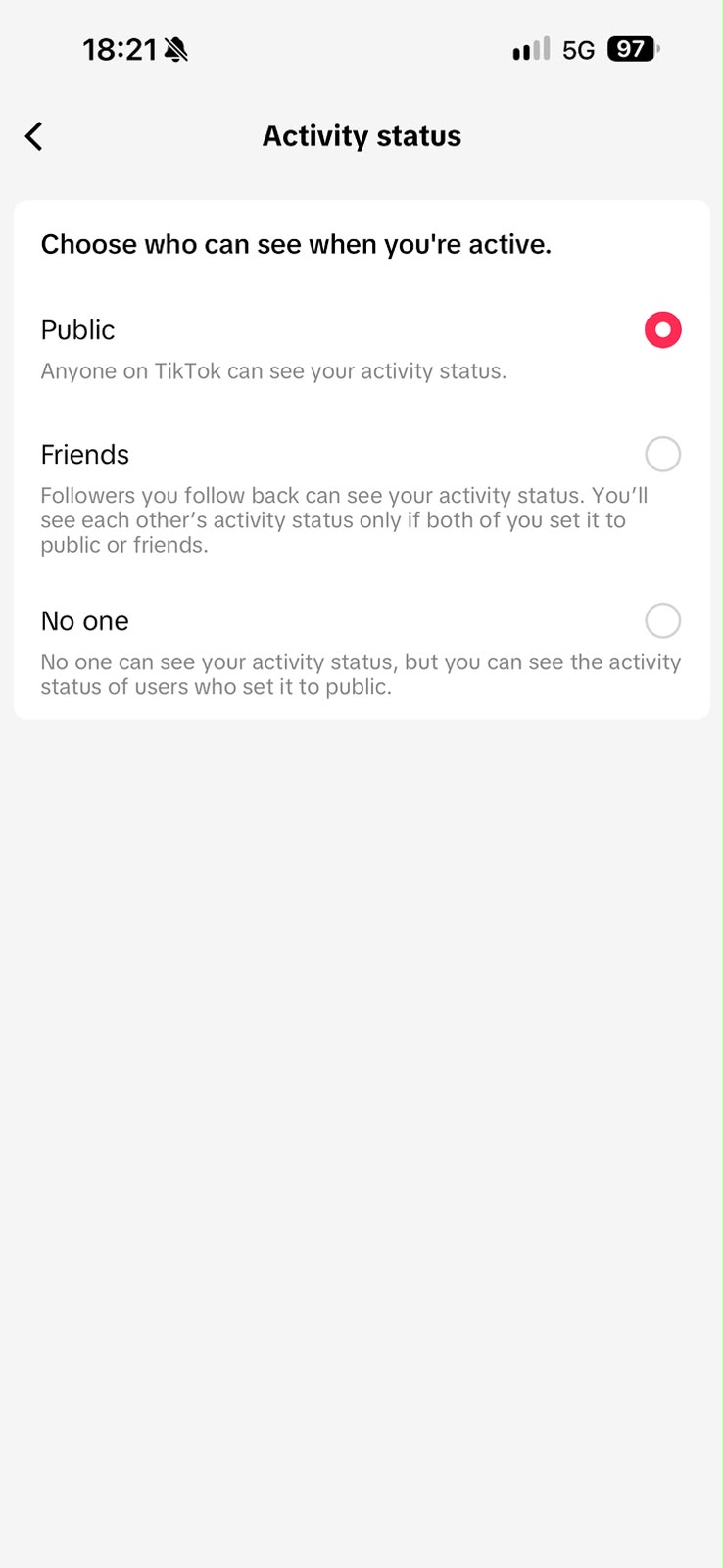
- In the Direct messages menu, tap Activity status.
- Select Public as your visibility option.
- This ensures your active business availability is broadcasted across the TikTok messaging network, allowing seamless session handoff to live agents and bots.
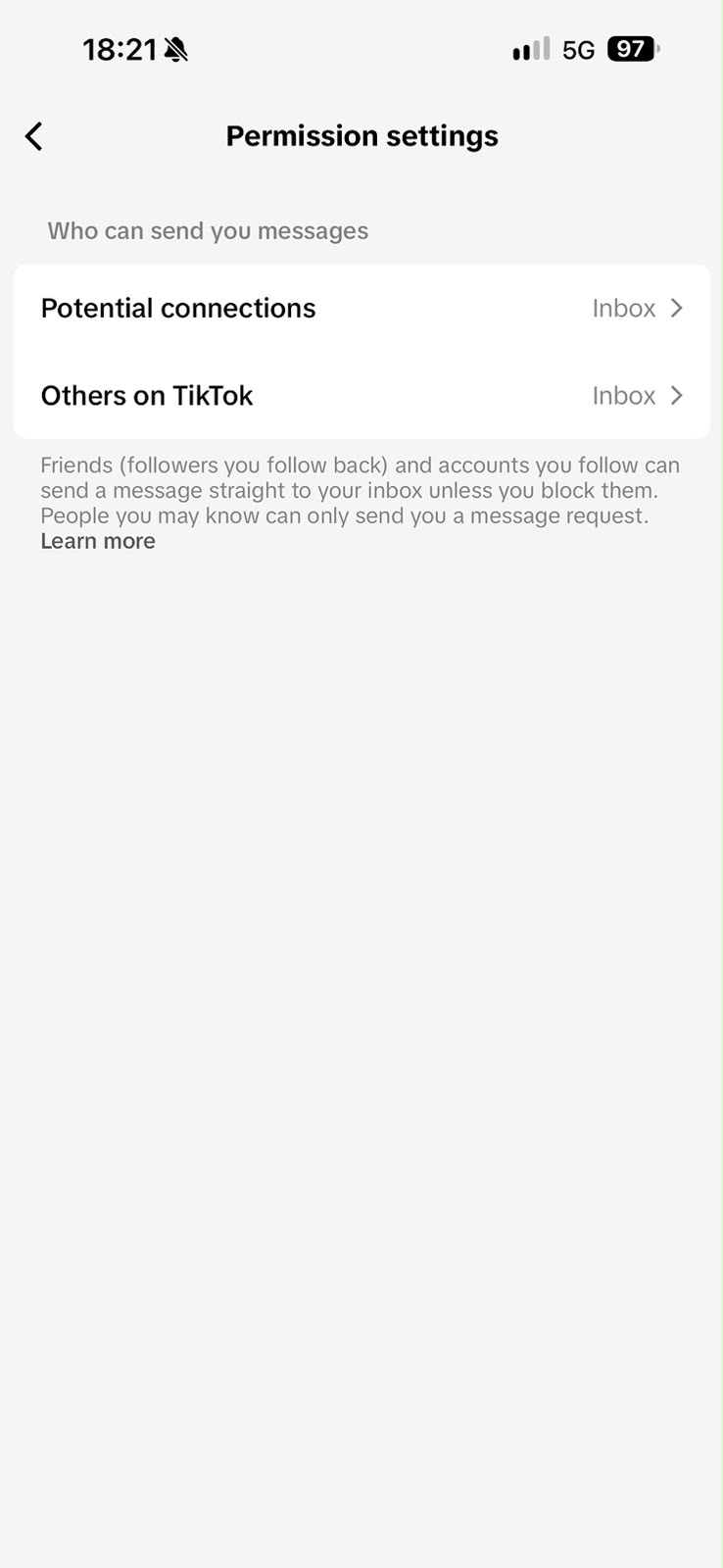
- Permission Settings - Receiving Inbound Messages from Everyone:
- In the Direct messages menu, tap Permission settings.
- Configure both options under Who can send you messages to Inbox:
- Potential connections → Inbox
- Others on TikTok → Inbox
- This guarantees that anyone on TikTok—even non-followers and first-time visitors—can initiate a conversation that routes straight into your inbox and triggers an immediate webhook to Supsis.
Summary of Required Mobile Settings
| Setting / Option | App Screen | Required Value | Purpose & Impact |
|---|---|---|---|
| Direct Messages | Settings and privacy | Menu Entry | Navigates from Interactions into messaging management. |
| Permission Settings | Direct messages → Permission settings | Inbox (for all) | Enables message reception from potential connections and others on TikTok; triggers webhook. |
| Activity Status | Direct messages → Activity status | Public | Validates active status and ensures continuous queue connectivity. |
| Safe Mode | Direct messages | Off | Prevents incoming customer messages from getting trapped in filtered requests. |
🛑 Critical Verification: If either "Others on TikTok" or "Potential connections" is restricted ("Friends" or "No one"), TikTok will drop inbound webhook dispatches. To eliminate silent message delivery issues, always ensure all four settings match the screenshots above.
2.c – Requirement 3: Regional Availability & Supported Countries
TikTok enables the Business Messaging API infrastructure in designated global markets based on regional data regulations and policy guidelines. For the integration to deliver and receive messages seamlessly, your TikTok Business account must be registered in one of the supported service countries.
Complete List of Supported Service Countries
| Region / Market | Supported Countries | Regional Scope / Notes |
|---|---|---|
| Turkey | Turkey | Fully supported primary domestic market. |
| Middle East | Saudi Arabia, UAE, Qatar, Kuwait, Bahrain, Oman, Jordan, Lebanon, Iraq | Core GCC and Levant markets. |
| Africa | Egypt, Morocco, Algeria, Tunisia, South Africa, Nigeria, Kenya, Ghana | North Africa and Sub-Saharan key commercial hubs. |
| Pakistan | Pakistan | Key South Asian market. |
Excluded & Unsupported Jurisdictions
TikTok Business Messaging API does not support accounts registered in the following countries and territories:
- EEA (European Economic Area) member states,
- Switzerland,
- United Kingdom (UK),
- United States of America (USA).
Even if an account registered in these excluded regions connects via OAuth, TikTok servers will automatically drop inbound and outbound direct message flows.
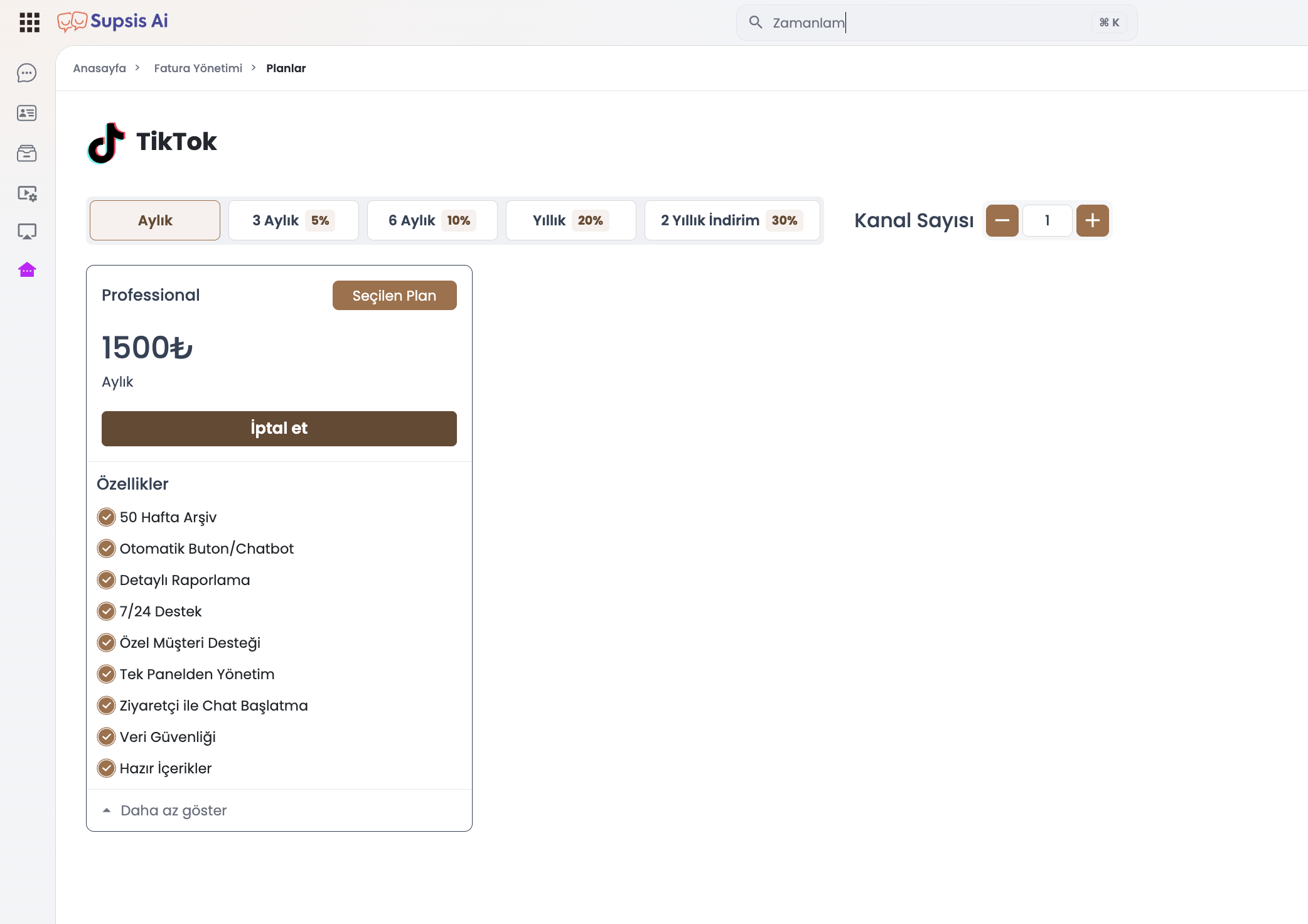
2.d – Package and Channel Quota Requirements
TikTok Integration operates under an active channel subscription:
* You can connect up to the channel limit defined under Billing → Plans → TikTok (x / y channels).
* If your quota is reached, upgrade your plan to connect additional accounts.
* Permissions such as "Manage Inbox", "Manage with Chatbot", and "Comment to Message" are activated according to your plan tier.
3- Steps to Connect a TikTok Channel to Supsis
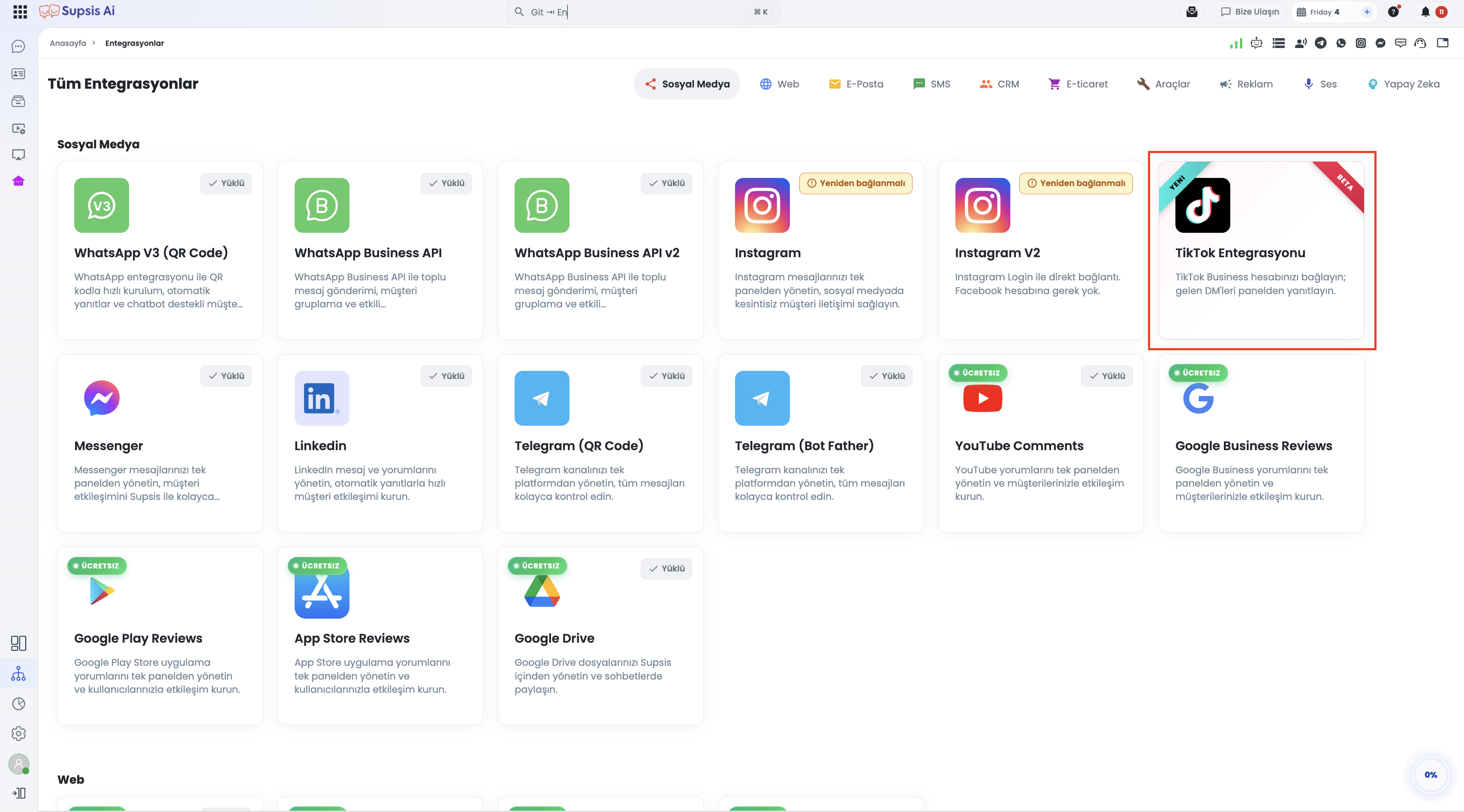
3.a – Accessing the Integrations Menu
- Log in to your Supsis Customer Panel.
- Click Integrations on the left main navigation menu.
- Under the Social Media category, locate and click the TikTok Integration card.
3.b – Adding a Channel and Agreeing to Terms
- On the TikTok Channels page, click the
+ Add Channelbutton in the top right. - A modal displays the 3 prerequisites and official policy notices.
- Review the TikTok Terms of Service, TikTok Privacy Policy, and Supsis user agreement, then check the confirmation box.
- Click the now-active Connect to TikTok button.
3.c – Granting Official TikTok OAuth Permissions
Log in on the secure TikTok OAuth pop-up window. TikTok displays the 3 scopes requested by Supsis:
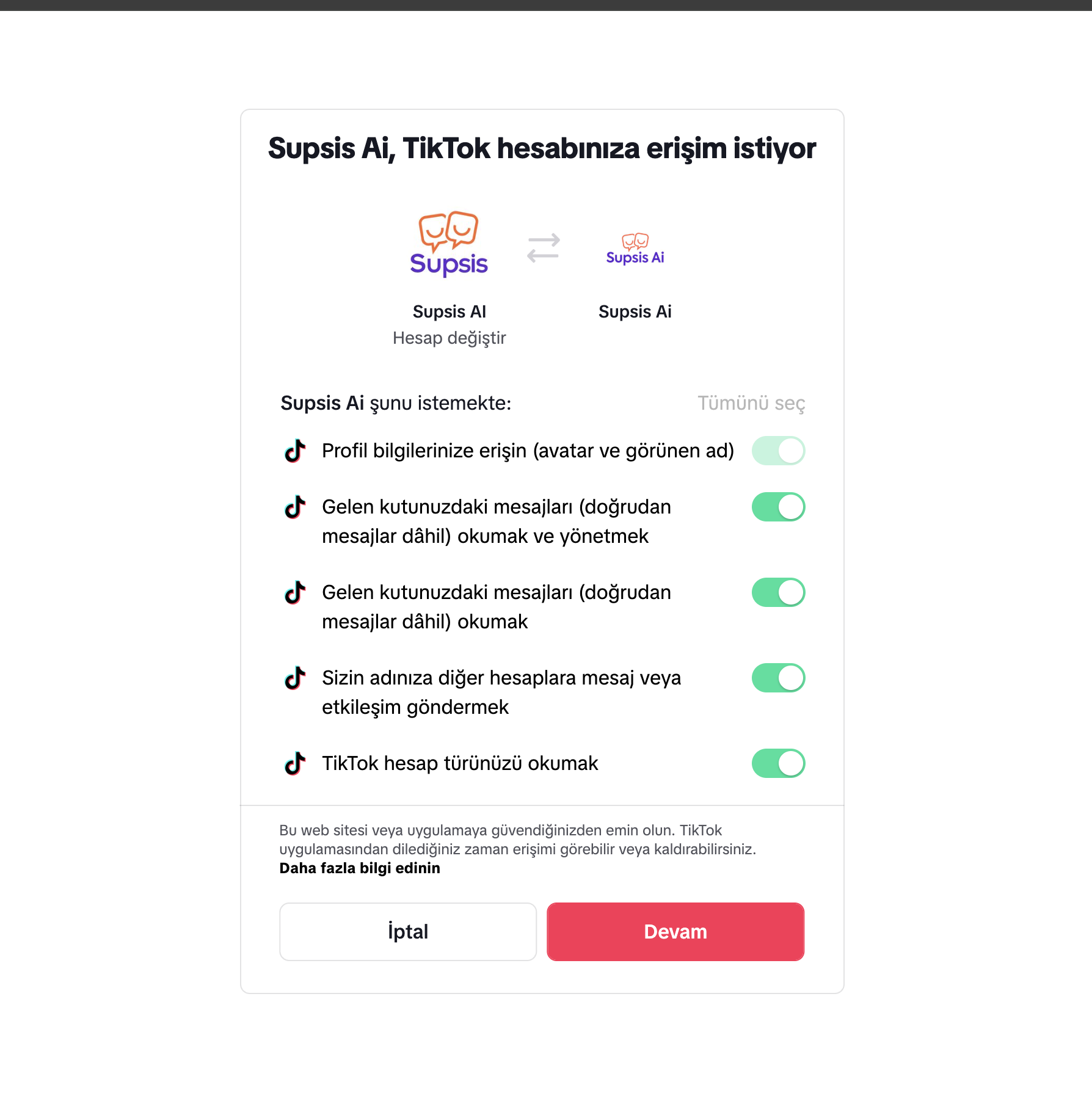
message.list.read— View conversations and inbound message history.message.list.send— Send responses to customers via Supsis.message.list.manage— Manage conversation states, read markers, and configuration.
Click Authorize. The pop-up closes automatically, returning you to the Supsis setup wizard.
3.d – Saving and Configuring the Channel
- The modal confirms the authenticated account username and avatar.
- Click Create Channel to finalize.
- The new channel appears in your list. Click it to customize settings:
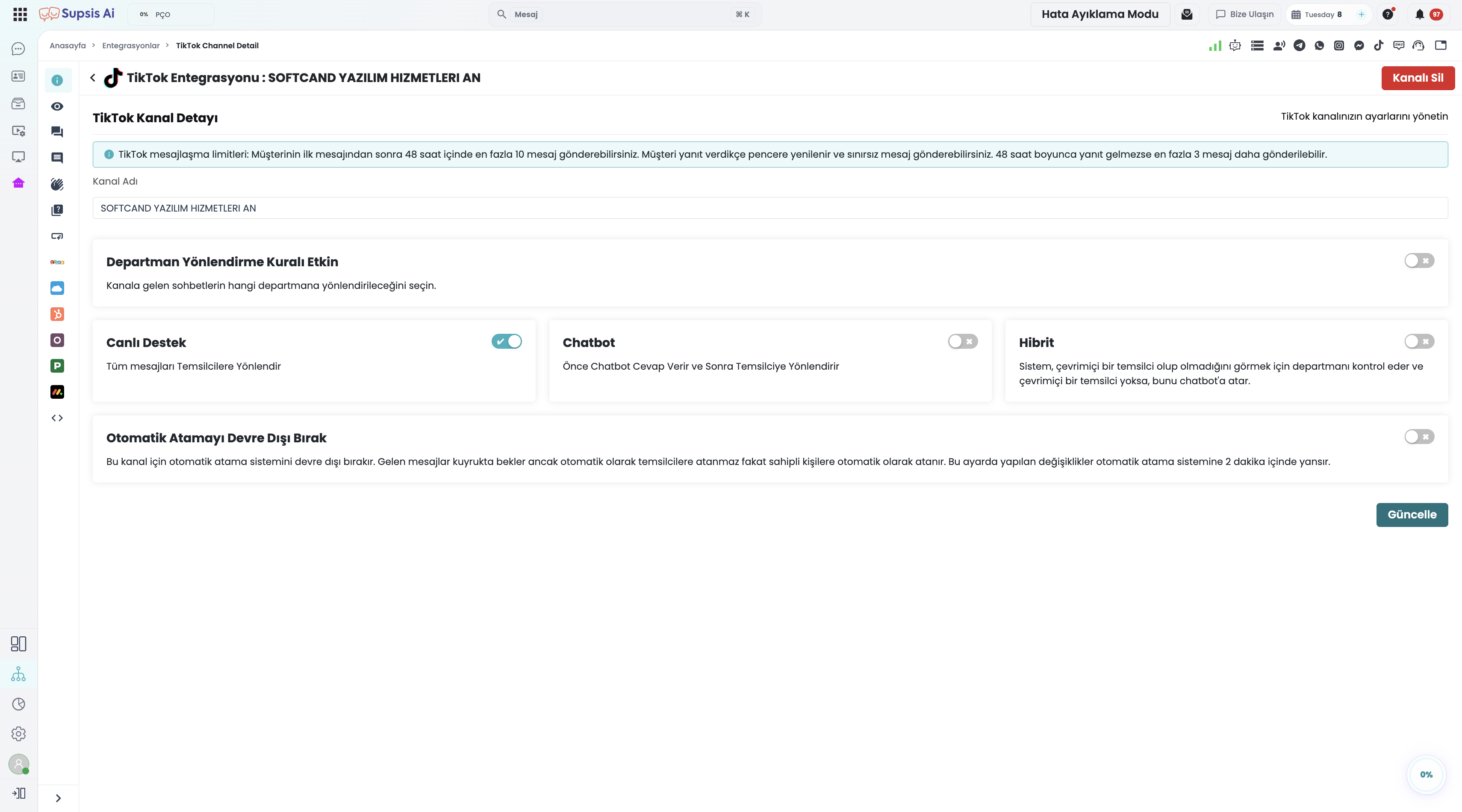
- Channel Name: Assign an internal display label (e.g., TikTok Global Support).
- Routing Mode: Choose whether incoming DMs route directly to live agents or to a Chatbot.
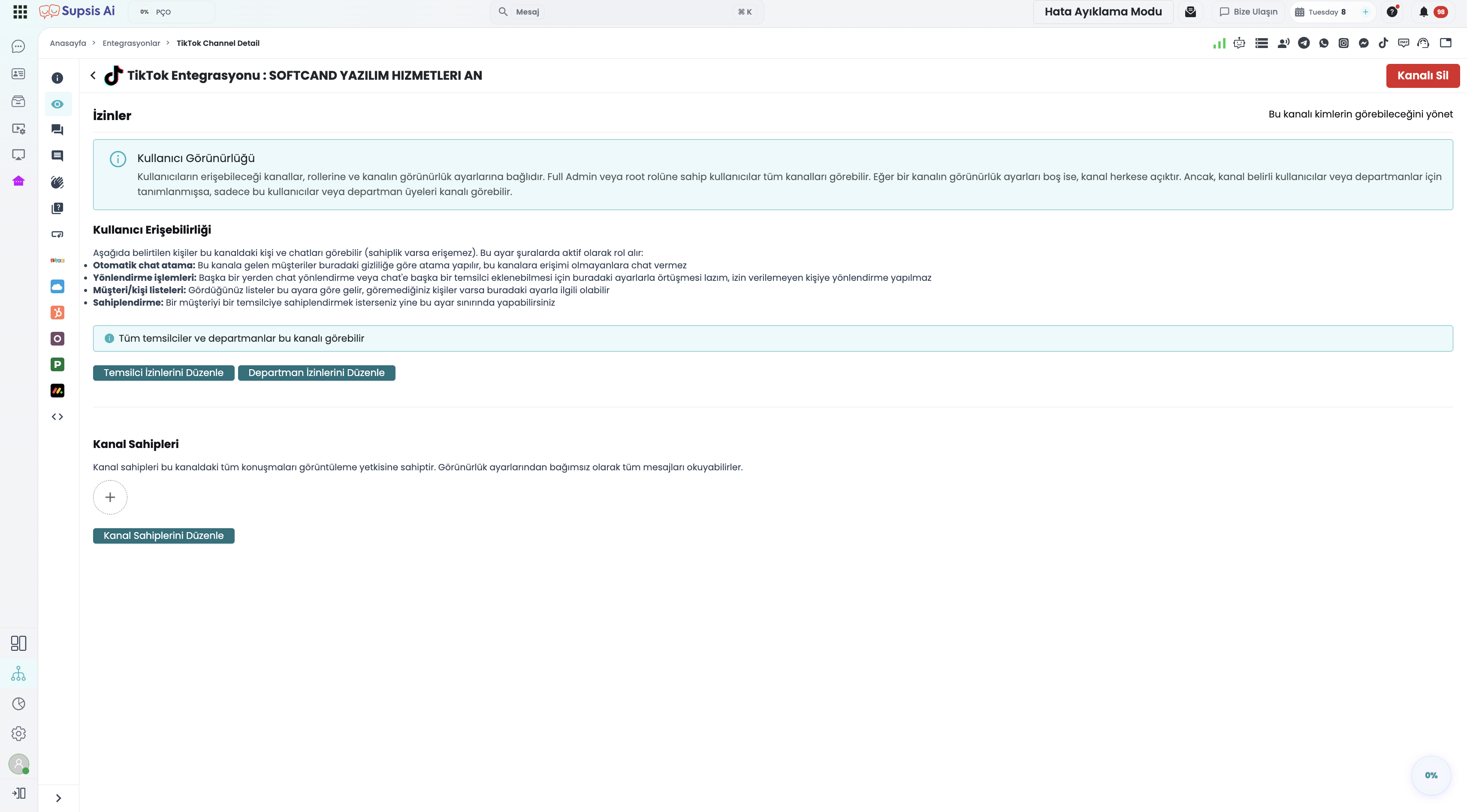
- Visibility Tab: Specify which departments or agents have access to view and answer chats from this channel.
4- TikTok Conversations in the Chat Interface
4.a – Contact Profile and Channel Badges
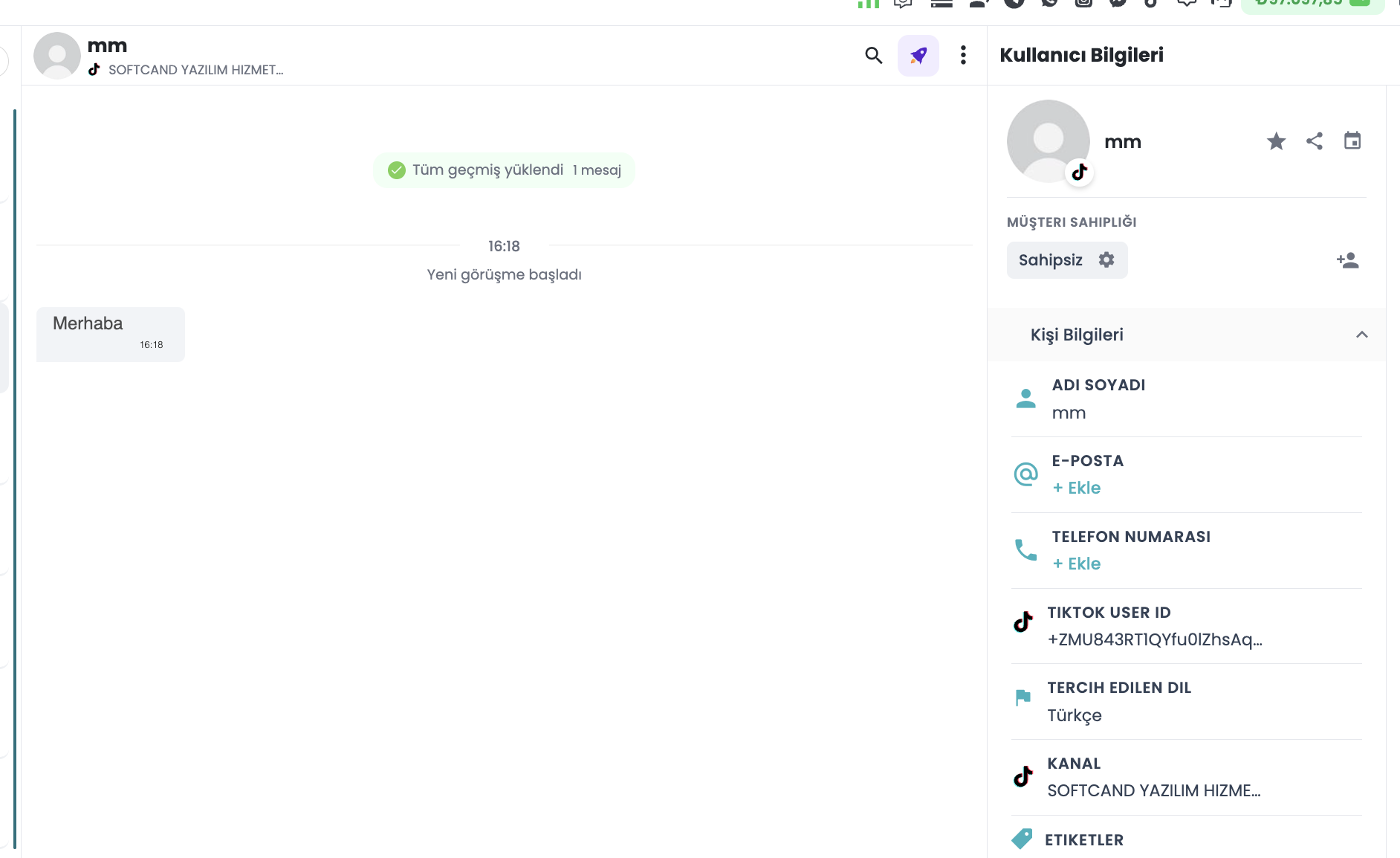
Every new inbound message automatically generates or matches a Supsis contact profile:
* The conversation displays a black TikTok icon in the inbox list.
* The customer's TikTok username (@username), profile picture, and channel source are displayed in the Contact Card.
* If the user previously messaged from WhatsApp or Web Chat, profiles can be merged into a single omnichannel contact.
4.b – Rule: Businesses Cannot Initiate First Messages
Under TikTok platform policy, conversations must always be initiated by the end user:
* Businesses cannot send cold outbound or unsolicited marketing broadcasts to TikTok users.
* A live agent cannot open a new chat window to an arbitrary TikTok username from the panel.
* If attempted, the system blocks the message and alerts:
"Business cannot initiate conversation; user must write first."
4.c – Echo Messages (Mobile App Sync)
If a team member replies to a customer directly from the TikTok mobile application: * Supsis captures the outbound message via webhook (Echo Message). * The message is recorded in the Supsis conversation thread, preserving historical continuity. * Important: Messages sent from the mobile app are also counted against the 48-hour messaging limit counter.
4.d – Ad Attribution Tracking (TikTok Ads)
When a customer messages via a TikTok Ad (Spark Ads, Lead Generation, or DM objective ads): * Supsis extracts the associated ad metadata (Ad ID, Campaign ID). * Attribution tags are attached to the contact card and chat session. * Marketing teams can directly analyze which creative drove inquiries and customer acquisition.
5- 48-Hour Messaging Window and Limits
TikTok enforces a strict messaging window and counter to prevent spam. Supsis proactively validates these limits prior to API dispatch, preventing rejected deliveries and informing agents in real time.
5.a – Mechanics of the 48-Hour Rule
| Scenario | Allowed Outbound Messages | Explanation |
|---|---|---|
| User Sent a Message Within Past 48 Hours | Up to 10 messages | During active chats, each new message received from the customer resets the counter to zero and restarts the 48-hour timer. |
| Over 48 Hours Since Last User Message | Up to 3 messages | If 48 hours lapse without user interaction, the business may send at most 3 follow-up messages. Once exhausted, no further messages can be sent until the user replies. |
| User Has Never Sent a Message | 0 messages (Blocked) | Businesses cannot initiate first contact. |
5.b – 10-Message Cap and 11th Message Warning
If a business sends successive messages without receiving a reply:
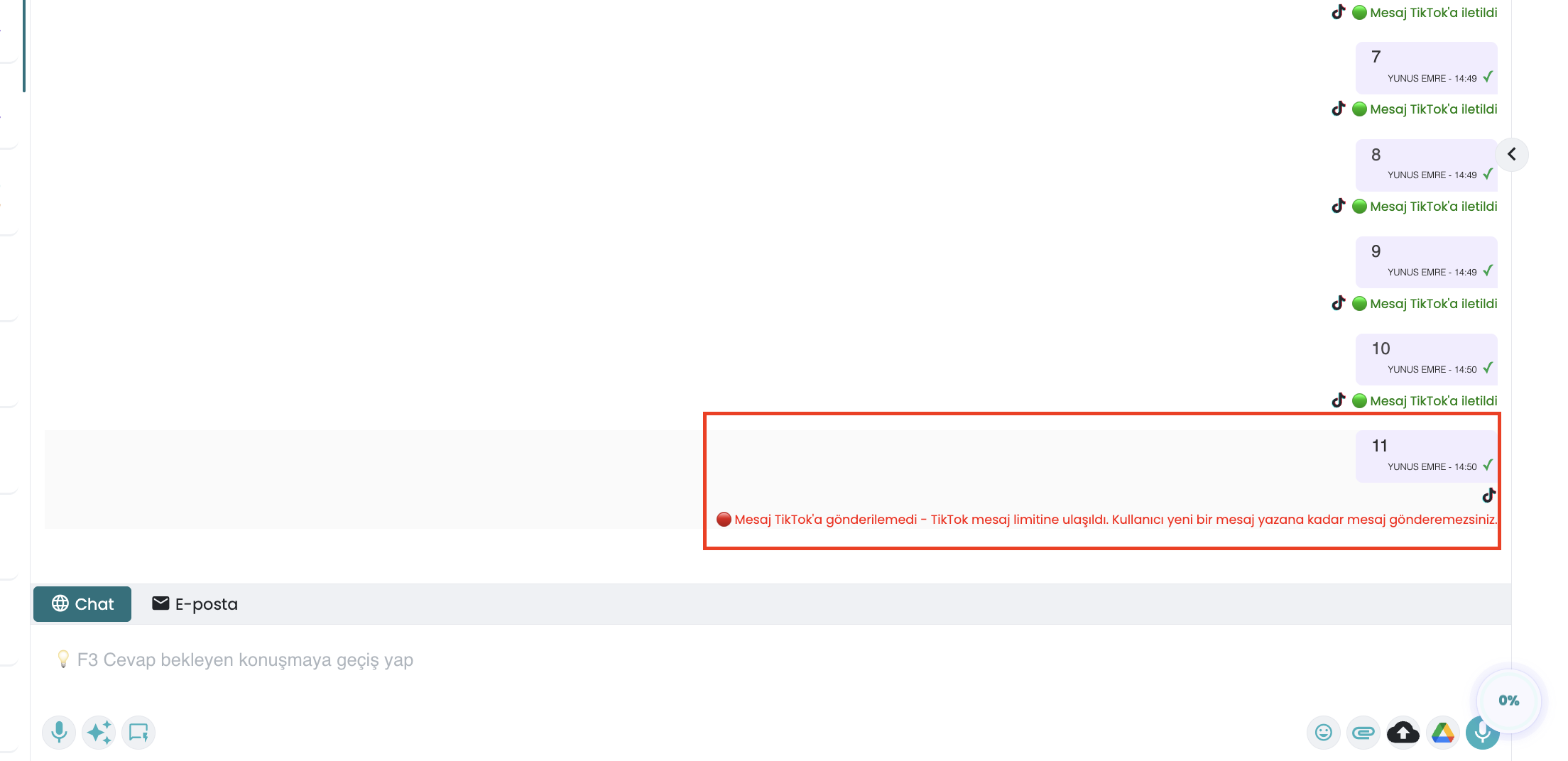
1. Messages 1 through 10 are delivered normally.
2. After 10 outbound messages, the quota is temporarily locked until the user responds.
3. Attempting an 11th message marks it as Failed in the chat interface.
4. An alert banner appears across the chat header:
"TikTok 48-hour messaging window is closed. You can only send limited messages; awaiting customer reply."
6- Supported and Unsupported Message Types
6.a – Comparative Message Types Matrix
| Message Type | Inbound from TikTok (Customer) | Outbound to TikTok (Business) | Rules & Constraints |
|---|---|---|---|
| Plain Text | ✅ Supported | ✅ Supported | Standard UTF-8 text messages. |
| Photo / Image | ✅ Supported | ✅ Supported | JPG, PNG formats (Supsis downloads and previews media). |
| Button Card (QA Button Card) | ✅ (Click Response) | ✅ Supported | Prompt: max 40 chars. Max 3 buttons per card. Button title: max 20 chars. |
| Link Card (QA Link Card) | — | ✅ Supported | Prompt/Title: max 40 chars. Up to 3 external URL links. |
| Emojis & AI Emojis | ✅ Supported | ✅ Supported | Standard emojis and TikTok proprietary AI animated emojis. |
| Stickers | ✅ Supported | ❌ Unsupported | Customers can send stickers; rendered as images in Supsis. |
| Video | ✅ Supported | ❌ Unsupported | Customers can send video; businesses cannot send video due to API limits. |
| Shared Post (Share Post) | ✅ Supported | ❌ Unsupported | Video/post shares appear as clickable links in Supsis. |
| Reactions (Emoji Reaction) | ✅ Supported | ❌ Unsupported | Emoji reactions from users attach directly to the respective message bubble. |
| Quote Reply | ✅ Supported | ❌ Unsupported | Inbound quoted messages display preview context in Supsis. |
| Audio / Voice Notes | ⚠️ Partial | ❌ Unsupported | Businesses cannot send audio. Incompatible inbound audio displays a fallback note. |
| Documents / Files (PDF, etc.) | ❌ Unsupported | ❌ Unsupported | Document transfer is not supported by TikTok Business Messaging API. |
| Location Sharing | ❌ Unsupported | ❌ Unsupported | Geolocation sharing is unavailable in TikTok Messaging API. |
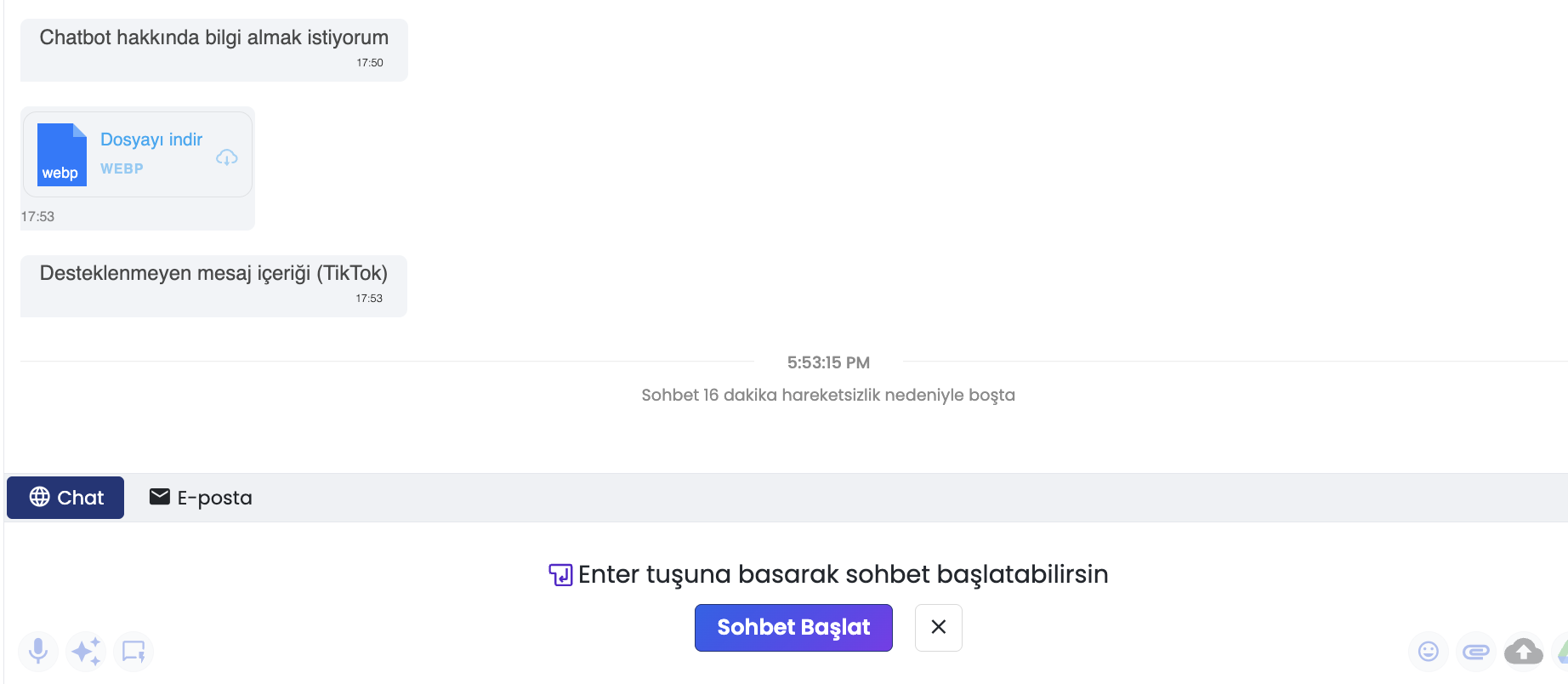
6.b – Agent Alerts for Unsupported Media
When an agent attempts to send an unsupported attachment format (video, voice note, PDF, or location) to a TikTok customer:
* Dispatch is blocked proactively.
* The system displays an error dialog:
"Only text, images, and button cards can be sent via TikTok. Video and document formats are not supported."
7- Historical Message Synchronization
Upon initial connection of a TikTok channel, an automated background synchronization job imports past interactions without interrupting panel operations.
- Import Boundaries (TikTok API Constraints):
- Time Range: Past 90 days of conversations.
- Conversation Count: Up to 100 conversations.
- Message Depth: Up to the most recent 20 messages per conversation.
- Rate Limiting Protection: Sync operates at a controlled throttle of 1 request per second (
1 req/sec) to safeguard API integrity. - Deduplication: Messages received simultaneously via webhook and historical import are deduplicated automatically.
8- Managing TikTok Channels with Chatbots
TikTok channels integrate natively with the Supsis Chatbot engine for 24/7 automated resolution and intelligent routing.
8.a – Routing Modes
- Live Agents Only: Inbound messages queue directly to human agents.
- Chatbot Only: Chatbot handles conversations autonomously, escalating to agents when needed.
- Hybrid Mode: Live support during business operating hours; automated Chatbot during off-hours.
8.b – Chatbot Block Adaptations for TikTok
Due to TikTok messaging constraints, standard web chatbot blocks are adapted automatically:
- Button Blocks: Converted into QA Button Cards (max 3 buttons per card; blocks with more buttons split into successive cards).
- Carousel / Gallery Blocks: Converted into sequential image messages followed by button cards.
- Location Request Blocks: Converted into plain guidance text.
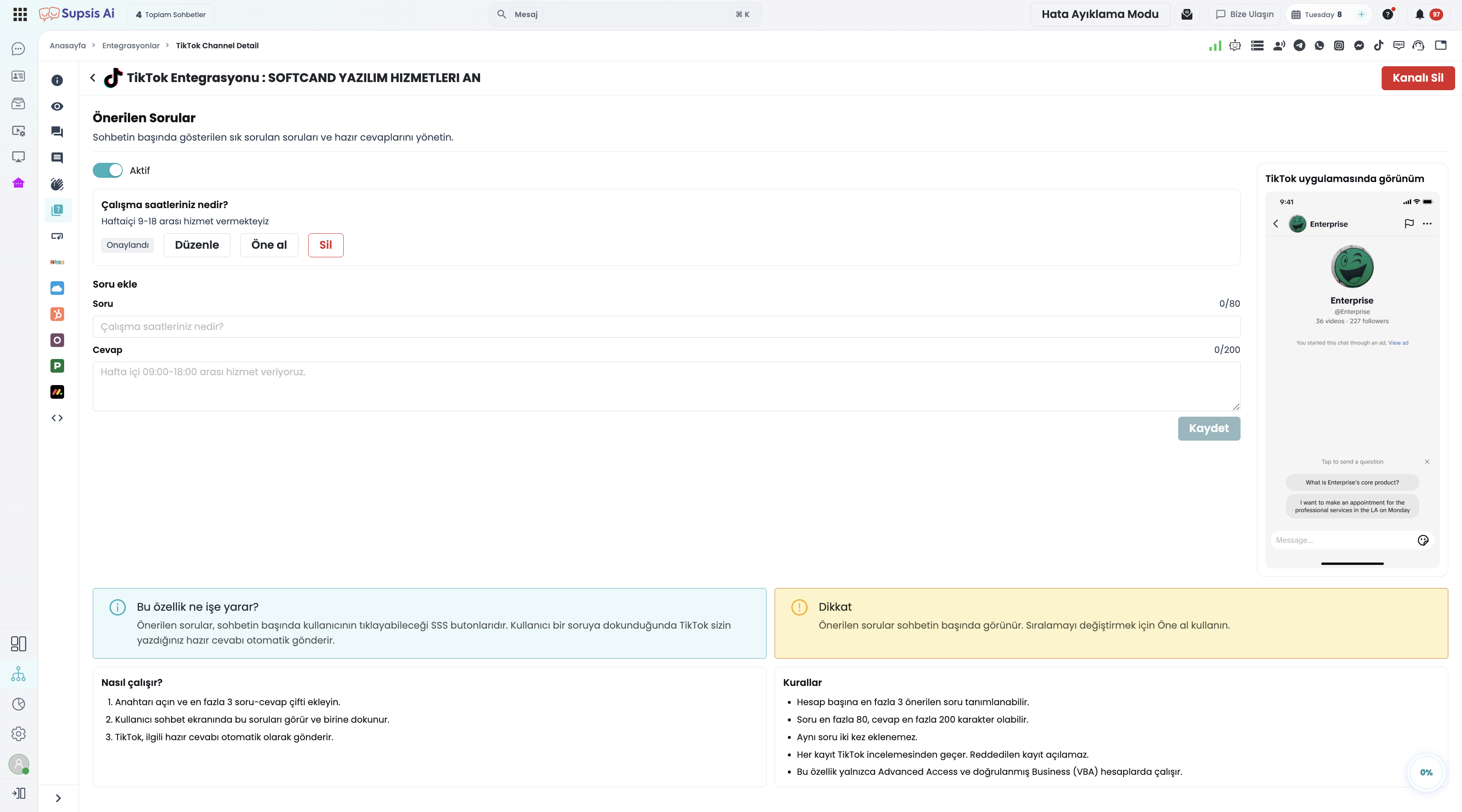
- Suggested Questions: Pre-configured starter buttons can be set up in the channel's "Suggested Questions" tab.
9- Connection Health, Security & Token Lifecycle
- Token Lifecycle:
- TikTok Access Tokens are valid for 1 day.
- TikTok Refresh Tokens remain valid for ~1 year.
- Supsis runs hourly background routines to automatically renew any tokens expiring in less than 2 hours, requiring zero manual action.
- Revocation and Invalidation:
- If permissions are revoked via the TikTok mobile app or Business Suite, token renewal will fail.
- The channel enters a
Token-Invalidstate. Reconnect with one click from the channel settings. - Data Retention on Channel Deletion:
- Removing a TikTok channel from Supsis retains all past conversations and customer records. Only live messaging and webhooks are terminated.
10- Business Use Cases and Value
| Use Case | Core Challenge | Supsis TikTok Solution |
|---|---|---|
| Inbound Surge from Viral Content | Viral TikToks generate hundreds of DMs that overwhelm single-phone inboxes. | Inquiries stream into Supsis, load-balancing across the entire team with instant Chatbot triaging. |
| Automated Product & Pricing FAQs | Repetitive price and shipping questions occupy staff. | Chatbot handles FAQs in seconds, escalating only high-intent buyers to sales agents. |
| TikTok Ads ROI Measurement | Inability to track which ad creative generated real leads. | Ad attribution tags bind to the contact card, tracking real customer conversions. |
| Unified Omnichannel Inbox | Switching between WhatsApp, Instagram, and TikTok apps slows down workflows. | Agents handle all messaging apps inside a single unified window. |
| Off-Hours Coverage | Messages arriving at night risk breaching TikTok's 48-hour window. | Chatbot provides immediate 24/7 engagement, keeping the messaging window open for the morning shift. |
11- Troubleshooting Guide
11.a – "Channel is connected, but inbound TikTok messages do not appear in Supsis"
- Check "Direct Messages from Everyone": In TikTok app, verify
Settings and privacy → Privacy → Direct messagesis set to Everyone. - Verify Account Tier: Ensure the account is a Business Account (Personal/Creator accounts cannot dispatch webhooks).
- Verify Geographical Location: Ensure the account is registered in a supported market (Turkey, Middle East, Africa, or Pakistan), and not registered in an excluded region (EEA, UK, Switzerland, USA).
11.b – "Cannot send messages; messaging window is closed"
- More than 48 hours have passed since the customer's last message, or your 3 follow-up message quota is exhausted. Await the customer's next message to reopen the window. You can continue sending messages via the TikTok mobile app. These limitations only apply to messages sent through the Supsis panel.
11.c – "Cannot send videos or PDF documents"
- TikTok Business Messaging API forbids outbound videos, audio files, and documents from businesses. Send clear images (JPG/PNG) or structured link cards instead.
11.d – "Channel status shows Token Invalid"
- Password changes or security resets on TikTok invalidate active tokens. Open
Integrations → TikTok Channels → Channel Detailsand click Reconnect to re-authorize.