
7-) Conversation Settings
This section allows you to control customer and representative interactions, visibility notifications, and messaging behaviors within the WebChat channel. User experience, privacy, and communication flow are managed through these settings.
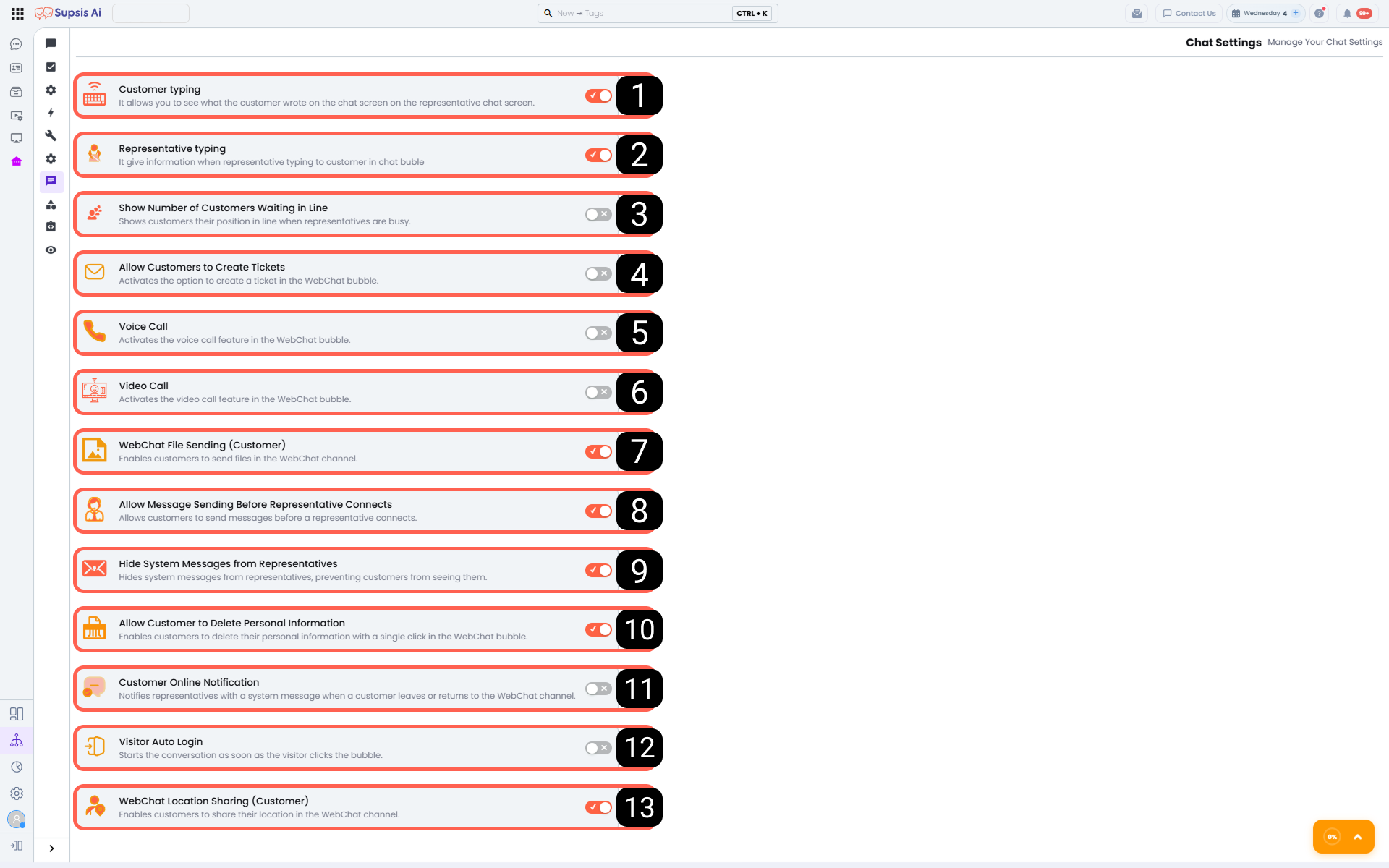
1 - User Typing:
When this feature is enabled, what the customer is typing in real time is displayed on the representative’s chat screen. It accelerates response preparation and supports real-time communication.
2 - Representative Typing:
When activated, the representative’s typing status is displayed in the customer’s chat widget. Informing the customer that a response is being prepared improves the waiting experience.
3 - Show Queue Position to Customer:
When this setting is enabled, customers who want to connect to live support during busy periods are shown their position in the queue. This makes the waiting process more transparent.
4 - Allow Customers to Create “Tickets”:
When this feature is enabled, customers are allowed to create tickets through the WebChat widget. It ensures that support requests outside live support are recorded.
5 - Voice Call:
When this setting is enabled, the voice call feature becomes available in the WebChat widget. It provides an alternative communication channel when written communication is not sufficient.
6 - Video Call:
When activated, video calls can be initiated through the WebChat widget. It enables face-to-face communication in situations requiring more detailed support.
7 - WebChat File Sending (Customer):
When this feature is enabled, customers can send files via the WebChat channel. It allows sharing images, documents, or additional content.
8 - WebChat Message Sending Before Representative Connection:
When this setting is enabled, customers can send messages before being connected to a representative. It allows the initial request to be received in advance, accelerating the conversation process.
9 - Hide WebChat Representative System Messages:
When this feature is enabled, system messages related to the representative are not shown to the customer. It provides a cleaner and more user-focused chat experience.
10 - WebChat Customer Personal Data Deletion:
When activated, customers can delete their own personal data with a single click via the WebChat widget. This supports data privacy and compliance requirements.
11 - Customer Online Notification:
When this setting is enabled, the representative is informed via a system message when the customer leaves the chat or returns. This helps the representative better track the chat status.
12 - Automatic Visitor Start:
When this feature is enabled, the chat automatically starts as soon as the visitor clicks on the WebChat widget. It removes extra steps and enables faster communication.
13 - WebChat Location Sharing (Customer):
When activated, customers can share their location via the WebChat channel. It is used in cases requiring physical direction or location-based support.