
Chat Bubble
You can manage the appearance, behavior, and operation of the chat bubble seen by your visitors on your website from this section.
What is the Chat Bubble Used For?
The Chat Bubble allows website visitors to get instant support and easily communicate with the business. Users can start a conversation through the bubble, send their questions, and receive quick responses. It also works integrated with chatbot and live support systems, helping ensure uninterrupted communication.
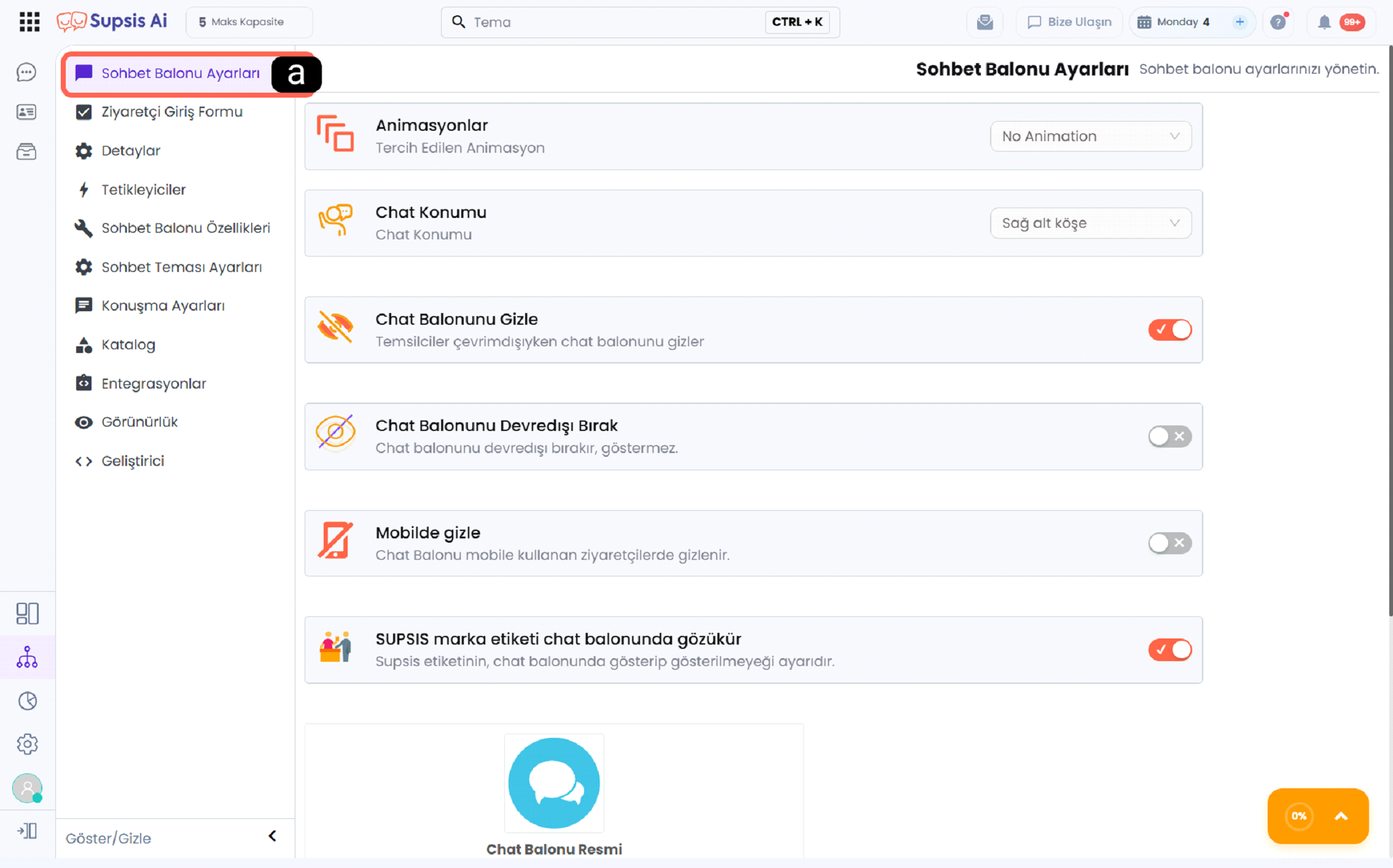
a - Chat Bubble Settings
The Chat Bubble Settings option in the left menu opens the configuration screen for the chat bubble. When clicked, settings related to animation, position, visibility, and behavior of the bubble are listed.
Settings Managed Within the Chat Bubble Module
-
Animation Settings: Opening and appearance animations of the chat bubble can be configured.
-
Position Selection: The position of the chat bubble on the website (for example bottom right corner) can be set.
-
Visibility Control: The chat bubble can be hidden or disabled under specific conditions.
-
Device-Based Settings: The chat bubble can be shown or hidden separately for mobile users.
-
Branding and Appearance Settings: Brand label and visual elements on the chat bubble can be customized.
Table of Contents
In this section, you can find all settings and usage details of the chat bubble.
Chat Bubble Settings
You can configure animation, position, color, size, and basic appearance settings of the chat bubble.
Visitor Entry Form
You can organize the information to be taken from the visitor and form fields before the chat starts.
Details
You can determine how chats will be routed via live support, department, or chatbot.
Triggers
You can define automatic messages and actions based on visitor behavior.
Chat Bubble Features
You can manage communication channels and menu structures to be included in the chat bubble.
Chat Theme Settings
You can customize visual design settings such as theme, colors, and font.
Conversation Settings
You can configure typing indicators, file sending, and conversation features.
Working Hours
You can manage service working hours, online/offline modes, and offline messages.
Catalog
You can organize content accessible to visitors under category and menu structure.
Integration
You can view the code and integration steps required to add the chat bubble to your website.