
2-) General
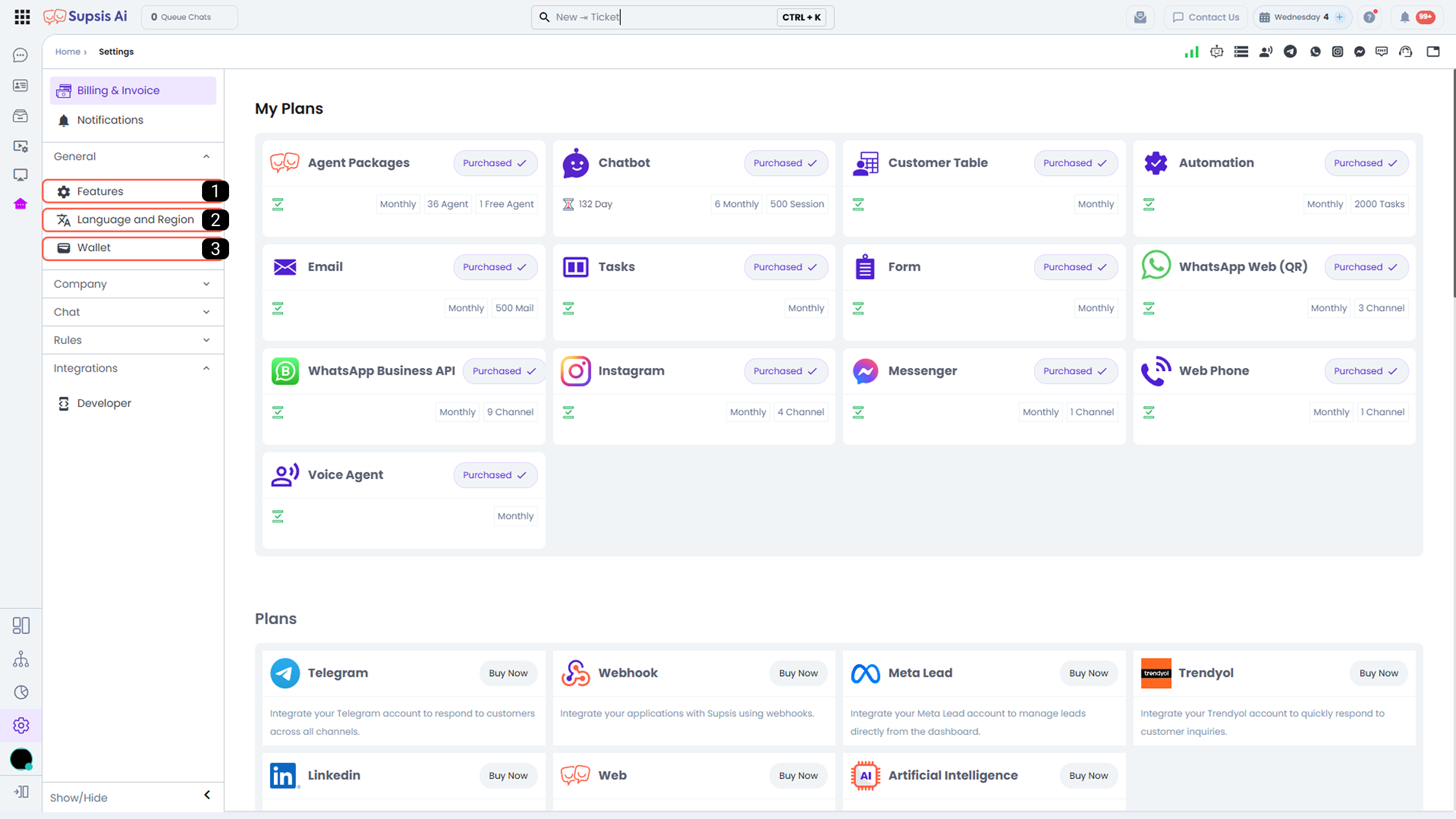
1-) Features
The Features menu is the area where additional functions and modules to be used within the Supsis Ai platform are managed. From this section, you can enable or disable specific features according to your needs. The available features include various functions that enhance the messaging experience and increase customer and agent interaction.
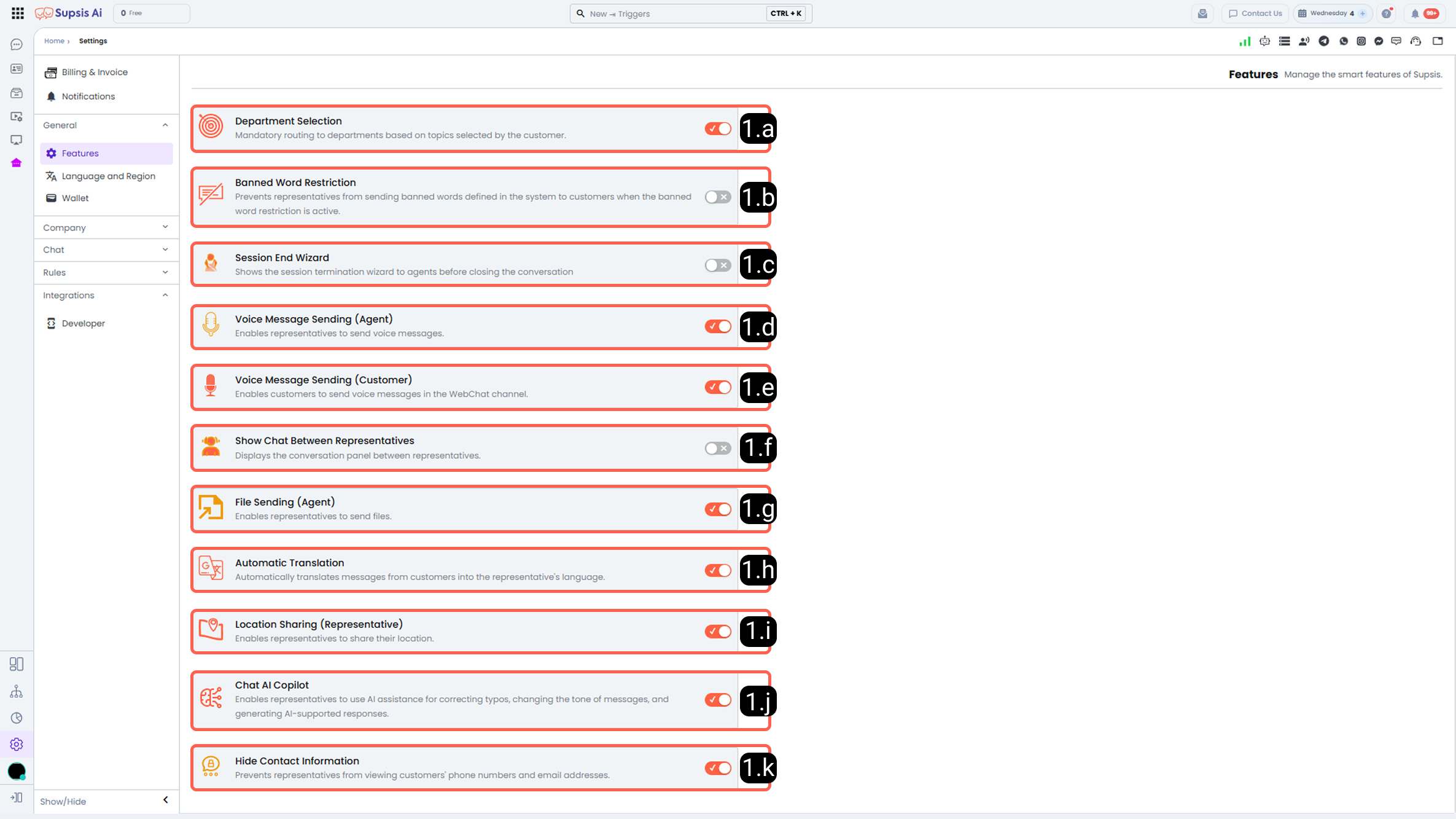
1.a – Department Selection
From this section, you can create new ticket statuses. To create a status, it is sufficient to define only the status name. The created statuses can be used in ticket management processes.
1.b – Forbidden Word Restriction
When this feature is activated, messages containing forbidden words defined in the system are prevented from being sent to customers by agents. The purpose is to maintain corporate communication standards and prevent negative content.
For detailed information about forbidden words, please review the Forbidden Words documentation.
1.c – Conversation End Wizard
When this setting is enabled, the Conversation End Wizard is automatically activated when the agent closes a conversation. In order to complete the conversation, the agent is required to complete the necessary steps through the wizard. This standardizes the closing processes.
1.d – Voice Message Sending (Agent)
When this feature is activated, agents can send voice messages to customers via all supported platforms during a conversation. It enables faster and more effective communication in cases where written communication is insufficient.
1.e – Voice Message Sending (Customer)
When this feature is enabled, customers can send voice messages to agents via the WebChat channel. This allows customer requests to be delivered more quickly and clearly.
1.f – Show Inter-Agent Chat
When this setting is activated, the agent chat panel, where agents can communicate with each other, becomes visible. It strengthens internal communication, enabling fast information sharing and improved operational coordination.
1.g – File Sending (Agent)
When this setting is enabled, agents can send files to customers from all platforms. It allows sharing documents, images, informational PDFs, and similar content. This feature supports providing fast and clear responses to customer requests.
1.h – Automatic Translation
When the Automatic Translation feature is activated, messages received from customers communicating in a different language are automatically translated into the agent’s language by the system. This facilitates multilingual communication and eliminates language barriers.
1.i – Location Sharing (Agent)
When this feature is activated, agents can share location information with customers. It enables effective communication in scenarios requiring physical directions, address sharing, or on-site support.
1.j – Chat Ai Copilot
Chat Ai Copilot provides agents with an AI-powered assistant. This feature offers functions such as correcting grammar mistakes, improving message tone, and generating AI-supported reply suggestions. It enhances agent productivity and supports more consistent and professional communication.
For more information, please review the Chat Ai Copilot section of the Chat Assistants documentation.
1.k – Hide Contact Information
When this setting is activated, customer contact information such as phone numbers and email addresses cannot be viewed by agents. It ensures compliance with personal data protection requirements and enhances data security.
1.l – WhatsApp Profile Synchronization
When this feature is activated, whenever a field (Full Name, tags, custom contact fields, etc.) is updated on a customer profile belonging to the same WhatsApp phone number across different channels (e.g., Sales and Support WhatsApp lines), only the modified fields are automatically synchronized across all other profiles of that same customer (contact update operation propagation). * Default State: Disabled (OFF) by default. Can be enabled via Settings → Features. * Workflow Logic: Any update made via customer card, chat details, or data input fields is instantly reflected across all other channels (e.g. if a customer's tag is updated from "Lead" to "Won" on Channel A, it is automatically updated to "Won" on Channel B as well).
1.m – Wallet & Spending Analytics
The Wallet Reports feature under the Wallet menu enables you to visually analyze wallet expenditures, balance top-ups, transaction counts, and product/channel cost distributions across your platform using interactive charts, text insights, and data tables.
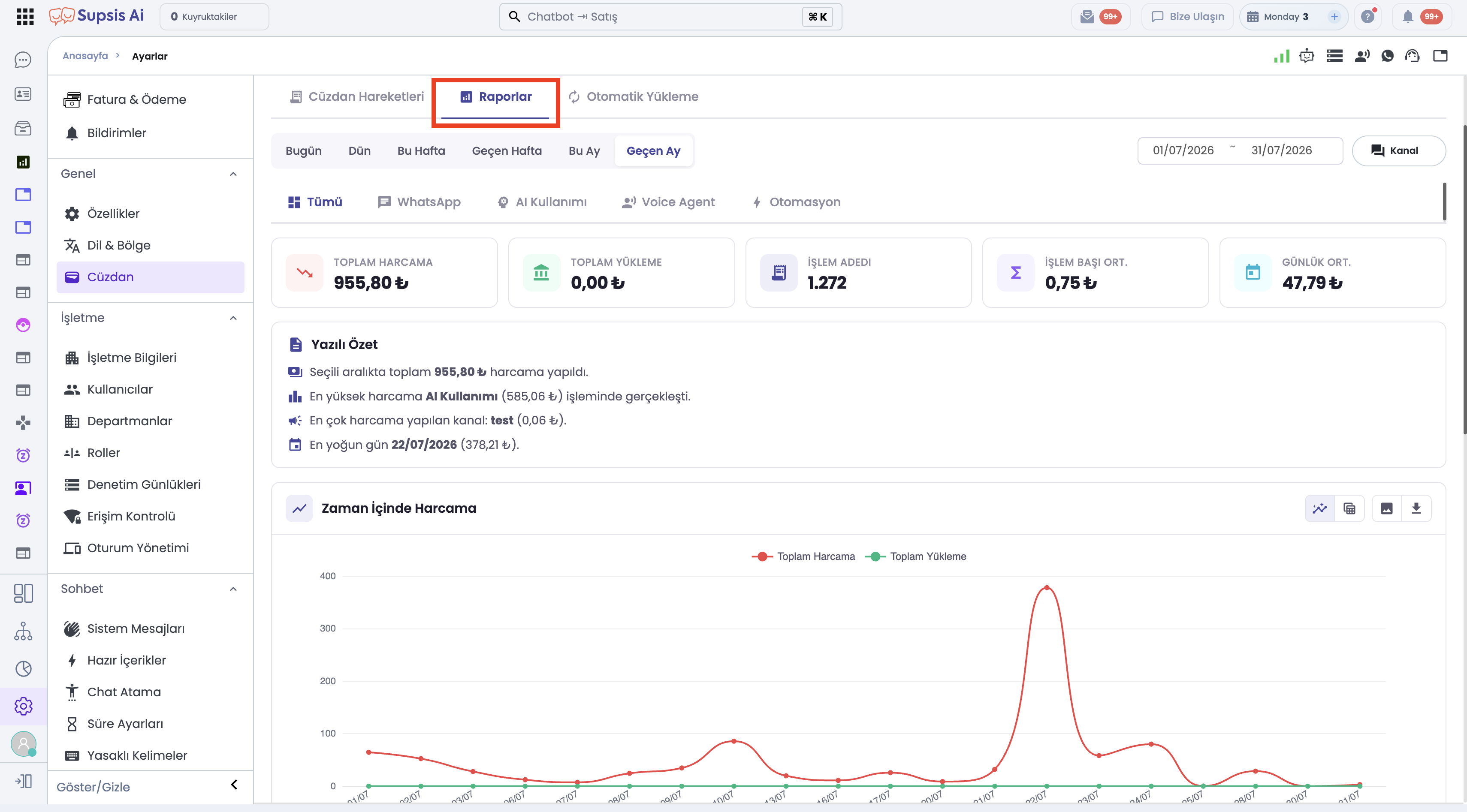
- Multilingual UI Support (8 Languages): Based on your panel language setting, the report interface seamlessly adapts to Turkish, English, German, Spanish, French, Italian, Arabic, and Russian.
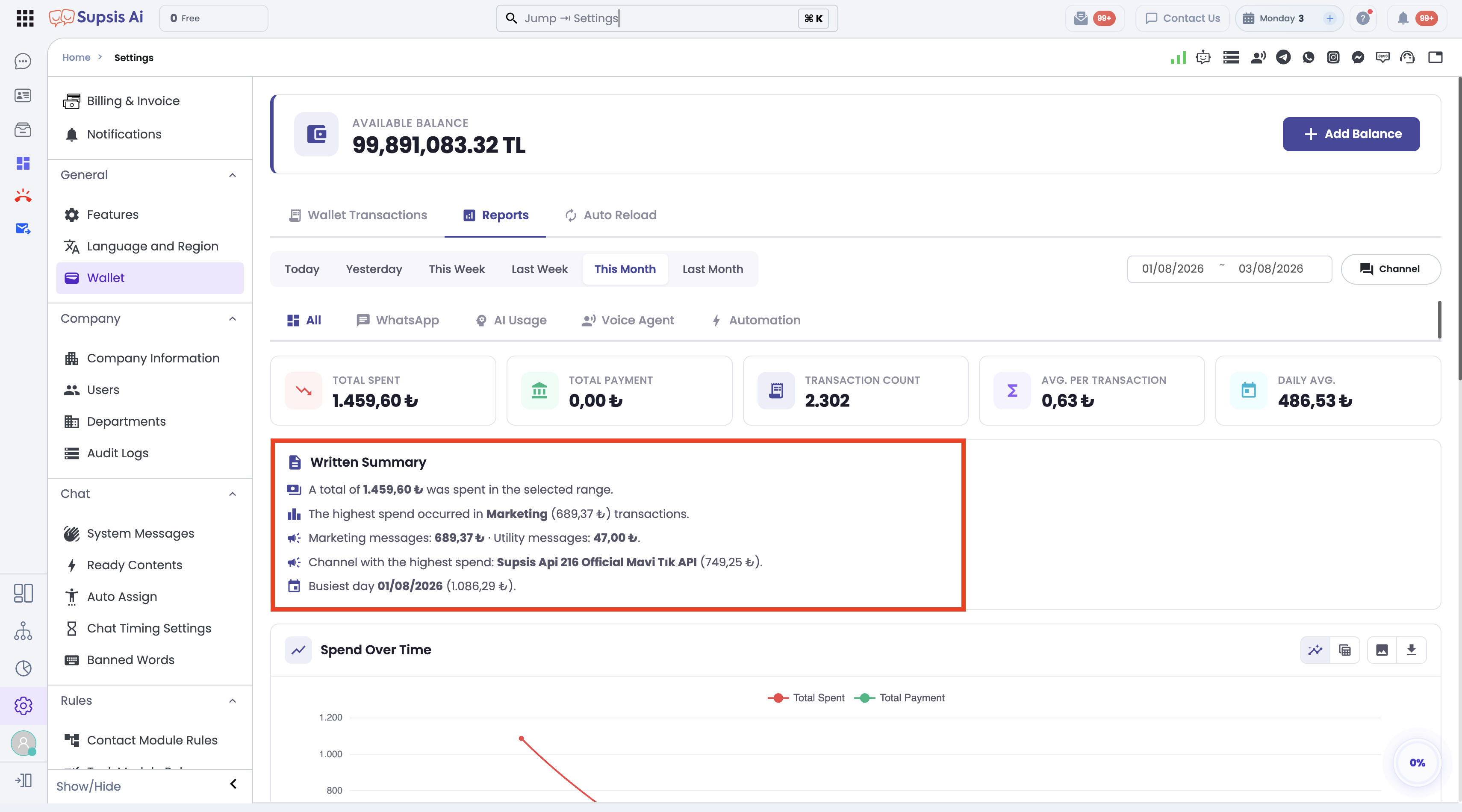
- Two Primary Access Points:
- Site-Wide Report (Settings):
Left Sidebar → Settings → Wallet → Reportstab. Displays overall site metrics with product sub-tabs (All, WhatsApp, AI Agent, Voice Agent, Automations) and multi-channel WhatsApp filters. - Channel-Focused Report (Channel Details):
Integrations → WhatsApp Business API → [Select Channel] → Left Sidebar → Wallet. Automatically locks to the selected channel (fixedChannelId), hiding product sub-tabs and channel selectors to focus strictly on that WhatsApp number.
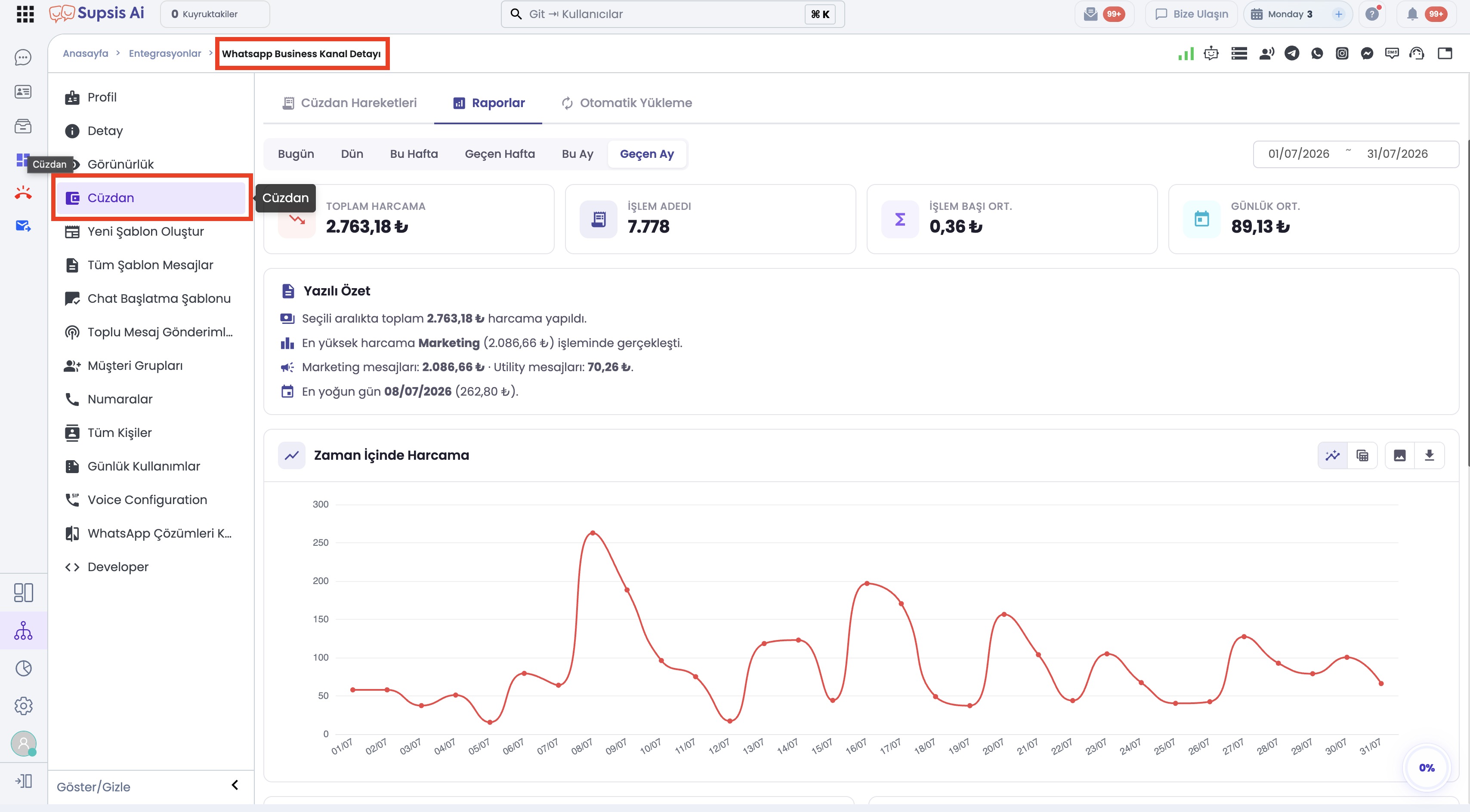
Date Presets & Filter Tools
- Date Range Selector: Date ranges can span a maximum of 31 days and future dates cannot be selected.
- Quick Date Presets: Change date ranges with a single click using Today, Yesterday, This Week, Last Week, This Month, Last Month.
- Multi-Channel Filter: In site-wide views (All and WhatsApp tabs), filter reports by selecting one or more WhatsApp channels from the grouped icon list.
Report Sections by Product Sub-Tabs
- All (Overall Spending Summary):
- Spending and top-up line charts over time.
- Product distribution donut chart.
-
Channel breakdown and transaction type splits.
-
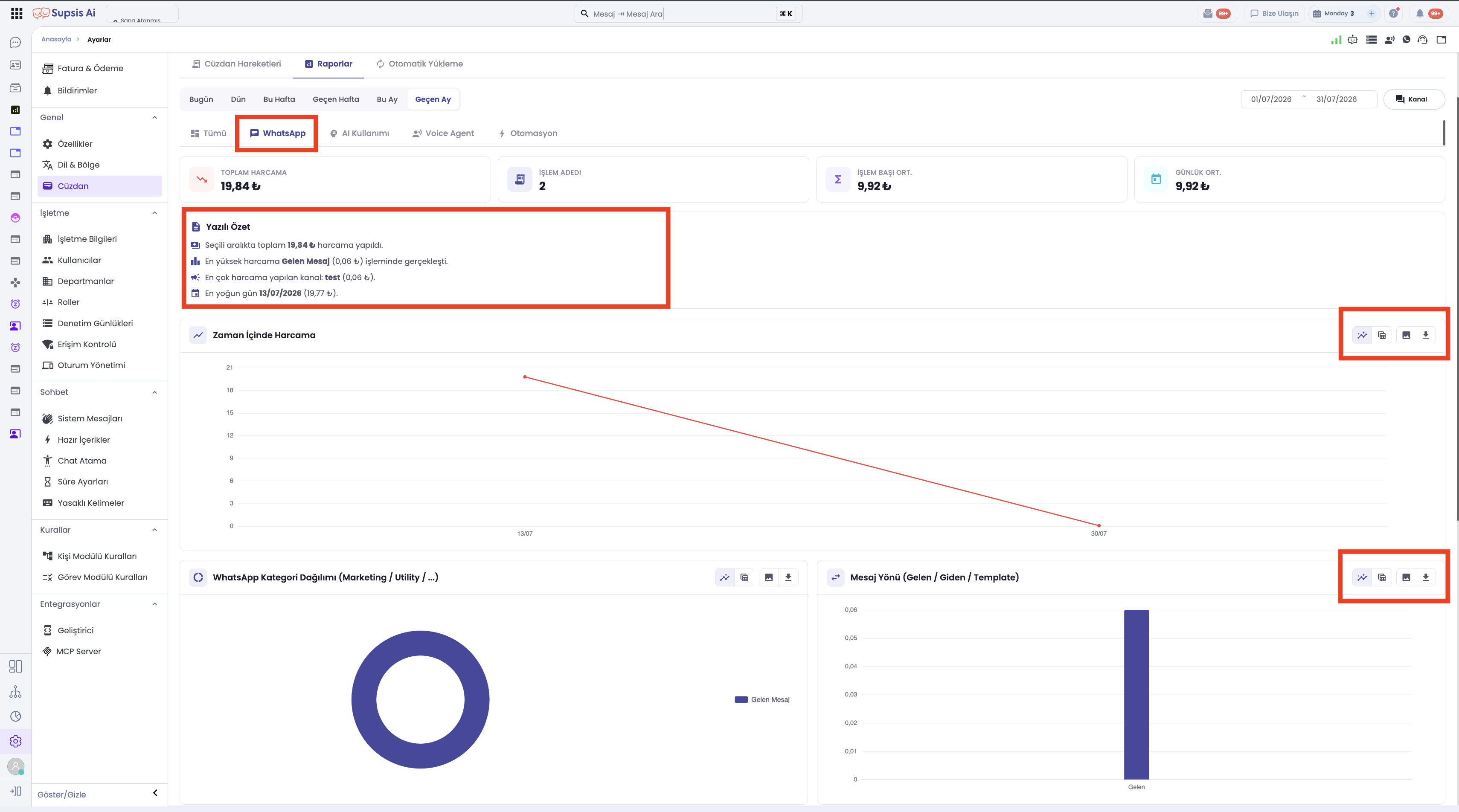
WhatsApp Spending Analytics:
- Time-series spending charts.
- Meta template categories (Marketing, Utility, Authentication, Service).
- Message direction bar charts (Inbound vs. Outbound).
- Country distribution and transaction types (channel breakdown section is hidden in channel detail view).
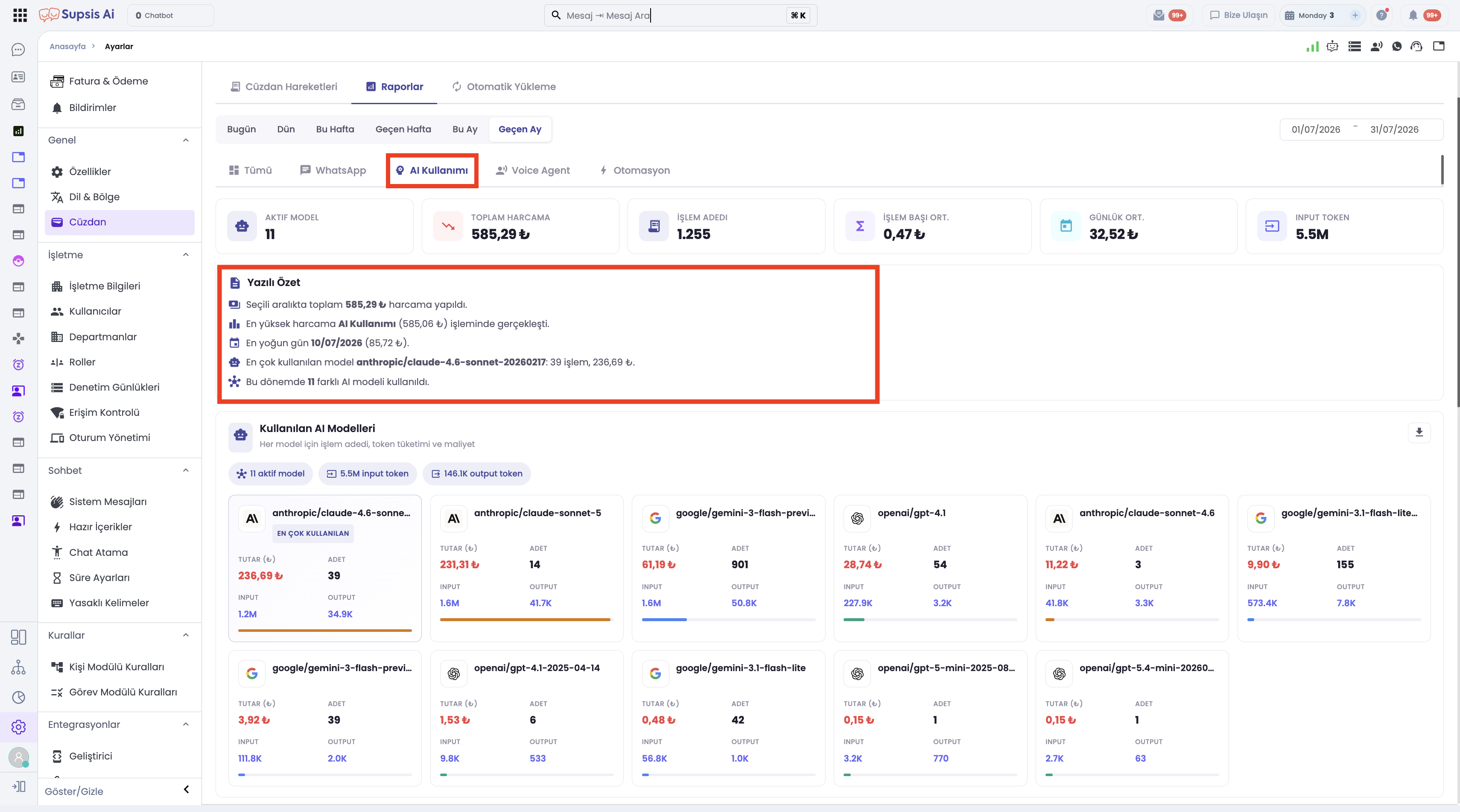
- AI Agent Spending & Model Analytics:
- Time-series AI expenditure, provider distribution (OpenAI, Anthropic, Google), and source breakdown (Chatbot, Copilot, Auto-Reply).
- Used AI Models Cards: Transparently lists provider logos, model names (gpt-4o, claude-3-5-sonnet, etc.), token consumption, and total cost incurred.
- Voice Agent Analytics:
-
Time-series call expenses, inbound/outbound call direction breakdowns, and charge items.
-
Automation Analytics:
- Time-series execution fees, spending ranked by automation scenario, and transaction types.
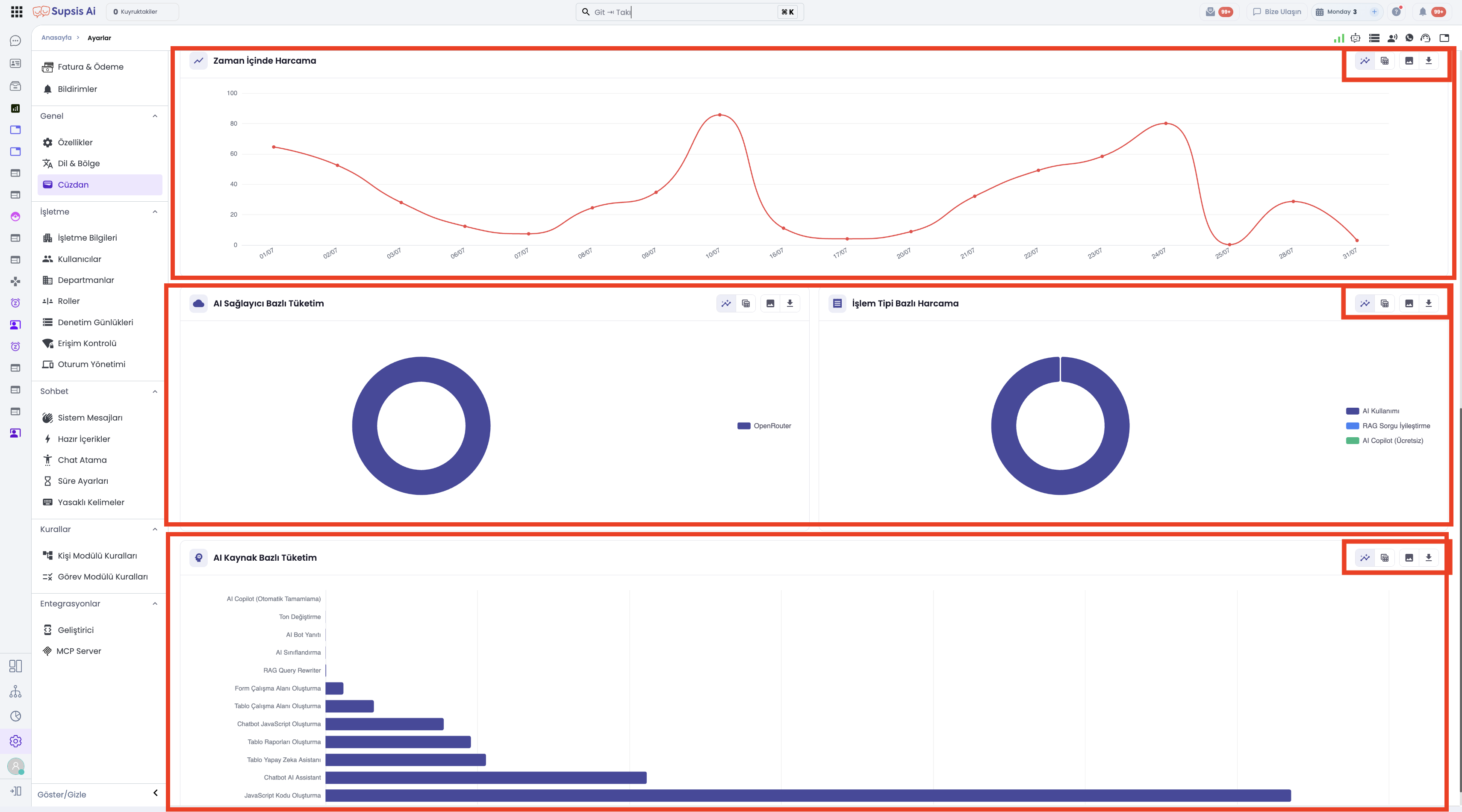
Chart / Table Toggle & Data Export (Excel & PNG)
Every report section provides flexible viewing modes and export capabilities:
- Chart / Table View Toggle: Switch any report section instantly between Chart View and Data Table View via the top-right toggle button.
- Excel Export (.xlsx): Export raw section data into Excel format for offline sharing and analysis.
- PNG Image Download: Save charts as high-resolution PNG image files.
💡 Dynamic Text Insights
The top section of the report automatically generates intelligent bullet points: * Summarizes total top-ups and expenditures for the selected period. * Highlights primary cost drivers (e.g. WhatsApp Marketing templates or AI token usage). * Flags periods with zero spending or missing top-ups using distinct icons (⚠️, ℹ️, 💡).
2-) Language & Region
The Language & Region section is where the language, automatic translation, and regional settings of the Supsis Ai system are configured. From this menu, you can adjust settings such as panel language, messaging language, date format, and time zone to provide a user experience suitable for the region you serve.
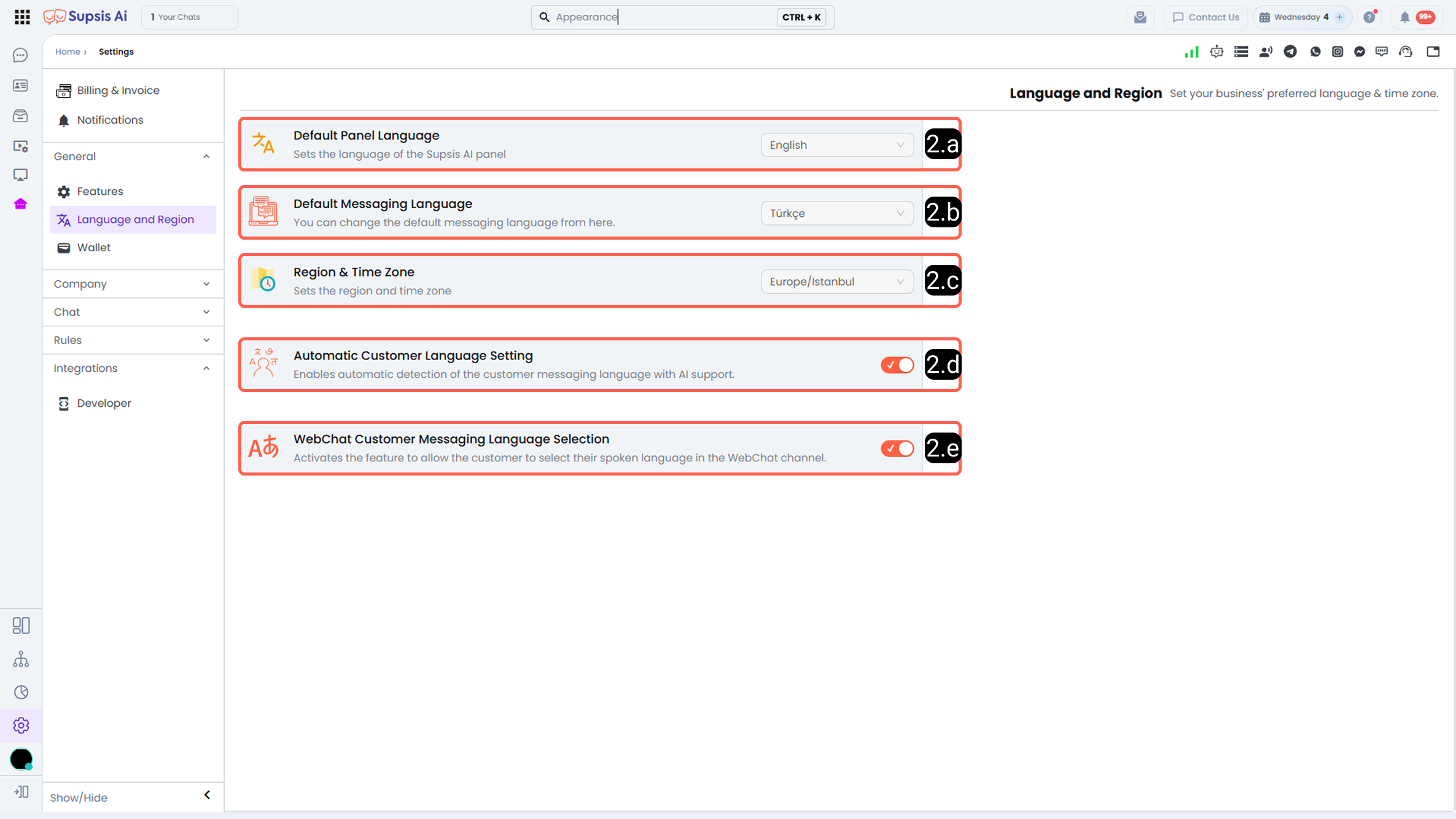
2.a – Default Panel Language:
The Default Panel Language determines which language the Supsis Ai management panel will be displayed in. You can choose from the following languages:
- Turkish
- English
- Russian
- German
- French
- Spanish
- Arabic
- Italian
The selected language applies to the entire panel interface for the relevant user.
2.b – Default Messaging Language:
This section allows you to define the default messaging language assigned to customers.
For customers connecting via WebChat, the language is automatically detected based on browser settings. For customers coming from channels other than WebChat, the default messaging language is applied.
The customer language can be manually edited via the contact card and chat screen if needed. Additionally, by enabling the Automatic Customer Language Setting, the language detection process can be handled automatically by the system.
2.c – Region & Time Zone:
The Region & Time Zone setting determines the time zone used by the Supsis Ai panel. This setting is referenced for agent working hours, chatbot time filters, and all time-based operations within the panel.
2.d – Automatic Customer Language Setting:
When this feature is activated, the customer’s language is automatically detected by analyzing the conversation content using AI. Based on the detected language, the messaging language is dynamically adjusted, facilitating multilingual communication processes.
2.e – Webchat Customer Messaging Language Selection:
When this feature is enabled, users connecting via WebChat can manually select their preferred messaging language through the chat bubble. This provides flexibility for users to communicate in their chosen language.
3-) Wallet
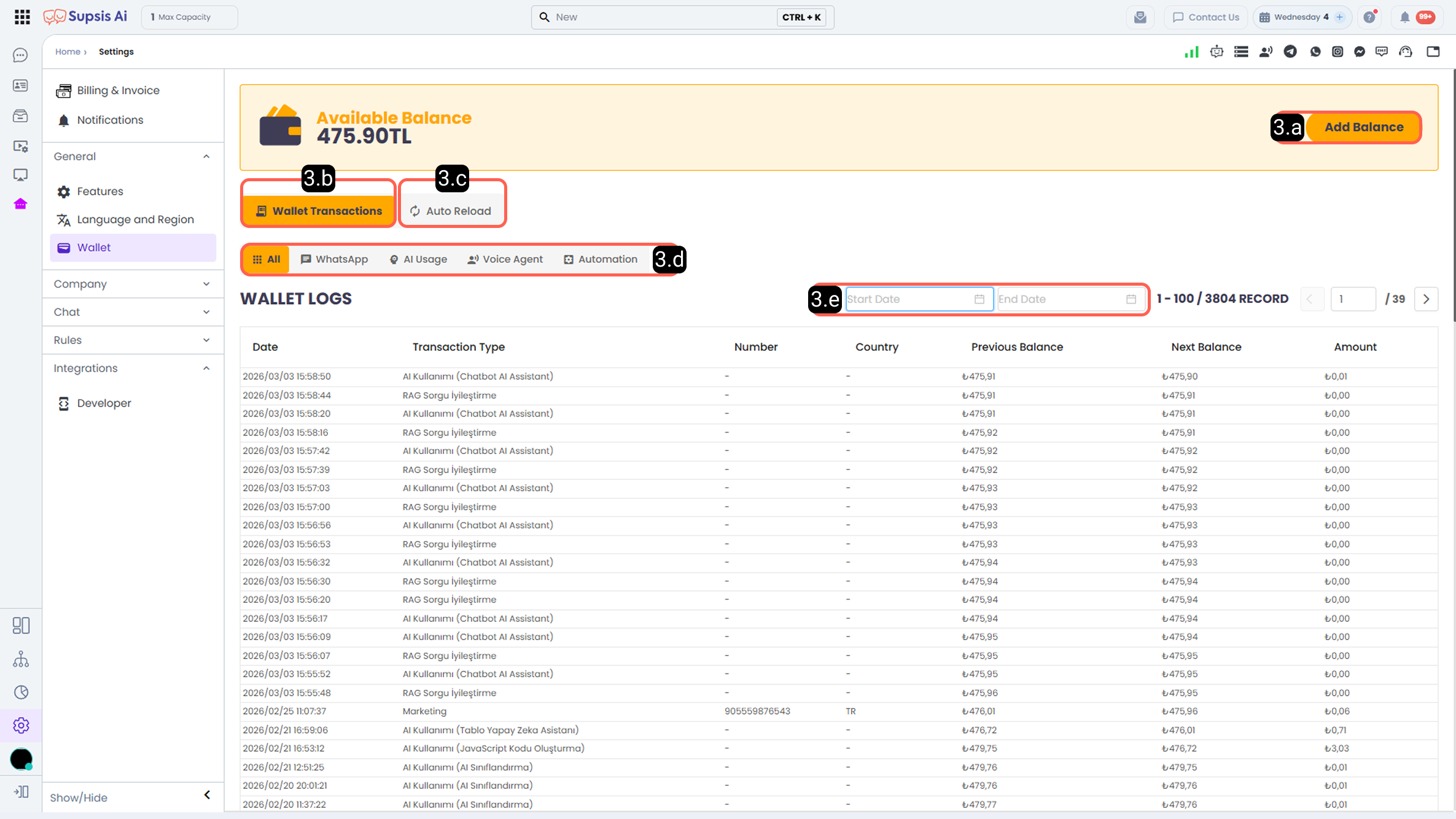
The Wallet menu provides a centralized financial management system where spending and balance top-ups across Supsis AI services (WhatsApp Message API, OpenAI, Anthropic, Voice Agent, Automations) are monitored platform-wide or per WhatsApp channel.
- Access Routes:
- Site-Wide Wallet:
Left Sidebar → Settings → Wallet. Covers overall platform balance and spending. - Channel-Scoped Wallet:
Integrations → WhatsApp Business API → Select Channel → Wallet. Displays expenses and transactions specific to the selected WhatsApp channel.
3.a – Add Balance (Deposit):
From this section, you can top up your wallet balance. Top-up payments are processed immediately via the credit or debit card registered under Invoice & Payment Method (requires customer-wallet-deposit permission).
3.b – Transactions Tab (High-Performance History & Token Pagination):
The Transactions tab inside the Wallet menu presents a comprehensive ledger of all spending deductions and deposits. List performance has been significantly upgraded by transitioning to an Atlas Search index (balance_activity_search) and token-based pagination architecture (nextToken / prevToken).
- Viewport Height Spreading (Desktop Enhancement): Table layout dynamically expands according to viewport height on large displays, eliminating dead empty spaces underneath the table and displaying more records at a single glance.
- Product Category Pills: Quickly isolate expenses using product category tabs:
- All: Comprehensive platform spending and top-ups.
- WhatsApp: Message template and conversation charges.
- AI Usage: Token consumption costs across OpenAI, Anthropic, and Google models.
- Voice Agent: Voice call duration and agent charges.
- Automations: Execution costs for automated workflows and webhooks.
- Toolbar Filters: Date range, transaction type (Spending / Top-up), channel selector, and source filters.
- Token-Based Pagination Controls:
- Navigated using
◀(Previous) and▶(Next) arrow buttons on the right side of the toolbar instead of page numbers. - Record Range Indicator: Displays current record boundaries and total count on the toolbar (e.g.,
1–100 / 3500 recordsor101–200 / 3500 records). Total count computed on initial load is preserved across page shifts.
3.c – Auto Top-Up:
Automatically charges your saved payment card to add a pre-configured deposit amount whenever your wallet balance drops below a set threshold.
Mandatory Auto Wallet Rebalance for Voice Agent
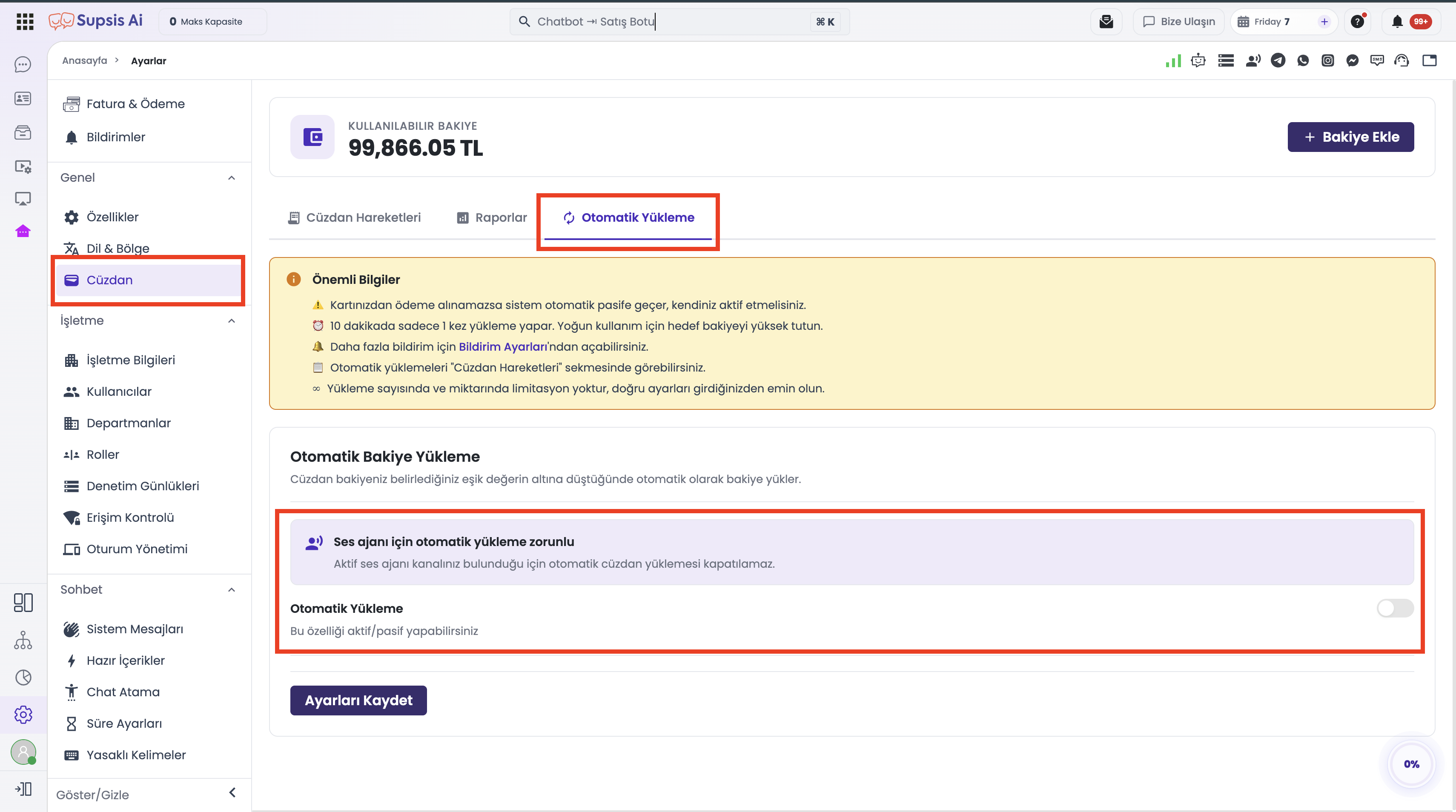
For businesses with an active AI Voice Agent channel on the Supsis platform, the wallet automatic rebalance feature is mandatory. This rule guarantees that inbound and outbound voice calls are never interrupted due to insufficient balance.
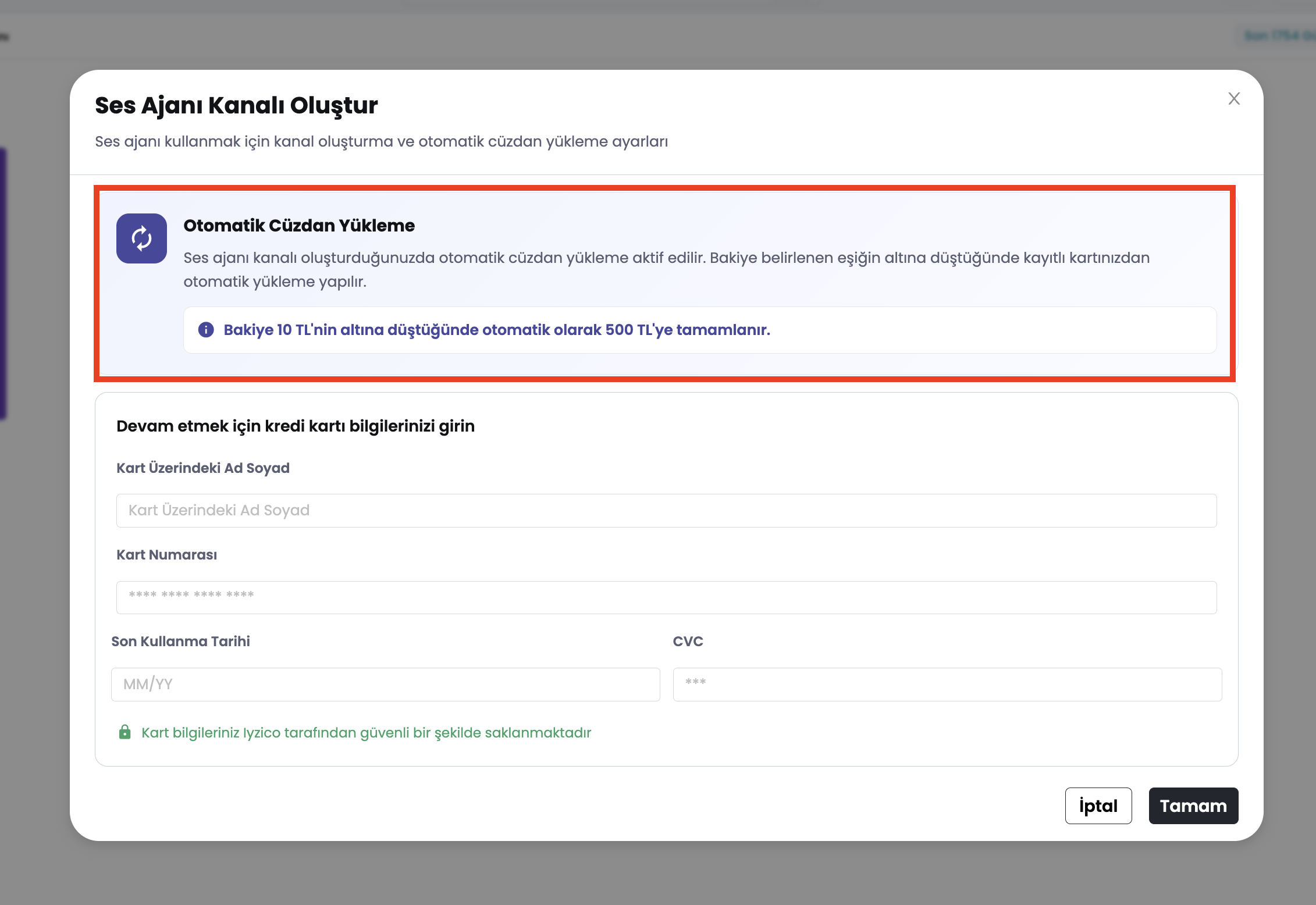
- Auto Rebalance Rule (Fixed Balance Mode): The moment your wallet balance drops below 10 TL, the system automatically charges your saved credit card to top up the balance to 500 TL (
threshold = 10 TL,target/upTo = 500 TL). - Disable Restriction: As long as an active AI Voice Agent channel exists in your account, the toggle switch under
Settings → Wallet → Auto Reloadis locked (disabled) and an explanatory notification banner is displayed. Customers cannot turn off auto rebalance while a voice agent channel is active. - Removing the Restriction: The auto-rebalance lock is only removed if all active Voice Agent channels are deleted or deactivated.
Step-by-Step Usage Guide
- Navigate to
Settings → Walletin the Customer Panel (or open the Wallet tab in WhatsApp channel details). - Select the Transactions tab.
- Narrow down records using product category pills (
All,WhatsApp,AI Usage,Voice Agent,Automations) and toolbar filters (Date, Transaction Type, Channel, Source). - Click the
◀and▶arrow buttons on the right side of the toolbar to shift between page token intervals. - Track your overall ledger position via the record range indicator (
e.g., 101–200 / 3500 records).
Use Cases
- High-Volume Ledger Scanning: Scan through thousands of wallet activity entries instantly without browser stutter.
- Service-Specific Cost Inspections: Isolate spending records for WhatsApp, AI models, or Voice Agents using product category pills.
- Periodic Audit & Billing Checks: Filter transaction history by custom date ranges to audit monthly or weekly balance deductions.
- Channel-Scoped Expense Audits: Access dedicated wallet transaction history directly from WhatsApp channel details.
Customer Benefits
- Significantly accelerates transaction list loading times for accounts with heavy wallet usage.
- Maximizes screen real estate on large displays by stretching table height to fit viewports.
- Delivers fluid, lag-free navigation across large datasets via token-based pagination.
Control & Technical Notes
- Permissions: Viewing wallet transactions requires
customer-walletpermission; funding balance requirescustomer-wallet-depositpermission. - Admin Actions Privacy: Actions performed by administrators (
payload.isAdmin: true) are excluded from customer panel lists. - Pagination Structure: Uses cursor tokens (
nextToken/prevToken); jumping directly to arbitrary page numbers (e.g. page 15) is not supported. - Backend Infrastructure: Powered by MongoDB Atlas Search index (
balance_activity_search).