
1) Smart Writing Suggestion
CoPilot Smart Writing Suggestion is an AI-powered autocomplete feature that enables live chat agents to respond to customer messages faster, more accurately, and consistently. The AI automatically generates response suggestions while the agent is typing or in specific scenarios. Suggestions are displayed as faded text (ghost text) within the message field; the agent can accept the suggestion using the Tab key, edit it by continuing to type, or ignore it using the Esc key.
1.a – Using Smart Writing Suggestions
Follow the steps below to use CoPilot Smart Writing Suggestions:
-
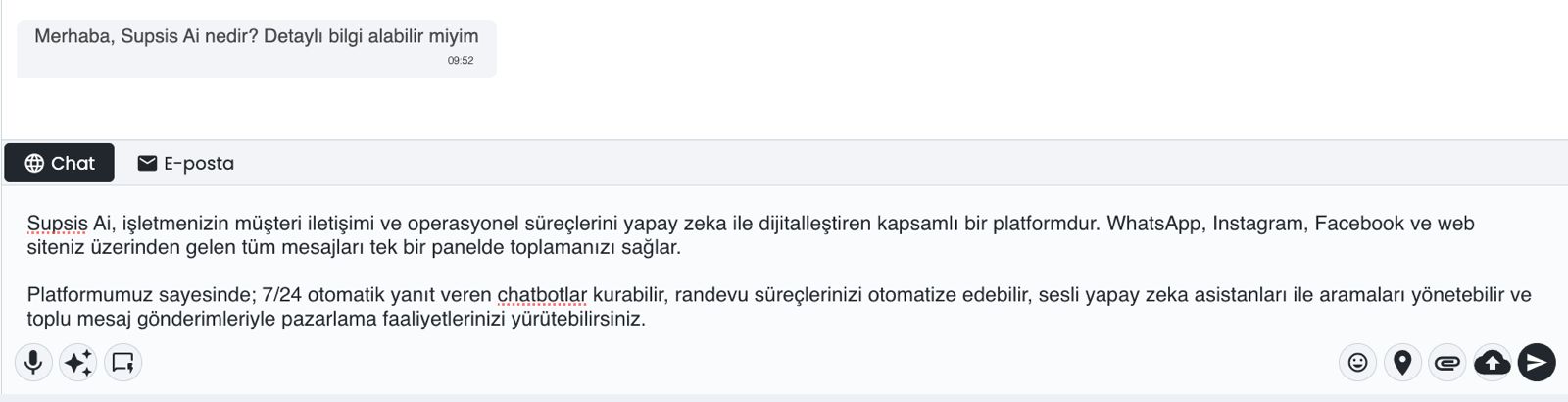
a – Message Field
The input field where the agent writes replies to the customer. AI suggestions are displayed as faded text (ghost text) in this field. -
b – AI Suggestion (Ghost Text)
The suggestion text generated by the AI. The agent can review, edit, or accept the suggestion.
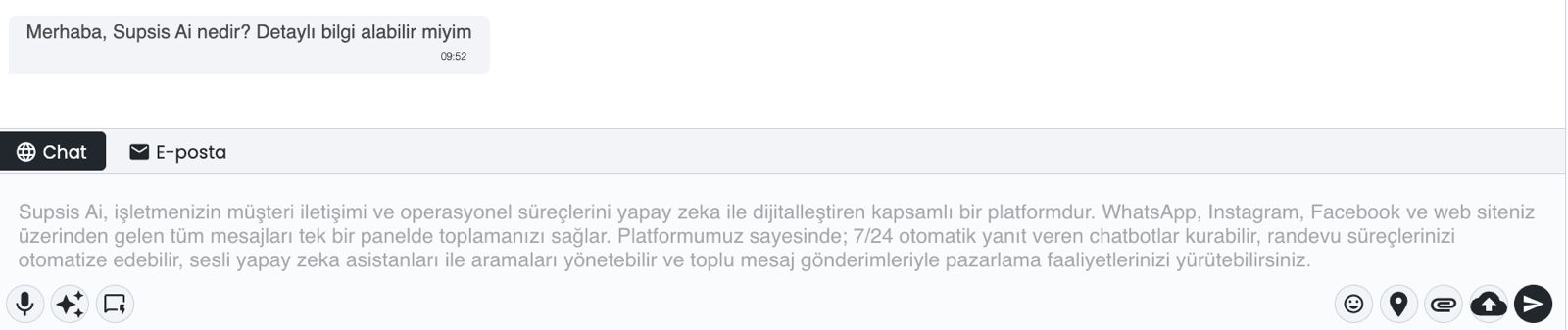
- c – Tab Guide
When a suggestion is displayed, a brief notification card is shown in the upper-right corner of the screen. This card reminds the agent to press the Tab key to accept the suggestion.
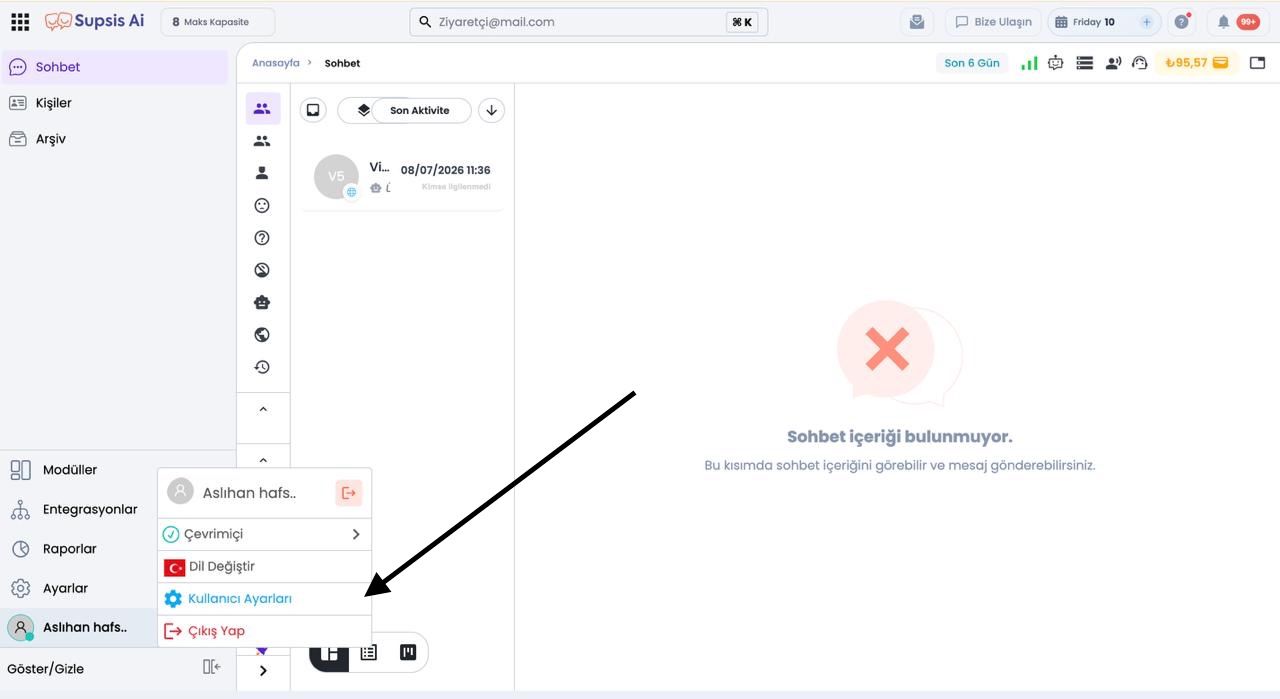
1.b – CoPilot Settings
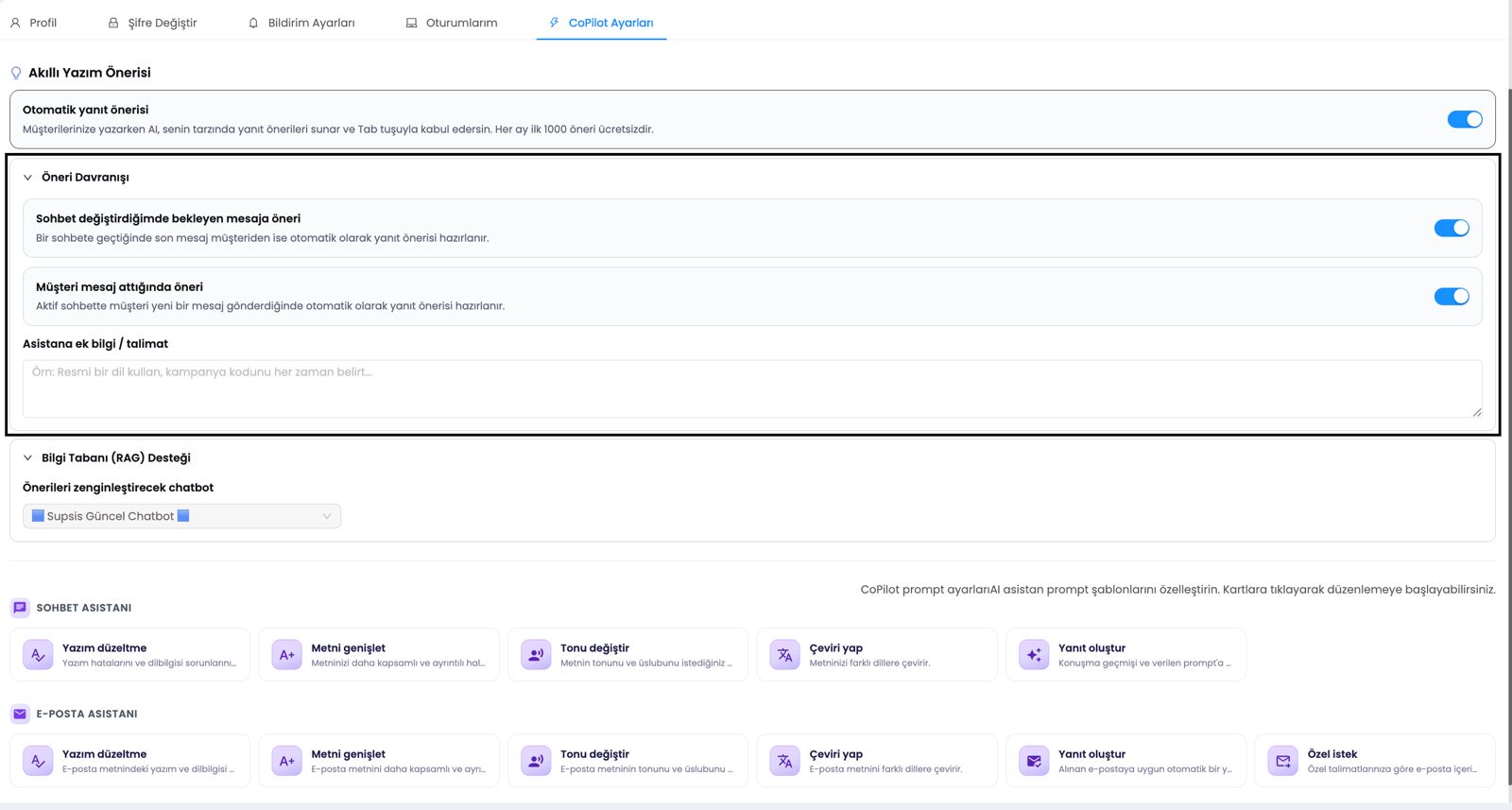
You can manage CoPilot Smart Writing Suggestion settings on the Profile > CoPilot Settings screen.
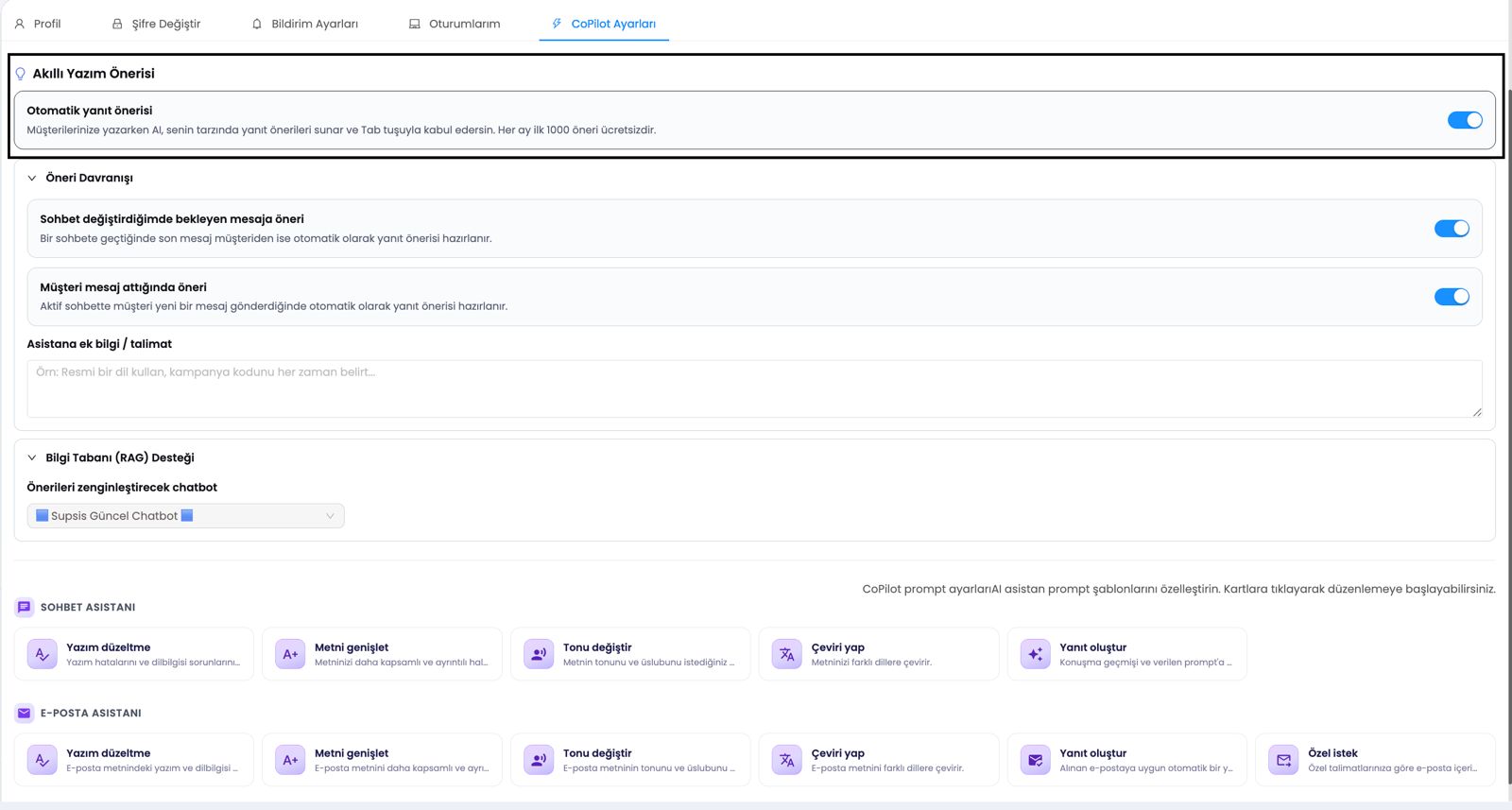
- a – Smart Writing Suggestion
The main toggle switch that fully enables or disables the feature. When this switch is turned off, sub-settings are hidden.
-
b – Suggestion on Unresolved Message When Switching Chats
When the agent switches to a different chat screen, this automatically generates a suggestion if the last message was sent by the customer. -
c – Suggestion When Customer Sends a Message
Generates an automatic suggestion when the customer sends a new message on the active chat screen and the message input field is empty. -
d – Additional Information / Instructions for the Assistant
The area where agents can provide specific instructions to the AI. For example, rules can be defined such as using formal language, including campaign details, or preferring a specific style of address.
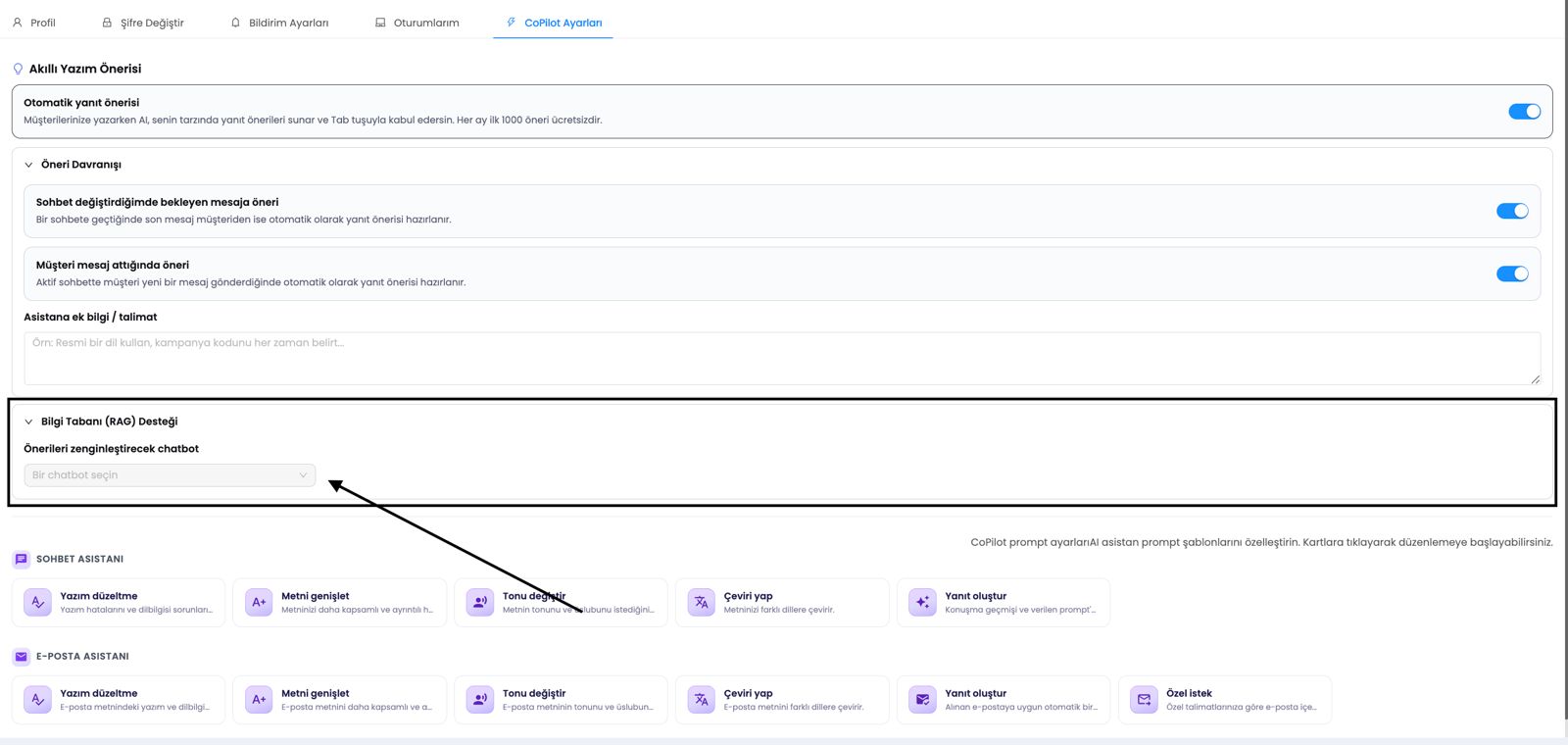
1.c – Knowledge Base (RAG) Support
CoPilot can integrate content from the knowledge base into its suggestions using the Supsis-RAG infrastructure.
-
a – Knowledge Base Selection
Select one of the chatbot knowledge bases that operate using the Supsis-RAG method. -
b – RAG-Powered Response Generation
The AI analyzes the customer's latest messages, finds the most relevant content in the knowledge base, and includes it as context in the generated suggestion.
Note: Knowledge base queries (embedding and vector search operations) are billed separately from the free autocomplete usage quota.
1.d – CoPilot Prompt Settings
CoPilot Prompt Settings share the same structure as the Prompt Management component on the Integrations screen. This section allows editing of the system prompts used in automated writing suggestions.
-
a – Prompt Settings
Edit the system instructions that the AI will use to generate suggestions. -
b – Predefined Variables
Variables such as visitor details, agent details, settings, and input values can be inserted into the prompt.
1.e – Introduction Screen
When an agent accepts a suggestion using the Tab key for the first time, an information screen introducing the CoPilot feature is displayed.
-
a – Introduction Slides
Provide brief information about how CoPilot works, its usage, and its advantages. -
b – Enable Button
Activates the CoPilot Smart Writing Suggestion feature. -
c – Close for Now Button
Closes the introduction screen, allowing the agent to continue with their current settings.
1.f – Free Usage and Pricing
CoPilot Smart Writing Suggestion is offered with a specific free usage quota.
-
The first 1000 suggestions per month are free for each agent.
-
Free usage records are displayed as 0 ₺ in wallet transactions.
-
Once the monthly free usage quota is exceeded, the standard AI usage pricing applies.
-
If 1000 free suggestions are generated in a month but the user does not accept any suggestions using the Tab key, the feature is automatically disabled.
1.g – Operating Conditions
CoPilot Smart Writing Suggestion operates when the following conditions are met:
-
It is active only on the live support chat screen.
-
The chat must be actively managed by an agent.
-
The browser tab must be active.
-
If the message field already contains text typed by the user, an automatic suggestion is not generated; instead, the inline autocomplete feature takes over.
-
When switching chats, an automatic suggestion can be generated if the last message was from the customer.
-
When a new customer message arrives and the message input field is empty, an automatic suggestion can be generated.
1.h – Use Cases
CoPilot Smart Writing Suggestion provides significant advantages to agents in the following scenarios:
-
High-Volume Chat Management
Agents can quickly use AI-generated suggestions while multitasking across numerous chats. -
Consistent Communication
The AI takes the agent's previous conversations into account to generate suggestions with a similar tone and style. -
Knowledge-Base Supported Answers
Thanks to RAG support, technical documentation or FAQ content can be automatically integrated into suggestions. -
Personalized AI
Agents can customize how the AI generates replies by providing additional instructions.
1.i – Customer & Business Benefits
With CoPilot Smart Writing Suggestion, agents can provide faster, more accurate, and more consistent responses to customers. Knowledge base support ensures technical questions are answered with higher accuracy, while customizable AI behaviors help maintain the organization's communication standards. Thanks to the free usage quota, users can try the feature risk-free and monitor all usage activity via the wallet dashboard.