
Agent statuses allow representatives to define their availability and working conditions within the system. These statuses inform other team members and the system about the agent’s real-time state. Status changes indicate whether the agent is ready to receive chat assignments and, when necessary, can switch the agent to offline mode to prevent chat assignments. All statuses other than "Online" have the same effect—they block chat assignments. However, different options are provided to give more information about the agent’s response time and availability.
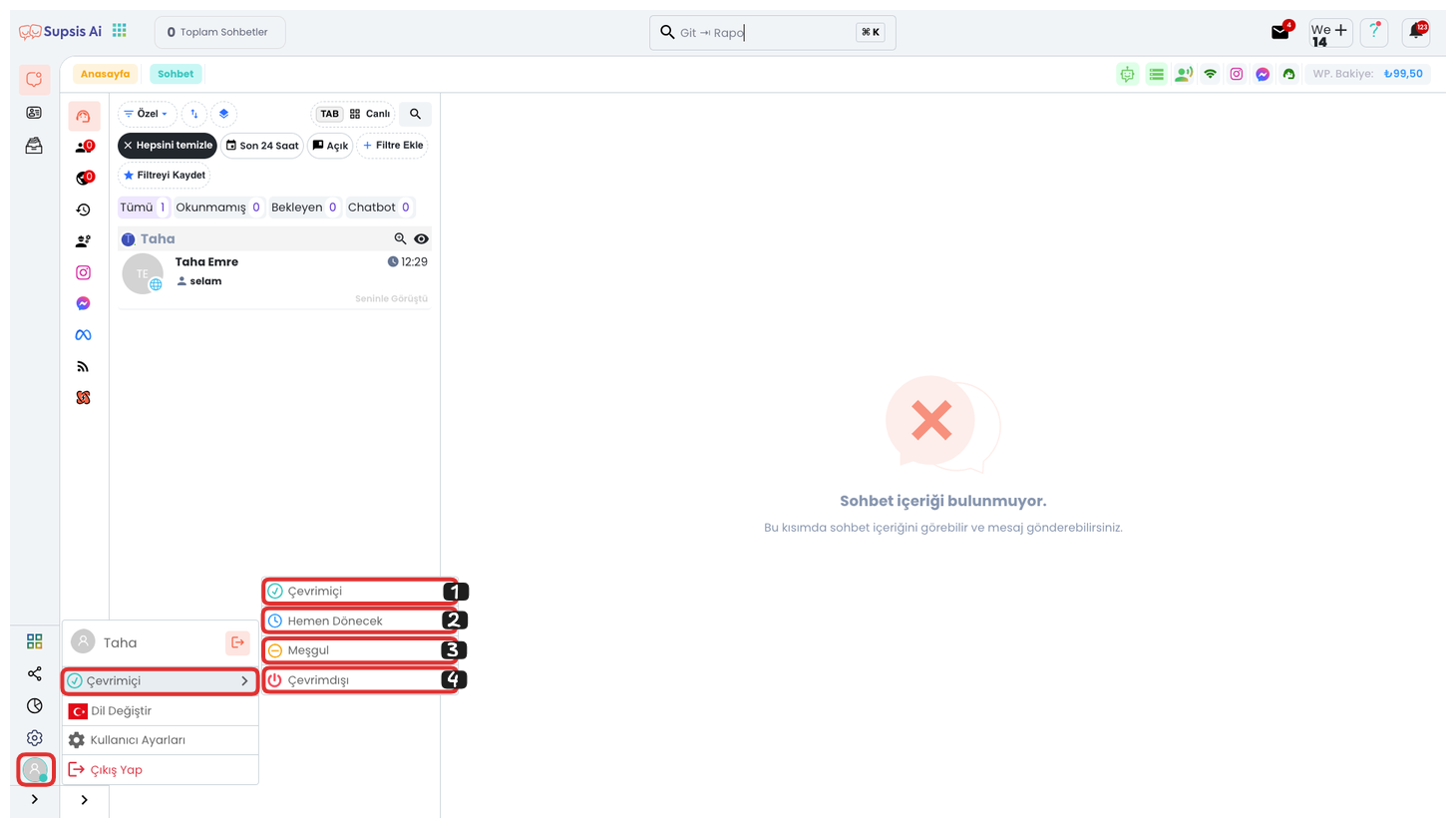
1-) Online
The agent is actively ready to work in the system and is available to receive chat requests. The "Online" mode indicates that the agent can immediately communicate with customers.
2-) Be Right Back
The agent is away for a short period but will return soon. This mode indicates that the agent is on a short break or handling a quick task and will be back shortly. No new chat assignments are made to the agent while in "Be Right Back" mode.
3-) Busy
The agent is occupied with a task and is unable to respond to customers. This status indicates the agent’s current workload or involvement in another task. No new chat assignments are made to the agent while in "Busy" mode.
4-) Offline
The agent is not active in the system and will not be able to respond to customer requests. The "Offline" status indicates that the agent is not available for work and will not receive any new chat assignments.